
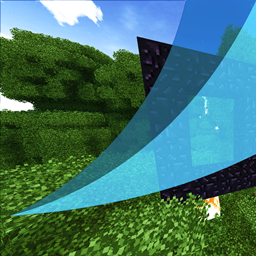
截图


介绍
DO NOT DISABLE
A large, opinionated resource pack built over several years for the Twilight modpack.
It is released separately so that any pack author can use it, and so that it can be updated independently of the modpack.
What is inside
- Music and ambient sound — the bulk of the download, replacing and extending vanilla and mod tracks
- Textures for vanilla and for a long list of mods
- Emissive overlays — things that should glow, glow
- Custom Item Textures — items change appearance by enchantment, by name, by variant
- Connected textures
- Custom sky
- Custom lightmaps for the Overworld, the Nether and the End
- Interface work — including a custom theme for WTHIT
- Localisation fixes
Requirements
Minecraft 1.20.1 and earlier
OptiFine. Everything in those versions is built on OptiFine’s format: CIT, CTM, custom sky, emissive textures, custom colours. Without OptiFine the pack still loads, but only the plain textures and the music will apply.
Minecraft 1.21.1
OptiFine does not exist for Neoforge 1.21.1. Its features are split across several mods, and the pack expects these:
| Mod | What it enables here |
|---|---|
| CIT Resewn | custom item textures |
| Entity Texture Features (ETF) | emissive entity textures, random entity textures |
| Entity Model Features (EMF) | custom entity models (optifine/cem) |
| Polytone | custom lightmaps for the Overworld, the Nether and the End, colour maps |
| Fusion | connected textures |
All five are optional in the strict sense — the pack loads without them and simply shows fewer effects. Nothing breaks.
About the item textures
The CIT rules have been updated for 1.21, not merely carried over. Minecraft 1.20.5 replaced item NBT with data components, and every rule that relied on NBT paths has been rewritten:
- firework rules now match
components.minecraft:fireworks.flight_durationandexplosions.0.shape, with the explosion shape given as its 1.21 name (small_ball,large_ball,star,creeper,burst) instead of the old numeric type - tropical fish buckets match
components.minecraft:bucket_entity_data.BucketVariantTag - name matching uses
nbt.display.Name, which CIT Resewn bridges to the modern component itself
Rules whose assets were never shipped have been removed rather than left to fail silently. The result is a clean parse: CIT Resewn reports no errors on this pack.
If you are on 1.20.1 or earlier, OptiFine reads the same files and the older syntax it expects is still what those versions use.
Custom sky is OptiFine-format and has no reader on 1.21.1 at the moment. It is kept in the pack for the older versions.
Supported mods
The pack carries assets for the mods below. The more of them your pack has, the more of this pack you will actually see. Anything not on the list is simply untouched — the pack never breaks a mod it does not know.
Names below are taken from each mod’s own manifest, so they match what you will see in your mod list.
Deep coverage
Music, textures and models throughout. Listed roughly by how much of each mod the pack touches.
- The Twilight Forest
- L_Ender’s Cataclysm
- The Aether and Deep Aether
- The Undergarden
- Ars Nouveau
- Biomes O’ Plenty
- Better Nether
- Mowzie’s Mobs
Partial coverage
Selected items, blocks or sounds rather than a full pass.
- End Remastered
- Create
- Gobber for NeoForge
- Repurposed Structures
- Iron Chests
- Waystones
- Aquaculture 2
- Grimoire of Gaia 4
- Project: Vibrant Journeys
Interface and utility
Icons, themes and small touches.
- Just Enough Items (JEI) and Just Enough Professions (JEP)
- FTB Quests, FTB Library
- WTHIT — includes a custom
legacytheme - ToroHealth-Continued
- Inventory HUD+, Inventory Profiles Next, libIPN
- Better Advancements
- AppleSkin
- Overflowing Bars
- Toast Control
- More Overlays Updated
- Curios API, Accessories
- Patchouli
- Distant Horizons, Iris, Sodium
- Konkrete, MidnightLib, Cloth Config, oωo
Notes
Load order. Place this pack above other packs that only add small overrides, and below any pack whose look you want to win. It touches a lot of namespaces, so it will override more than most packs do.
Music. Most of the download is audio — that is where the size comes from. Every track has been normalised to −18 LUFS with a −1.5 dBTP ceiling, so nothing clips and nothing is startlingly loud next to anything else.
Performance. The pack is stored uncompressed inside the archive. That makes the file larger, but it removes the decompression step every time Minecraft reads a texture or a sound — loading is faster, which matters at this size.
About the name
The pack is called DO NOT DISABLE because it is an inseparable part of my Twilight modpack. Switching it off there breaks the pack: interface themes, several sound fixes and a large amount of content go with it.
If you are here from outside that modpack — the name is a note to my own players, not a warning to you. Use it with whatever pack you like, disable it whenever you want, mix it with anything.
The name is inconvenient. The contents are worth it.
常见问题
DO NOT DISABLE 支持哪些 Minecraft 版本?
DO NOT DISABLE 支持 Minecraft Java 版 1.7.10–1.21.1,共 7 个版本。下载时注意选择和你游戏版本一致的文件。
DO NOT DISABLE 怎么安装?
把下载的 .zip 文件(不用解压)放进游戏目录的 resourcepacks 文件夹,进游戏后在「选项 → 资源包」里把它移到右边启用。

评论
登录后评论和评分