
截图
介绍
中文介绍正在准备中,下面暂时显示原文。
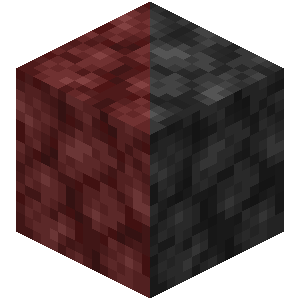
Minecraft Dark Netherrack Resource Pack

Have you ever sored your eyes by endless mining for netherite in the nether?
Have you ever burned your retina by helplessly wandering for fortress in the nether?
Now here’s a solution: Make the netherrack darker!
How to use
- Download the resource pack (
dark-netherrack.zip) from release.
- Open your
.minecraftfolder
- Put
dark-netherrack.zipin theresourcepacksfolder.
- Launch Minecraft
- Options -> Resource Packs… -> Available
- Select
dark-netherrack.zip. If done correctly, it will move to selected.
- Done! Enjoy your adventure without straining your eyes!
Target minecraft versions
I think this pack is able to work on any version after the nether update (1.16).
常见问题
Darker Netherrack 支持哪些 Minecraft 版本?
Darker Netherrack 支持 Minecraft Java 版 1.16–1.21.1,共 25 个版本。下载时注意选择和你游戏版本一致的文件。
Darker Netherrack 怎么安装?
把下载的 .zip 文件(不用解压)放进游戏目录的 resourcepacks 文件夹,进游戏后在「选项 → 资源包」里把它移到右边启用。
评论
登录后评论和评分