
截图


介绍
Dark UI
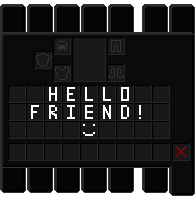
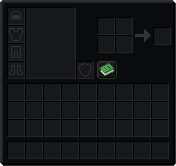
A minimal resource pack that replaces the bright vanilla GUI with a deep, immersive dark theme.
Designed to reduce eye strain and provide a clean, modern interface for long Minecraft sessions.
Features
- Deep, dark textures for the entire vanilla GUI.
- Perfect for night-time playing or dimly lit rooms.
- Sleek, borderless design that fits seamlessly into the game world.
- Pure vanilla 16x style.
- No code changes, purely a texture replacement.
How to Install
- Download the
.zipfile. - Put it in your
resourcepacksfolder. - Enable it in the game’s “Resource Packs”.
- Enjoy the sleek, dark interface!
This project is licensed under the MIT License. You are free to use, modify, and redistribute it, provided that you credit the original author, ‘Enderstudent’.
常见问题
Dark UI 支持哪些 Minecraft 版本?
Dark UI 支持 Minecraft Java 版 1.21–26.3,共 17 个版本。下载时注意选择和你游戏版本一致的文件。
Dark UI 怎么安装?
把下载的 .zip 文件(不用解压)放进游戏目录的 resourcepacks 文件夹,进游戏后在「选项 → 资源包」里把它移到右边启用。
BoyaMC 的其他作品
查看全部 →
Netherite Elytra
Netherite Elytron changes the Elytra texture to match the Netherite armor set, giving it a dark, metallic look.

Aurora Elytra
An Elytra texture that replicates the Aurora Cape design.

Compass
Compass moves the needle of the Compass and Recovery Compass to the center of the texture.

Boya’s Enderman
Created a new texture for the Enderman.
评论
登录后评论和评分