
截图
介绍
中文介绍正在准备中,下面暂时显示原文。
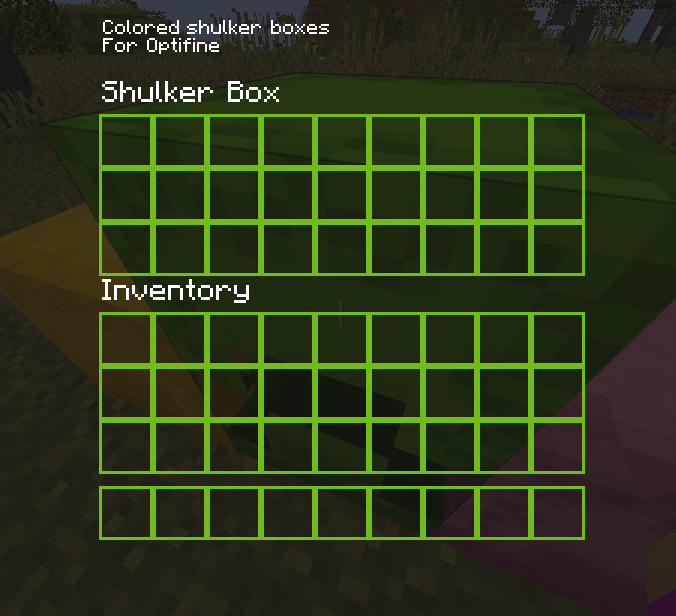
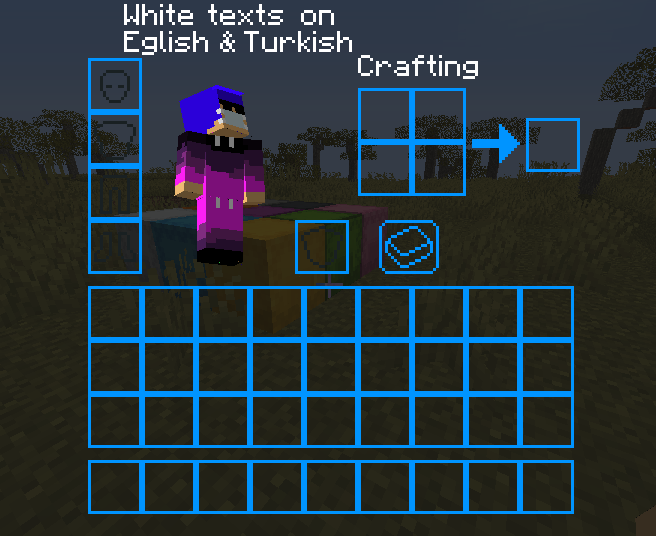
Dark Gui Texture Pack
If your eyes get kinda blind when a menu opens while playing Minecraft in midnight, you can use this resource pack
This Texture Pack Support:
- All GUI Textures
- Colored shulker box menus (Optifine Required)
Versions:
- V1.1
- 1.19.X (“dark_gui_1-19-v1.1.zip”)
- V1.0
- 1.18.X (“dark_gui_1-18.zip”)
- 1.17.X (“dark_gui_1-17.zip”)
- 1.16.X (“dark_gui_1-16.zip”)
- 1.15.X (“dark_gui_1-15.zip”)
- 1.14.X (“dark_gui_1-14.zip”)
How To Install:
- Download File
- Open Minecraft
- Go to resource packs in settings
- Click “Open Pack Folder”
- Put the zip file to opened folder
- Right-Click zip file and Excraft to Folder
- Go back to the game and you should see the resource pack
- Click the arrow on the pack’s logo
- Click “Done”
- Have fun and don’t be blind!
常见问题
Dark Gui – V1.1 支持哪些 Minecraft 版本?
Dark Gui – V1.1 支持 Minecraft Java 版 1.14–1.19.3,共 23 个版本。下载时注意选择和你游戏版本一致的文件。
Dark Gui – V1.1 怎么安装?
把下载的 .zip 文件(不用解压)放进游戏目录的 resourcepacks 文件夹,进游戏后在「选项 → 资源包」里把它移到右边启用。
ehilynxin 的其他作品
查看全部 →
Fancy Health Bar
by ehilynxin
优雅地掉血。
73.2万
12 天前
Modrinth · CurseForge

Resource Cracker/Tools
by ehilynxin, Morthen
轻松收集资源。
21.1万
25 天前
Modrinth · CurseForge

Resource Nether Ores
by Morthen, ehilynxin
将原版矿石添加到下界。
18.8万
25 天前
Modrinth · CurseForge

BetterArmorHUD
by ehilynxin
让盔甲图标更鲜艳,并显示韧性和击退抗性。
5,590
2 年前
Modrinth
评论
登录后评论和评分