
Custome Totem Skin Pack
A customizable Minecraft resource pack that replaces the default Totem of Undying with high-quality custom totem skins. Lightweight, easy to use, and compatible with the latest Minecraft versions.
截图

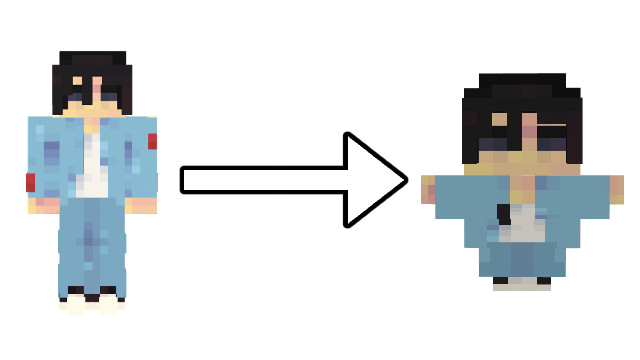
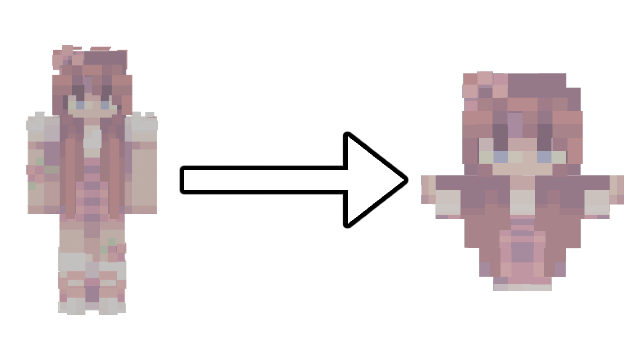


介绍
🖼️ Custom Totem Skin System
This texture pack includes a custom 3D model for the Totem of Undying that allows you to turn any Minecraft skin into a mini totem.
Simply replace the included totem_skin.png file with any Minecraft player skin, and the pack will automatically map the skin onto the custom totem model, creating a miniature version of that skin in-game.
🛠️ How to Use
- Download any Minecraft skin from a website like NameMC.
- Open the resource pack file.
- Navigate to:
assets/minecraft/textures/totem_skin.png- Replace the existing totem_skin.png with your downloaded skin.
- Rename the new file to totem_skin.png if necessary.
- Save the resource pack and enable it in Minecraft.
Your Totem of Undying will now appear as a miniature version of the selected Minecraft skin.
💡 Tips
- Works with almost any standard Minecraft skin.
- Supports custom player skins.
- Only changes the appearance of the Totem of Undying.
- No gameplay mechanics are modified.
- Lightweight and performance-friendly.
常见问题
Custome Totem Skin Pack 支持哪些 Minecraft 版本?
Custome Totem Skin Pack 支持 Minecraft Java 版 1.20–26.1,共 20 个版本。下载时注意选择和你游戏版本一致的文件。
Custome Totem Skin Pack 怎么安装?
把下载的 .zip 文件(不用解压)放进游戏目录的 resourcepacks 文件夹,进游戏后在「选项 → 资源包」里把它移到右边启用。
评论
登录后评论和评分