
Contrast Pack
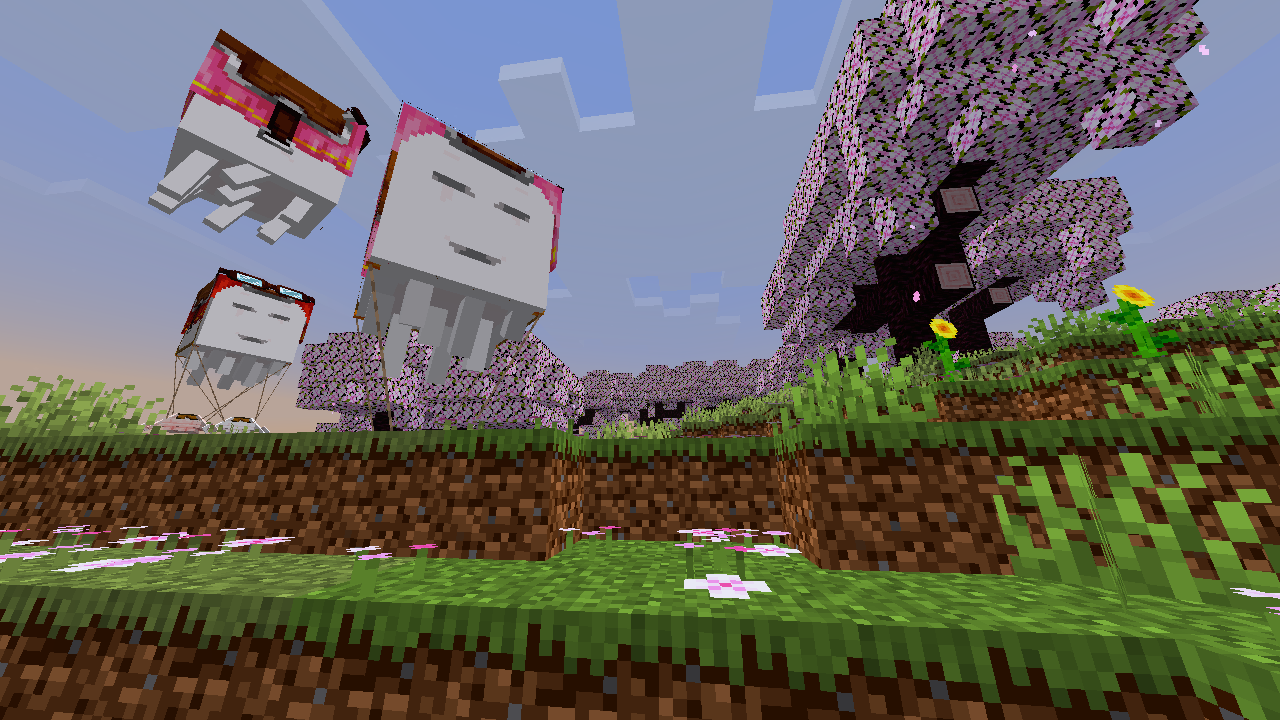
TexturePack that increases the contrast of the game, both menus, panoramas and GamePlay.
截图


介绍

Increase the contrast of textures, making them look deeper or more vibrant. Shadows appear sharper, lights brighter, giving the game a bold retro touch. Perfect for players who enjoy a clean, pixel look.
With simple rendering tweaks and texture changes, it adds more depth and detail, sometimes even a shader‑like feel—without using shaders.
🎨 Features:
- More vibrant and deeper colors.
- Support for vanilla: mobs, blocks, entities, and more.
- Vanilla standard (16x) lightweight, ideal for low‑spec PCs.
- For players who enjoy using features like Optifine or Continuity: certain versions include compatibility with connected glass through the ConnectedBlocks function.
⛏ Utility:
This pack works perfectly in both single-player worlds and vanilla servers.
It doesn’t alter gameplay directly, so it won’t add or remove anything that changes your vanilla experience — only visual improvements.
If you’d like to keep the vanilla essence but make it a little more vibrant and colorful, this might be the one to try!
🎬 See It in Action

✨ Compatible with Minecraft Java:
- 26.1.x [Latest]
- 1.21.x
- 1.20.x
📥 Download it now and rediscover Minecraft in a more colorful, vibrant way!


常见问题
Contrast Pack 支持哪些 Minecraft 版本?
Contrast Pack 支持 Minecraft Java 版 1.20–26.3,共 23 个版本。下载时注意选择和你游戏版本一致的文件。
Contrast Pack 怎么安装?
把下载的 .zip 文件(不用解压)放进游戏目录的 resourcepacks 文件夹,进游戏后在「选项 → 资源包」里把它移到右边启用。
JBlock 的其他作品
查看全部 →
Best Saturation Pack
This TexturePack reinterprets the way we see the game and adds more vibrant and eye-catching colors, improving your viewing experience.
Best Saturation x Fresh Animations
A TexturePack (ResoucePack) that makes BestSaturation_pack compatible with FreshAnimations
Best Saturation Pack
This TexturePack reinterprets the way we see the game and adds more vibrant and eye-catching colors, improving your viewing experience.
Goldelion Shaders
It implements basic functions for the game's visual experience, adding small details and subtle changes while maintaining the vanilla appearance. This shader does not contain realistic shadows or lighting.
评论
登录后评论和评分