
截图

介绍
☁ Cloud World GUI
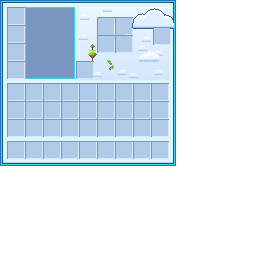
A soft, sky-themed GUI and HUD pack that wraps every Minecraft interface in
clouds, floating islands, and a bright cyan palette. Built to match the
Cloud World server’s look, but at home on any world that wants a lighter,
friendlier menu.
✨ Features
HUD
- Sky-blue cloud hearts
- Fluffy cloud armor icons
- Raindrop hunger bar
- Leafy green vine XP bar
- Cyan hotbar and selection
Containers
- Every screen themed: inventory, crafting, furnaces, anvil, enchanting, brewing, loom, beacon, chests, and more
- Cloud-white panels with a bright cyan frame and cobalt detailing
- Custom furnace smelting animation — a blue progress arrow and a sun that fills as it cooks
- Decorative clouds, floating grass islands, and leaves scattered throughout
Style
- Palette pulled straight from the Cloud World menu
- Soft-shaded clouds and hand-placed details on every panel
📥 Installation
- Download the latest version.
- Place the
.zipin your.minecraft/resourcepacksfolder (no need to unzip). - In Minecraft, go to Options → Resource Packs and move Cloud World GUI to the active side.
💬 Notes
This pack themes the in-game HUD and container screens. Title-screen buttons
and server menus are controlled separately and aren’t part of a resource pack.
Made for the Cloud World community 💙
常见问题
Cloud World Misshalottv 支持哪些 Minecraft 版本?
Cloud World Misshalottv 支持 Minecraft Java 版 1.21–1.21.11,共 12 个版本。下载时注意选择和你游戏版本一致的文件。
Cloud World Misshalottv 怎么安装?
把下载的 .zip 文件(不用解压)放进游戏目录的 resourcepacks 文件夹,进游戏后在「选项 → 资源包」里把它移到右边启用。
grepmyheart.exe 的其他作品
查看全部 →
Autumn Cottage
Burnt orange with scattered pumpkins and a maple leaf border.

blossom gui
Gui and hud; pink with bow borders, heart slots and butterfly armour.
blossom gui
Gui and hud; pink with bow borders, heart slots and butterfly armour.

GUI Crafter
Build your own Minecraft interface in game. 173 icon shapes for your hearts, 120 backgrounds, 96 borders, 78 slot designs, 96 colours and 52 ready-made presets. Every other GUI mod changes colours. This one changes the art.
评论
登录后评论和评分