
Classic’s Note Block Tweaks
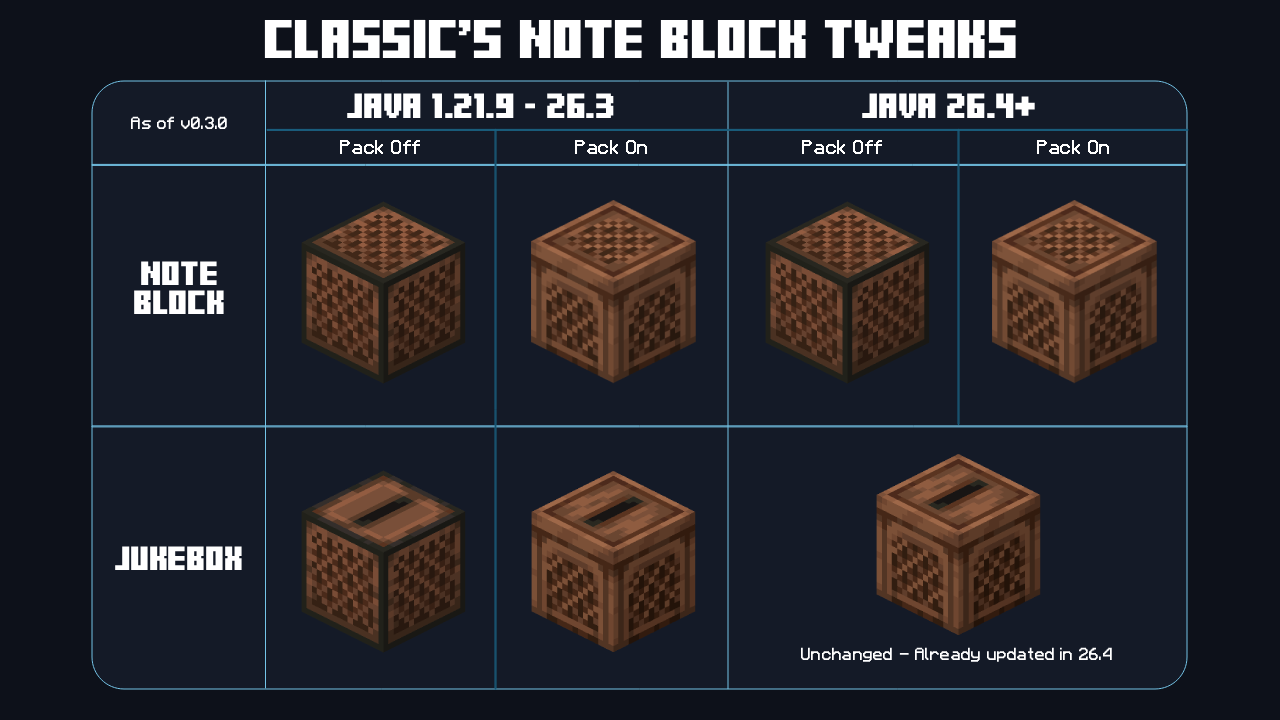
Updates Note Blocks to better match new Jukebox textures, and backports them to 1.21.9 - 26.3.
截图


介绍
Classic’s Note Block Tweaks
Updates Note Blocks to better match new Jukebox textures, and backports them to 1.21.9 – 26.3.
Classic’s Note Block Tweaks is moving!
Classic’s Note Block Tweaks has been merged into Classic’s Tweaks – an all-in-one pack with toggleable options. This standalone pack will continue to receive updates throughout the 26.4 development cycle, but will be archived after the v1.0.0 release.
Overview
This simple pack updates the textures of Note Blocks to match the new Jukebox textures, and backports them to Java 1.21.9 – 26.3.
Java 26.4 Snapshot 4 updated the Jukebox’s top and side textures and added a separate bottom texture. This pack brings those changes to older versions, so the Jukebox and Note Block stay visually consistent.
- Note Blocks and Jukeboxes both use separate top, side and bottom textures
- The Jukebox textures are the ones introduced in 26.4 Snapshot 4, including the new bottom texture
- The new Note Block textures are based on the 26.4 Jukebox textures
As the 26.4 game drop is still in development, Mojang may update the Note Block texture themselves at some point. Because of this, the pack icon is currently a placeholder and will only be updated to match the quality of my other packs if the vanilla texture doesn’t change.
Versions
| Minecraft Version | Pack Version |
| :–: | :–: |
| 1.21.9 – 26.4-snap-7 | v1.0.0-beta.2 |
Older versions and snapshots can be found on Modrinth or here on GitHub.
If you’re using the latest version on a new snapshot, messages about the pack being incompatible can usually be ignored.
Bug Reports
- Open a GitHub issue
- Join Discord
常见问题
Classic’s Note Block Tweaks 支持哪些 Minecraft 版本?
Classic’s Note Block Tweaks 支持 Minecraft Java 版 1.21.9–26.3,共 8 个版本。下载时注意选择和你游戏版本一致的文件。
Classic’s Note Block Tweaks 怎么安装?
把下载的 .zip 文件(不用解压)放进游戏目录的 resourcepacks 文件夹,进游戏后在「选项 → 资源包」里把它移到右边启用。
Classic's Craftworks 的其他作品
查看全部 →
Better Craftables
Adds some quality-of-life crafting and smelting recipes to the game.

Better Unpackables
Adds some quality-of-life unpacking & reversible recipes to the game.

Silly Eatables
Eat things you shouldn't with these silly food recipes!

Classic’s Disc Tweaks
Subtly widens music discs and unifies their design for a more cohesive look.
评论
登录后评论和评分