
Cinematic Pumpkins
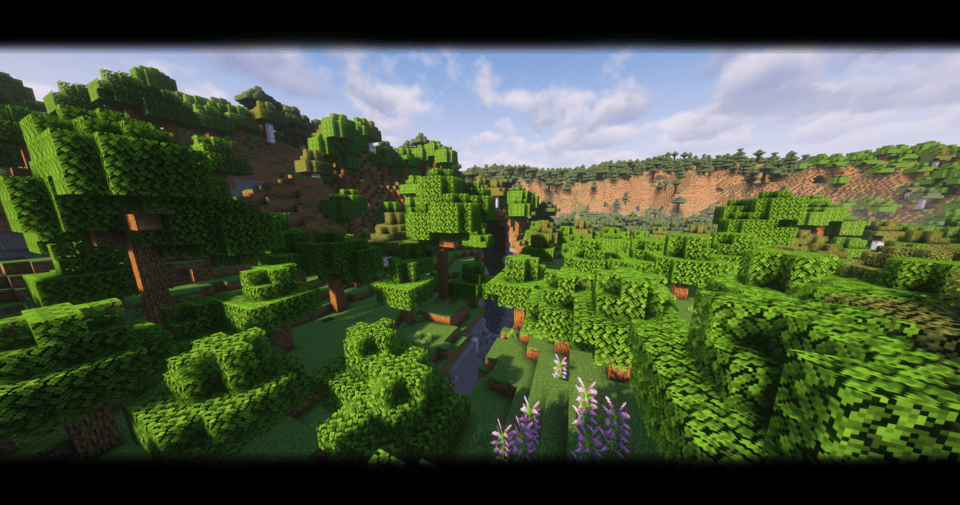
Cinematic Pumpkin Head brings widescreen letterboxing, dynamic lighting & shadows, and a subtle pumpkin-mask overlay to Minecraft Java 1.21+, turning every play session into a big-screen cinematic experience.
截图

介绍
🌟 Overview
Transform your Minecraft world into a scene!
Cinematic Pumpkin Head adds 21:9-style black letterboxing, and a subtle pumpkin-head overlay to give your builds that big-screen feel—shader-friendly and fully optimized for 1.21+.
🎥 Features
Cinematic Letterboxing
Top and bottom black bars for that widescreen movie aspect ratio.
Pumpkin-Head Overlay
A tasteful pumpkin-mask graphic in the corners of your screen, perfect for seasonal or horror builds.
Shader-Compatible
Looks great with or without your favorite shaders—no conflicts.
Optimized for 1.21+
Uses pack_format 34; guaranteed to load smoothly on modern Minecraft.
⚙️ Installation
Download the latest .zip from this page.
Move the .zip into your Minecraft resourcepacks/ folder.
In Minecraft, go to Options → Resource Packs and enable Cinematic Pumpkin Head.
(Optional) Tweak your FOV or apply a shader for extra drama!
常见问题
Cinematic Pumpkins 支持哪些 Minecraft 版本?
Cinematic Pumpkins 支持 Minecraft Java 版 1.20.6–26.1.2,共 16 个版本。下载时注意选择和你游戏版本一致的文件。
Cinematic Pumpkins 怎么安装?
把下载的 .zip 文件(不用解压)放进游戏目录的 resourcepacks 文件夹,进游戏后在「选项 → 资源包」里把它移到右边启用。
ItsTheLeviDR 的其他作品
查看全部 →
Fake hardcore hearts
This Minecraft Java Edition resource pack adds fake hardcore hearts. Free to download and easy to install. No Optifine required, compatible with Vanilla. Enjoy optimised resources with this free download.

Random block drops
A datapack that makes every block drop a random item

Ranks+
Enhance your Minecraft Java Edition server with the Ranks+ resource pack. This free download adds a collection of 560 rank badges in 16 different colors and 34 unique titles. Easy to install and featuring a simplistic, vanilla-like style, it's the perfect
Hidden Bossbars
This Minecraft Java Edition resource pack hides the bossbar from your HUD. It's a free and easy-to-install download that removes the visual bar but keeps the text, perfect for servers. No mods are required, and it works in both singleplayer an
评论
登录后评论和评分