
Chinese with Pinyin
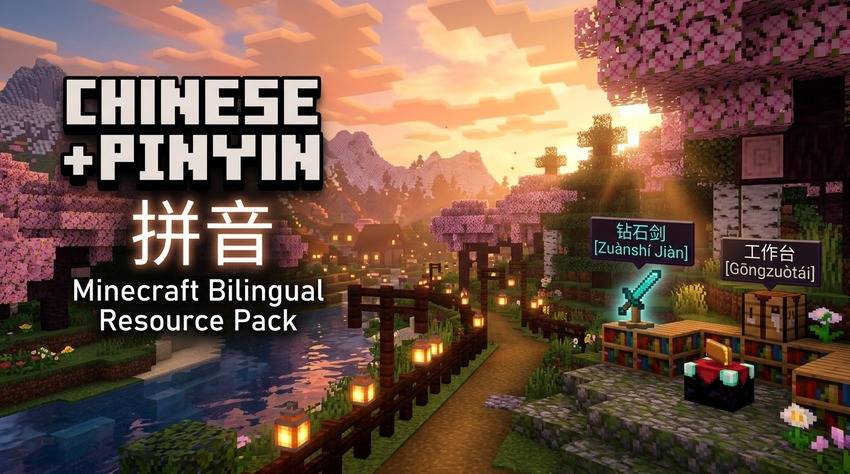
A Minecraft: Java Edition resource pack that displays Chinese characters (Hanzi) alongside tone-marked Pinyin for items, blocks, mobs, and UI elements, while keeping all in-game slash commands in standard English.
截图
介绍
Minecraft Chinese with Pinyin (拼音) Resource Pack
A Minecraft resource pack (for both Java Edition and Bedrock Edition) that displays Chinese characters (Hanzi) alongside tone-marked Pinyin, Zhuyin (Bopomofo), or Cantonese Jyutping for items, blocks, mobs, and UI elements, while keeping all in-game slash commands and parser feedback in standard English.
Features
- Dual Hanzi and Phonetic Annotations: Every in-game item, block, mob, and menu string is annotated with pronunciation and tone marks using Chinese NLP tokenization (
jieba+pypinyin). - Minecraft Bedrock Edition Export (
.mcpack): Generates ready-to-install Bedrock resource packs with custommanifest.json,pack_icon.png, and official vanilla.langtranslations from Mojang’s bedrock-samples repository. - Muted Pinyin Styling (
§7Gray): Pronunciation annotations appear in clean subtle gray§7(...)§rso Chinese characters remain visually dominant and easy to read. - Regional Phonetic Guides:
- Mandarin Pinyin (
zh_py): Standard Pinyin with tone marks. - Taiwan Zhuyin / Bopomofo (
zh_zy): Dedicated custom language 中文 (注音) with Bopomofo annotations (e.g.鑽石劍 §7(ㄗㄨㄢ ㄕˊ ㄐㄧㄢˋ)§r). - Cantonese Jyutping (
zh_yue): Dedicated custom language 廣東話 (粵拼) with LSHK Jyutping annotations (e.g.鑽石劍 §7(zyun3 sek6 gim3)§r).
- Mandarin Pinyin (
- Learning Modes & Multi-Variants:
- Standard Tone Marks:
钻石剑 §7(Zuànshí Jiàn)§r - Tone Numbers (
--pinyin-style numbers):钻石剑 §7(Zuan4shi2 Jian4)§r - Character Recall Mode (
--recall): Inverts display order to test character recognition:Zuànshí Jiàn §7(钻石剑)§r
- Standard Tone Marks:
- Broad CJK Unicode Coverage: Supports standard BMP Hanzi as well as CJK Extension A, compatibility, and supplementary plane characters (e.g.
䃮cobblestone,㭜acacia,䦪creaking,𥹉). - Domain Polyphone Overrides (
data/pinyin_overrides.json): Fine-tuned pronunciation for Minecraft-specific terminology (e.g.重锤->Zhòngchuí,藏宝图->Cángbǎotú,附魔->Fùmó,嘎枝->Gāzhī,粘性活塞->Niánxìng Huósāi). - 100% English Commands Preserved: All command syntax, arguments, error parsing strings, and command feedback (
/give,/teleport,/locate,/gamerule, argument helpers, SNBT parsing) remain in standard English to maintain muscle memory and autocomplete functionality across both Java and Bedrock editions. - Multi-Version Compatibility: Includes
supported_formats(min_inclusive: 32, max_inclusive: 97+) to eliminate red “Incompatible pack” warnings across 1.20.5 through 1.21.4+ and newer releases. - Fast Automated Asset Generation: Includes a cached Python generator that queries Mojang’s official
piston-metaAPI with local caching and CLI flags.
Use Cases
- Language Learning: Learn vocabulary and character pronunciation through in-game context without relying on standalone flashcards.
- Multiplayer and International Servers: Navigate Chinese-language Minecraft servers, inventories, trade menus, and chat references without translation friction.
- Heritage Speakers: Bridge existing conversational spoken Mandarin with character recognition using Pinyin phonetic guides.
- Server Administration: Maintain and execute command blocks, macros, and server commands without broken syntax or localized command arguments.
- Bilingual Content Creation: Produce dual-language content accessible to both English- and Chinese-speaking audiences.
In-Game Examples
| Item / Concept | Standard English | Vanilla Chinese | Pinyin Resource Pack |
|---|---|---|---|
| Diamond Sword | Diamond Sword | 钻石剑 | 钻石剑 (Zuànshí Jiàn) |
| Mace | Mace | 重锤 | 重锤 (Zhòngchuí) |
| Creeper | Creeper | 苦力怕 | 苦力怕 (Kǔlì Pà) |
| Crafting Table | Crafting Table | 工作台 | 工作台 (Gōngzuòtái) |
| Golden Apple | Golden Apple | 金苹果 | 金苹果 (Jīnpíngguǒ) |
| Buried Treasure Map | Buried Treasure Map | 藏宝图 | 藏宝图 (Cángbǎotú) |
| Ender Dragon | Ender Dragon | 末影龙 | 末影龙 (Mòyǐnglóng) |
| Cobblestone (Classical) | Cobblestone | 䃮 | 䃮 (Tán) |
| Commands | /gamerule keepInventory true |
游戏规则... |
/gamerule keepInventory true (English) |
Installation
Java Edition
- Download
Minecraft-Chinese-Pinyin-v1.2.0.zip(or Numbers / Recall variants) from Releases. - In Minecraft: Java Edition, go to Options -> Resource Packs… -> Open Pack Folder.
- Copy the
.zipfile into the openedresourcepacksdirectory. - Move the pack from the Available column to the Selected column, then click Done.
- Under Options -> Language…, select:
- 中文 (拼音) for Mandarin Pinyin
- 中文 (注音) for Taiwan Bopomofo
- 廣東話 (粵拼) for Hong Kong Cantonese Jyutping
- Or any standard Chinese dialect or English (US).
Bedrock Edition
- Download
Minecraft-Chinese-Pinyin-v1.2.0.mcpackfrom Releases. - Double-click or open the
.mcpackfile on Windows, Android, iOS, or iPadOS to import directly into Minecraft. - In Minecraft: Bedrock Edition, navigate to Settings -> Global Resources, select the pack, and click Activate.
Contributing
Feedback, bug reports, and pull requests are welcome:
- Polyphonic corrections (多音字): Submit updates directly to
data/pinyin_overrides.json. - New Minecraft versions: Test compatibility with new snapshots or drops.
- Submit issues and pull requests via the GitHub Issues page.
License
Distributed under the MIT License.
Minecraft is a registered trademark of Mojang AB / Microsoft. This project is an independent community resource pack and is not affiliated with Mojang or Microsoft.
常见问题
Chinese with Pinyin 支持哪些 Minecraft 版本?
Chinese with Pinyin 支持 Minecraft Java 版 1.20.5–26.3,共 6 个版本。下载时注意选择和你游戏版本一致的文件。
Chinese with Pinyin 怎么安装?
把下载的 .zip 文件(不用解压)放进游戏目录的 resourcepacks 文件夹,进游戏后在「选项 → 资源包」里把它移到右边启用。

评论
登录后评论和评分