
截图

介绍
中文介绍正在准备中,下面暂时显示原文。
Changed UI Textures
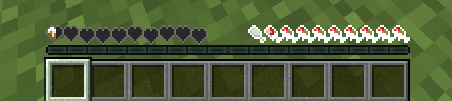
The “Gooey” UI from the changed mod, now in vanilla!
What does it add?
This resource packs adds the “gooey” hearts and inventory you get while being a latex creature in the Changed Minecraft Mod:
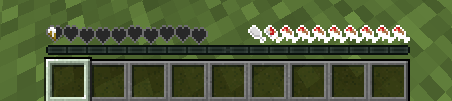
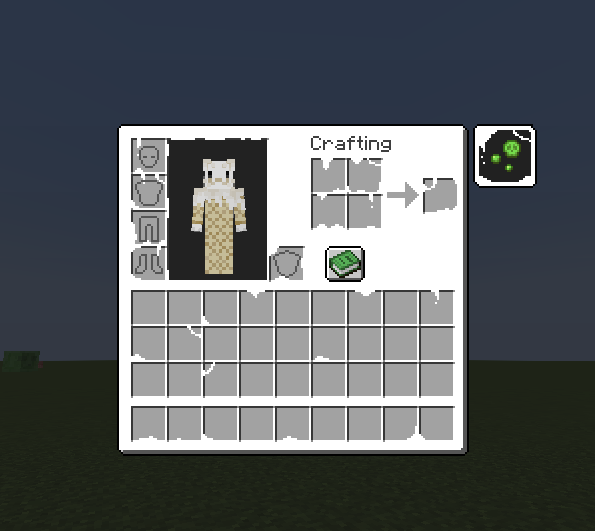
How do I change the color of the hearts and the inventory?
To do this and change the hue or color of the icons, you can follow these steps!
- Download your desired version
- Extract the zip into an empty folder: On windows: Microsoft support On unix-based systems (terminal): Run this on your terminal: unzip ChangedUI-Version.zip, Change the version name for your downloaded version
- On the resourcepack file hiearchy, open this folder: changed-textures\assets\minecraft\textures\gui
- Edit the icons.png file as you want!
To edit the inventory:
Complete steps 1-3, but instead of staying on \gui, open the folder named: “container” and edit the inventory.png file in there.
Credits
Credit to the main changed mod artists for making the base infected / latex textures, I edited them to make them more complete, and not just keep the main hearts
常见问题
Changed UI 支持哪些 Minecraft 版本?
Changed UI 支持 Minecraft Java 版 1.18–26.3,共 32 个版本。下载时注意选择和你游戏版本一致的文件。
Changed UI 怎么安装?
把下载的 .zip 文件(不用解压)放进游戏目录的 resourcepacks 文件夹,进游戏后在「选项 → 资源包」里把它移到右边启用。

评论
登录后评论和评分