
截图
介绍
Block in the Bucket
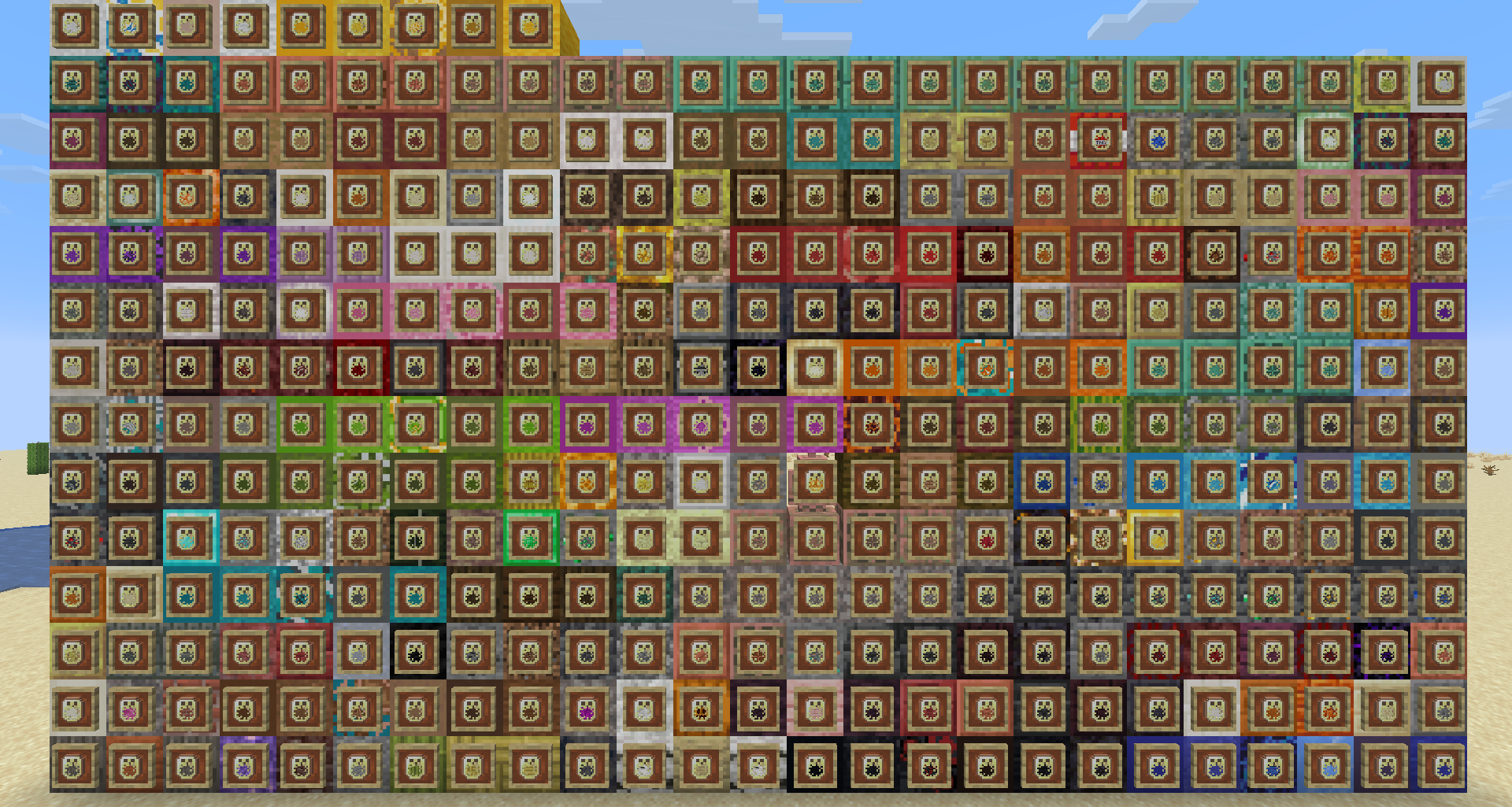
See what is inside every sulfur cube bucket at a glance.
Block in the Bucket gives sulfur cube buckets a visible preview of the block they contain. Each bucket keeps its familiar silhouette while displaying the stored block directly on the item icon, so you can tell your stone, copper, wood, ore, and decorative blocks apart without checking them one by one.
Features
- Displays the stored block directly on the sulfur cube bucket icon
- Supports 334 different block contents
- Uses vanilla-style 16× textures that fit naturally into the default game
- Makes collections and inventories faster to read and organise
- Changes visuals only, gameplay remains completely vanilla
Choose your resolution
This is the vanilla-style x16 edition of the pack.
Prefer higher-resolution textures? Download Block in the Bucket x32, made to match the Faithful x32 look.
Compatibility
Block in the Bucket is a client-side resource pack and does not change game mechanics. Always download the version that matches your Minecraft version from the Versions tab.
It may conflict with other resource packs that replace the sulfur cube bucket item definition. If you use several packs, place Block in the Bucket above conflicting packs in the resource pack list.
Installation
- Download the correct version of the pack.
- Open Minecraft and go to Options → Resource Packs.
- Select Open Pack Folder and place the downloaded
.zipfile inside. - Return to Minecraft and move Block in the Bucket into the selected packs list.
Credits
Support the creators
- EclairDeFeu360: Buy Me a Coffee
- Goldawn: Join on YouTube or subscribe on Twitch
常见问题
Block In The Bucket 支持哪些 Minecraft 版本?
Block In The Bucket 支持 Minecraft Java 版 26.2。下载时注意选择和你游戏版本一致的文件。
Block In The Bucket 怎么安装?
把下载的 .zip 文件(不用解压)放进游戏目录的 resourcepacks 文件夹,进游戏后在「选项 → 资源包」里把它移到右边启用。
EclairDeFeu360 的其他作品
查看全部 →
All Tropical Fish Collection
此资源包需搭配 All TropicalFish 数据包使用,可让你收集所有种类的热带鱼。

All Tropical Fish Datapack
这个数据包让你可以收集Minecraft中的全部3072种热带鱼变种,并在进度界面查看“鱼类图鉴”。

Colourful Tropical Fish
在物品栏中查看热带鱼的真实纹理

Vanilla Advancement Precisions
此数据包存储你所有进度信息!
评论
登录后评论和评分