
Black GUI’s
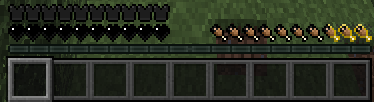
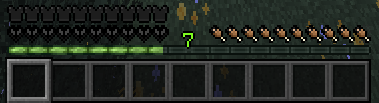
This resource pack offers both crisp white and deep black variants for Minecraft's health, armor, and hunger bars, delivering a customizable, sleek, and distraction-free HUD.
截图
介绍
This resource pack expands on the monochrome aesthetic by introducing a dark edition alongside the white version. By completely redesigning the health, armor, and hunger indicators using crisp white and deep black tones, it gives you full control over your HUD’s look and feel.
Key Highlights
Dual Minimalist Themes: Choose between a clean, bright white setup or a sleek, pitch-black “Dark Mode” HUD to match your personal playstyle and resource pack combination.
Enhanced Contrast Options: The high-contrast black edition provides exceptional visibility in bright biomes like deserts and snow peaks, while the white edition excels in dark caves and nighttime conditions.
Distraction-Free Oled-Style Aesthetic: Eliminating bright saturated colors keeps your screen clean, giving the interface a high-end, contemporary game feel without visual clutter.
Tailored for Immersion & PvP: Whether you need maximum focus during combat or an unobtrusive layout for survival building, both variants keep essential stats clear and stylish.
常见问题
Black GUI’s 支持哪些 Minecraft 版本?
Black GUI’s 支持 Minecraft Java 版 1.20–26.2,共 23 个版本。下载时注意选择和你游戏版本一致的文件。
Black GUI’s 怎么安装?
把下载的 .zip 文件(不用解压)放进游戏目录的 resourcepacks 文件夹,进游戏后在「选项 → 资源包」里把它移到右边启用。
Mrsad 的其他作品
查看全部 →
Realistic Sky
Transform your Minecraft world with this resource pack, designed solely to bring a stunningly detailed and realistic sky to your game while leaving all original textures untouched.

Bedwars 64×64
[Bedwars 64x64] is a high-performance 64x64 resource pack engineered specifically for competitive BedWars, SkyWars, and fast-paced PvP. Operating at a native 64x64 resolution, it delivers a high-definition aesthetic while maintaining maximum FPS stability.
Bedwars 64×64
[Bedwars 64x64] is a high-performance 64x64 resource pack engineered specifically for competitive BedWars, SkyWars, and fast-paced PvP. Operating at a native 64x64 resolution, it delivers a high-definition aesthetic while maintaining maximum FPS stability.

Crystal PVP Purple
A Crystal PvP resource pack that turns the End Crystal 3D and purple, adding animated items and custom purple-themed textures.
评论
登录后评论和评分