截图
介绍
Summary
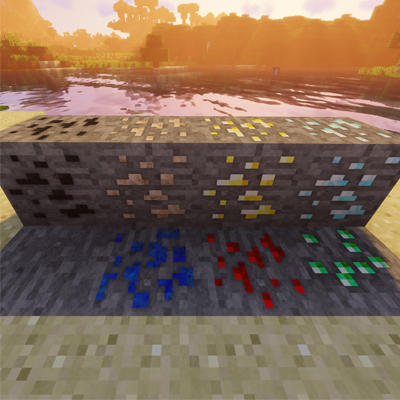
This pack is a Remaster of “Default Improved Textures” which was made compatible with Minecraft until Version 1.13.2. Better Texts 10 inherits the improved resolution textures from its successor and drops support of specular mapping, for those who are just interested in higher quality textures.
Questions
Feel free to direct pack questions to my account and the project comments and I will try to get back to you when available.
Credit
Credit for the original project goes to h0ppip who continued support of the original pack until Minecraft V. 1.13.2. He has diverged his work solely to specular mapping for future iterations. Links to his current and previous projects are below.
Default Improved Textures: https://www.curseforge.com/minecraft/texture-packs/default-improved
Specular Mapping Vanilla PBR : https://www.curseforge.com/minecraft/texture-packs/vanilla-pbr
Usage
I am not the original creator, merely a contributor responsible for remastering the pack for future Minecraft version support. Rules of Use put into effect by h0ppip are as follows:
————————————————————–
“You can use this resource pack in your mod packs if you don’t make any money off it and you can redistribute it on any non-English or non-German speaking websites if you give credits to me and use the curse or alternative download links.
Basically any usage is fine as long as you don’t claim to be the creator and you don’t make money off the pack.”
————————————————————–
+
I (InFuryate) respectfully ask that you also include credit to me as well if practicing the above mentioned uses of this specific pack.
Any further questions regarding usage are to be directed towards, h0ppip, being the owner and creator of the original pack.
常见问题
Better Texts 10 支持哪些 Minecraft 版本?
Better Texts 10 支持 Minecraft Java 版 1.15–1.16.1,共 5 个版本。下载时注意选择和你游戏版本一致的文件。
Better Texts 10 怎么安装?
把下载的 .zip 文件(不用解压)放进游戏目录的 resourcepacks 文件夹,进游戏后在「选项 → 资源包」里把它移到右边启用。
评论
登录后评论和评分