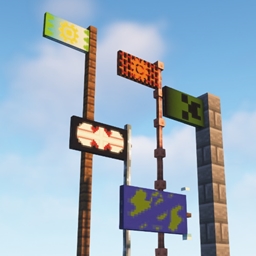
截图

介绍
1.20+ UPDATED VERSIONS ON MODRINTH: https://modrinth.com/datapack/banner-flags
Ever since banners were added I’ve wanted to place them horizontally like flags. Now I have made it possible using this data pack!
FEATURES:
– Place flag in 4 directions
– Displays the banner you actually placed
– Break the block it is placed on to remove it and get your banner back
– Place multiple on the same block!
– Works on multiplayer & survival friendly!
SUPPORTED BLOCKS:
– fences
– walls
– glass panes
– iron bars
– lightning rod
– chain
HOW TO USE:
Crouch + click a banner on one of the supported blocks to place your banner as a flag! Break the block it is placed on to remove it.
Break it from the front, because on the back is where the invisible armor stands are located and they won’t let you hit the block.
UPDATING:
If you updated from v1.2 or lower to v1.3 or higher then you will need to run the command /function bannerflags:update_flags to update the flags previously placed around you and other players to no longer have a hitbox!
UNINSTALLATION:
If you don’t end up liking the pack here are the ways you can remove the flags:
– manually breaking each block that a flag has been placed on so you get the banners back.
or
– writing /function bannerflags:removeall (you wont get your banners back though)
If you already removed the pack then you can use these commands, but you won’t get your banners back:
/execute at @e run kill @e[type=minecraft:armor_stand,tag=Flag]
/execute at @e run kill @e[type=minecraft:armor_stand,tag=Flag2]
SUMMARY:
They can be used well for decoration & direction pointers.
If you have any questions or suggestions you can write here or DM me on Discord Gurkis#5195
常见问题
Banner Flags 支持哪些 Minecraft 版本?
Banner Flags 支持 Minecraft Java 版 1.18–1.21.4,共 20 个版本。下载时注意选择和你游戏版本一致的文件。
Banner Flags 怎么安装?
把下载的 .zip 文件(不用解压)放进游戏目录的 resourcepacks 文件夹,进游戏后在「选项 → 资源包」里把它移到右边启用。

评论
登录后评论和评分