
截图

介绍
中文介绍正在准备中,下面暂时显示原文。
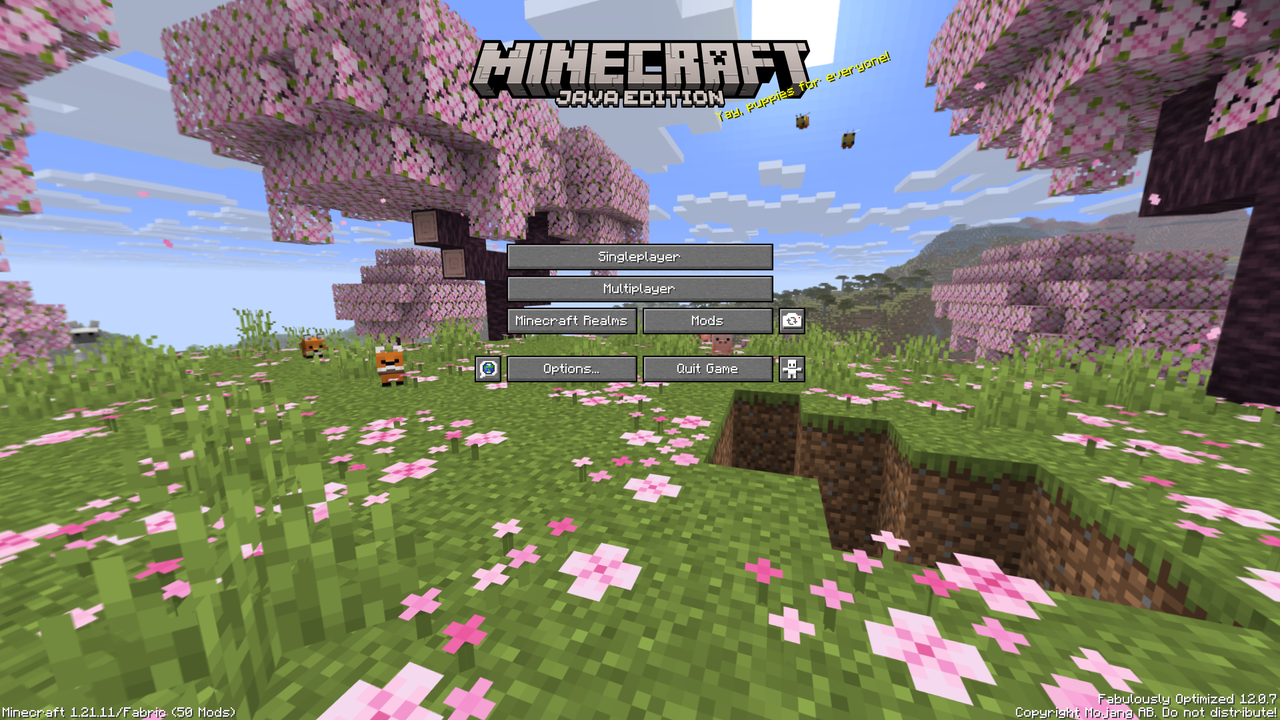
26.1 Panorama
This resource pack brings the Tiny Takeover panorama to 13w24a – 1.21.11. The panorama includes a cherry grove biome with the new baby animals like the baby wolf, cow, axolotl, sheep and more.
How to install
Prism Launcher / MultiMC (recommended)
- Open your instance settings (1.6.1 – 1.21.11)
- Go to Resource Packs, click on Download Packs and search for 26.1 Panorama
- Select the resource pack and click on Review and confirm
- Launch your instance and locate the resource packs, it should now be listed
Minecraft Launcher
- Download the resource pack
- Open the folder to where the resource pack was downloaded and copy the file (
26.1 Panorama.zip) - Open Minecraft, locate the Resource Packs (Options > Resource Packs) and click on Open Pack Folder or something similar
- Paste the file into the resource pack directory
- Go back to Minecraft and the resource pack should be listed, if not press Done and click Resource Packs again
常见问题
26.1 Panorama 支持哪些 Minecraft 版本?
26.1 Panorama 支持 Minecraft Java 版 1.6.1–1.21.11,共 82 个版本。下载时注意选择和你游戏版本一致的文件。
26.1 Panorama 怎么安装?
把下载的 .zip 文件(不用解压)放进游戏目录的 resourcepacks 文件夹,进游戏后在「选项 → 资源包」里把它移到右边启用。
评论
登录后评论和评分