
Vulkan Realistically – Optimized
A lightweight Minecraft modpack focused on higher FPS, better visuals, and smoother gameplay, with support for both Vulkan and OpenGL.
介绍
About
Unlock smoother Minecraft performance with a carefully optimized modpack built around Vulkan and OpenGL. Designed to deliver higher FPS, lower latency, and a more stable gameplay experience, it helps reduce stutters and frame drops across a wide range of hardware. From budget laptops to powerful gaming PCs, Vulkan Realistically – Optimized focuses on maximizing performance while keeping Minecraft looking and
feeling like Minecraft.

⚠️ Technical Features
- Vulkan and OpenGL rendering support
- Performance-focused optimization mods
- Reduced RAM usage and stuttering
- Improved rendering performance
- Lightweight visual enhancements

Why Choose This Modpack?
- 🚀 More FPS
- ⚡ Smoother gameplay
- 🎨 Better visuals
- 💻 Designed for low-end and mid-range PCs
- 🔄 Choose between Vulkan and OpenGL

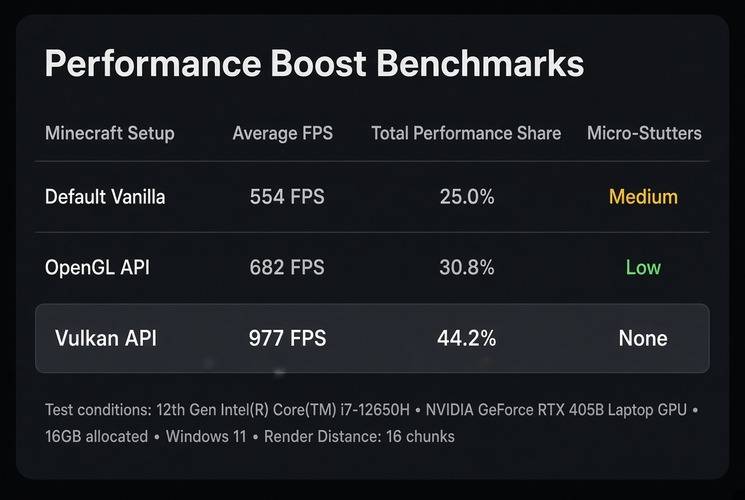

! Important Notes !
Performance may vary depending on your hardware, drivers, Minecraft version, and mod configuration. Vulkan is not guaranteed to work correctly on every GPU.
If you are using the Vulkan API, please check the Vulkan Incompatible Mods List before downloading or adding any additional mods.
Some mods are not compatible with Vulkan and may cause crashes, graphical glitches, rendering problems, or prevent the game from launching correctly. Do not install mods listed as incompatible while using Vulkan.
If you want to use any of the mods from the incompatible list, you must switch the rendering API from Vulkan to OpenGL first.
Always check the compatibility list before adding new mods to avoid conflicts and keep the modpack working properly.

❤️ Credits & Appreciation
Vulkan Optimized would not be possible without the time, creativity, and dedication of the developers and creators behind the mods and resource packs included in this project.
I am only the curator who brings these components together into one modpack. The actual work belongs to the talented people who develop, maintain, update, and support these projects.
Please consider visiting the original project pages, supporting the creators, and following their work if you enjoy what they have made. Every download, positive review, and kind message helps support the Minecraft modding community.
Thank you to every developer and creator who contributed to making Vulkan Optimized possible.
Included Mods
- Entity Model Features (EMF) — Traben
- Entity Texture Features (ETF) — Traben
- AppleSkin — squeek502
- Architectury API — shedaniel
- BadOptimizations — Thosea
- Better Block Entities — cseden
- Better FPS – Render Distance — someaddon
- Cloth Config API — shedaniel
- Clumps — Jaredlll08
- Concurrent Chunk Management Engine (C2ME) — ishland, RelativityMC
- Connectivity — someaddon
- Cupboard — someaddon
- Debugify — isXander
- Dynamic FPS — juliand665
- Entity Culling — tr7zw
- Fabric API — FabricMC
- Fabric Language Kotlin — FabricMC
- Fadeless — DerpDerpling
- Falling Leaves — Fourmisain, BrekiTomasson, RandomMcSomethin
- Fast IP Ping — Fallen_Breath
- Fast Noise — zenxarch
- FerriteCore — malte0811
- Fix GPU Memory Leak — someaddon
- Fzzy Config — fzzyhmstrs
- ImmediatelyFast — RaphiMC
- Jade — Snownee
- JustZoom — Keksuccino
- Konkrete — Keksuccino
- LambDynamicLights — LambdAurora
- Lithium — jellysquid3 / CaffeineMC
- Mod Menu — Prospector / TerraformersMC
- ModernFix — embeddedt
- MoreCulling — FxMorin
- Mouse Tweaks — YaLTeR
- Packet Fixer — TonimatasDEV
- Particle Core — fzzyhmstrs
- Presence Footsteps — Hurricaaane, Sollace
- Punchy! – First Person Animations — PunchyDevGuy, Godku
- Reese’s Sodium Options — FlashyReese
- Resourcify — DeDiamondPro
- Roughly Enough Items (REI) — shedaniel
- ScalableLux — Spottedleaf, ishland
- Sodium — JellySquid / CaffeineMC
- Sodium Extra — FlashyReese
- Text Placeholder API — Patbox
- Very Many Players (VMP) — ishland
- Visuality — PinkGoosik
- YetAnotherConfigLib (YACL) — isXander
- ZConfig — zenxarch
Included Resource Packs
- (Bee’s) Fancy Crops — bebebea_loste
- Aimz – Better Crosshair — GamerPotionDev
- Default Dark Mode — nebuIr
- Enchant Icons — CountXD
- Enchantment Glows — Sinnelar
- Fresh Animations — FreshLX
- Fresh Animations: Details — FreshLX
- Fresh Animations: Emissive — FreshLX
- Fresh Animations: Extensions — FreshLX
- Fresh Animations: Objects — FreshLX
- Fresh Animations: Player Extension — FreshLX
- Fresh Animations: Spiders — FreshLX
- Low On Fire — Haikis
- Torches Reimagined — Reijvi
常见问题
Vulkan Realistically – Optimized 支持哪些 Minecraft 版本?
Vulkan Realistically – Optimized 基于 Minecraft Java 版 26.2,使用 Fabric 加载器。
Vulkan Realistically – Optimized 怎么安装?
点本页「前往下载」拿到整合包文件(Modrinth 的是 .mrpack,CurseForge 的是 .zip),在 PCL2 或 HMCL 启动器里选择「导入整合包」,启动器会自动装好 Minecraft、加载器和全部模组。建议在启动器里给游戏分配 4–6 GB 内存。
Vulkan Realistically – Optimized 开服需要多大内存?
推荐服务器内存 12 GB。在线人数多、或者建了大量机器和区块加载器时,可以再加 2–4 GB。
怎么和朋友一起玩 Vulkan Realistically – Optimized?
点本页的「一键开服」,选好配置后会自动安装 Vulkan Realistically – Optimized 的服务端,几分钟就能开好。把服务器地址发给朋友,大家用同一个版本的整合包连进去就行。
评论
登录后评论和评分