
Thunder
[26.1 available] Boost FPS, reduce lag, speed up load times, and save resources with this modpack! Perfect for low-end computers. No extra mods, just pure performance improvement.
介绍

🚀Huge Performance Boost

Setup: Ryzen 9 7945HX, RTX 4080 Mobile, 16 GB RAM
Tested on fancy graphics, 24 render and 5 simulation distances
⬆️Always Up-to-Date
Thunder is kept current with the latest mods, supporting the newest Minecraft versions while also maintaining compatibility with older versions.
🪶Lightweight and Stable
Thunder includes only proven, stable performance mods and essential dependencies, ensuring a seamless vanilla gameplay experience without sacrificing stability.
📥 Installation
Use the official curseforge app. If you want to run the pack on alternative launchers i reccomend to check out the pack on Modrinth instead.
❓ FAQ
Q: Is there a version available for Minecraft 1.X?
Thunder supports the most popular and recent Minecraft versions, including snapshots when available.
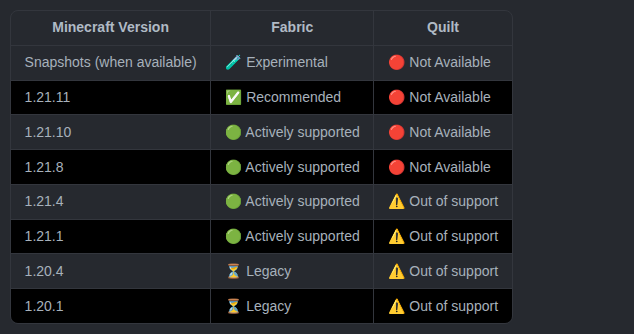
For deprectaed realeases and further deatils see this webpage.
Q: Which mods are included? Check the download page for each version for a detailed list of included mods.
Q: What should I do if I find a bug or want to suggest a mod? Report bugs or suggest changes by opening an issue on the GitHub repo. Thank you for your help!
Q: Can I use Thunder as a base for my modpack?
Absolutely! Just follow these two conditions:
1) Include a note in the description linking back to this page.
2) Do not just reupload the pack, its assets, or it’s branding. Also, avoid creating derivative works with minimal additions (e.g. adding just a couple of mods).
In case of doubt feel free to contact me on Discord
常见问题
Thunder 支持哪些 Minecraft 版本?
Thunder 支持 Minecraft Java 版 1.16.5–26.3,共 19 个版本,可用的加载器:Fabric。下载时注意选择和你游戏版本一致的文件。
Thunder 怎么安装?
点本页「前往下载」拿到整合包文件(Modrinth 的是 .mrpack,CurseForge 的是 .zip),在 PCL2 或 HMCL 启动器里选择「导入整合包」,启动器会自动装好 Minecraft、加载器和全部模组。建议在启动器里给游戏分配 4–6 GB 内存。
Thunder 开服需要多大内存?
推荐服务器内存 12 GB。在线人数多、或者建了大量机器和区块加载器时,可以再加 2–4 GB。
怎么和朋友一起玩 Thunder?
点本页的「一键开服」,选好配置后会自动安装 Thunder 的服务端,几分钟就能开好。把服务器地址发给朋友,大家用同一个版本的整合包连进去就行。
TheBossMagnus 的其他作品
查看全部 →
Config Manager
Config Manager 是一个 Minecraft 模组,允许整合包开发者随包发布配置文件,同时不会影响用户的个人设置。

Thunder
[26.3 版本可用] 通过这个整合包提升 FPS、减少卡顿、加快加载速度并节省资源!非常适合配置较低的电脑。不添加任何额外模组,专注于纯粹的性能提升。

KindaConnected Glass
Connected glass without optifine.

Og Menu Background
Bring back the old dirt background instead of the transparency effect added in 1.20.5
评论
登录后评论和评分