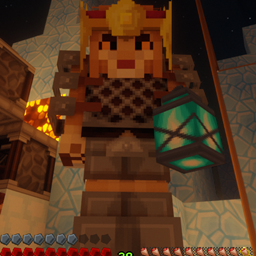
Seshcraft Private Server Modpack
This Minecraft modpack is perfect for someone looking for a vanilla-plus modpack.
介绍
About Seshcraft:
Seshcraft is a Vanilla-Plus 1.16.3 forge server including 45 forge mods, recommendations for my favorite texture pack, and a choice of four of my favorite shaders, all of which have been carefully curated and configured to enhance the vanilla Minecraft experience. Seshcraft is privately hosted by yours truly just for me and my bros. This page is an effort to streamline the mod installation for my bros and ensure proper configuration of their games, but if you like my Mod Pack feel free to download and try it for yourself as it is a fully client-side mod-pack. Leave any feedback below and I will do my best to respond.
Seshcraft Requirements:
1. Please install the modpack by importing a profile using the downloaded .zip file in the new CursedForge Overwolf app.
2. Optifine HD U 5 1.16.3 (due to licensing restrictions) and traveler’s backpack 1.16.2 5.1.1 (due to initial 1.16.3 port issues) must be manually installed into C:\Users\(YOUR USERNAME)\Documents\curseforge\minecraft\Instances\Seshcraft Mod-Pack\mods (Links provided below.)
3. Game must be launched through the CursedForge Overwolf app for mods to take effect.
4. Resource Packs and Shaders will need to be activated through the in-game settings. Place the main bdcraft resource pack file above the default packs followed by the addons above the purebdcraft 64 file. Select your shader pack through the settings>graphics>shaders menu.
Disclaimer:
I did not create any of these mods or resources, I merely curated and assembled them into a mod pack. All credit for the mods goes to the mod creators.
Recommended JVM Arguments for CursedForge*:
-XX:+AggressiveOpts -XX:+UnlockExperimentalVMOptions -XX:+UseG1GC -XX:ParallelGCThreads=4 -XX:+ParallelRefProcEnabled -XX:MaxGCPauseMillis=200 -XX:+DisableExplicitGC -XX:+AlwaysPreTouch -XX:G1NewSizePercent=30 -XX:G1MaxNewSizePercent=40 -XX:G1HeapRegionSize=8M -XX:G1ReservePercent=20 -XX:G1HeapWastePercent=5 -XX:G1MixedGCCountTarget=4 -XX:InitiatingHeapOccupancyPercent=15 -XX:G1MixedGCLiveThresholdPercent=90 -XX:G1RSetUpdatingPauseTimePercent=5 -XX:SurvivorRatio=32 -XX:+PerfDisableSharedMem -XX:MaxTenuringThreshold=1
*JVM/RAM allocation settings can be now be found in the CursedForge app in the minecraft game settings. I recommend 4-6GB of RAM allocation.
**Thanks for your patience as I adjust to the new Overwolf system. If any issues arise please let me know so I can try to solve them. If you have any requests for mod additions leave them below and I will consider them after testing.
Credits:
Mods:
AI Improvements: https://www.curseforge.com/minecraft/mc-mods/ai-improvements
Appleskin: https://www.curseforge.com/minecraft/mc-mods/appleskin
Aquaculture: https://www.curseforge.com/minecraft/mc-mods/aquaculture
AutoRegLib: https://www.curseforge.com/minecraft/mc-mods/autoreglib
Yung’s Better Caves: https://www.curseforge.com/minecraft/mc-mods/yungs-better-caves
Yung’s Better Mineshafts: https://www.curseforge.com/minecraft/mc-mods/yungs-better-mineshafts-forge
Better Than Mending: https://www.curseforge.com/minecraft/mc-mods/better-than-mending
Bookshelf: https://www.curseforge.com/minecraft/mc-mods/bookshelf
Botany Pots: https://www.curseforge.com/minecraft/mc-mods/botany-pots
Carryon: https://www.curseforge.com/minecraft/mc-mods/carry-on
Clumps: https://www.curseforge.com/minecraft/mc-mods/clumps
Caelus: https://www.curseforge.com/minecraft/mc-mods/caelus
Colytra: https://www.curseforge.com/minecraft/mc-mods/colytra
Chisel & Bits: https://www.curseforge.com/minecraft/mc-mods/chisels-bits
Cooking for Blockheads: https://www.curseforge.com/minecraft/mc-mods/cooking-for-blockheads
Creative Core: https://www.curseforge.com/minecraft/mc-mods/creativecore
FastLeafDecay: https://www.curseforge.com/minecraft/mc-mods/fast-leaf-decay
Forge: https://files.minecraftforge.net/maven/net/minecraftforge/forge/index_1.16.3.html
HWYLA: https://www.curseforge.com/minecraft/mc-mods/hwyla
Item Physic Full: https://www.curseforge.com/minecraft/mc-mods/itemphysic
KleeSlabs: https://www.curseforge.com/minecraft/mc-mods/kleeslabs
Macaw’s Bridges: https://www.curseforge.com/minecraft/mc-mods/macaws-bridges
Macaw’s Doors: https://www.curseforge.com/minecraft/mc-mods/macaws-doors
Macaw’s Roofs: https://www.curseforge.com/minecraft/mc-mods/macaws-roofs
Macaw’s Windows: https://www.curseforge.com/minecraft/mc-mods/macaws-windows
Macaw’s Trapdoors: https://www.curseforge.com/minecraft/mc-mods/macaws-trapdoors
Mining Helmet: https://www.curseforge.com/minecraft/mc-mods/miners-helmet
Optifine: https://optifine.net/downloads (Make sure to click see all versions and download the 1.16.3 Optifine HD U 5 version.)
Optiforge: https://www.curseforge.com/minecraft/mc-mods/optiforge
Quark Oddities: https://www.curseforge.com/minecraft/mc-mods/quark-oddities
Quark: https://www.curseforge.com/minecraft/mc-mods/quark
Repurposed Structures: https://www.curseforge.com/minecraft/mc-mods/repurposed-structures
Scuba Gear: https://www.curseforge.com/minecraft/mc-mods/scuba-gear
Simple Farming: https://www.curseforge.com/minecraft/mc-mods/simple-farming
Sit: https://www.curseforge.com/minecraft/mc-mods/sit
Slimy Boyos: https://www.curseforge.com/minecraft/mc-mods/slimyboyos
Spiders 2.0: https://www.curseforge.com/minecraft/mc-mods/spiders-2-0
Storage Drawers: https://www.curseforge.com/minecraft/mc-mods/storage-drawers
Trash Slot: https://www.curseforge.com/minecraft/mc-mods/trashslot
Traveler’s Backpack: https://www.curseforge.com/minecraft/mc-mods/travelers-backpack (Download 1.16.2 5.1.1 version.)
Valhelsia Structures: https://www.curseforge.com/minecraft/mc-mods/valhelsia-structures
WAWLA: https://www.curseforge.com/minecraft/mc-mods/wawla
Waystones: https://www.curseforge.com/minecraft/mc-mods/waystones
Xaero’s Minimap: https://chocolateminecraft.com/minimap2.php
Xaero’s Worldmap: https://chocolateminecraft.com/worldmap.php
XP From Harvest: https://www.curseforge.com/minecraft/mc-mods/xp-from-harvest
Resource Pack:
PureBDcraft: https://bdcraft.net/downloads/purebdcraft-minecraft/ (Recommend 64-bit, 3d blocks, damaged items, tech, font, connected textures, better leaves, and customizer add-ons.)
Shaders:
Chocapic13’s Shaders: https://www.curseforge.com/minecraft/customization/chocapic13-shaders (Recommended Extreme v9.1 Beta4 w/ disabled screen space reflections/contact sharpening)
SEUS: https://www.sonicether.com/seus/ (Also Recommended)
BSL: https://www.curseforge.com/minecraft/customization/bsl-shaders (Optional)
Sildurs: https://sildurs-shaders.github.io/ (Optional)
常见问题
Seshcraft Private Server Modpack 支持哪些 Minecraft 版本?
Seshcraft Private Server Modpack 基于 Minecraft Java 版 1.16.3。
Seshcraft Private Server Modpack 怎么安装?
点本页「前往下载」拿到整合包文件(Modrinth 的是 .mrpack,CurseForge 的是 .zip),在 PCL2 或 HMCL 启动器里选择「导入整合包」,启动器会自动装好 Minecraft、加载器和全部模组。建议在启动器里给游戏分配 4–6 GB 内存。
Seshcraft Private Server Modpack 开服需要多大内存?
推荐服务器内存 12 GB。在线人数多、或者建了大量机器和区块加载器时,可以再加 2–4 GB。
怎么和朋友一起玩 Seshcraft Private Server Modpack?
点本页的「一键开服」,选好配置后会自动安装 Seshcraft Private Server Modpack 的服务端,几分钟就能开好。把服务器地址发给朋友,大家用同一个版本的整合包连进去就行。
评论
登录后评论和评分