
Saffron
A Vanilla+ Modpack adding features for everyone. Suited for new players too.
截图


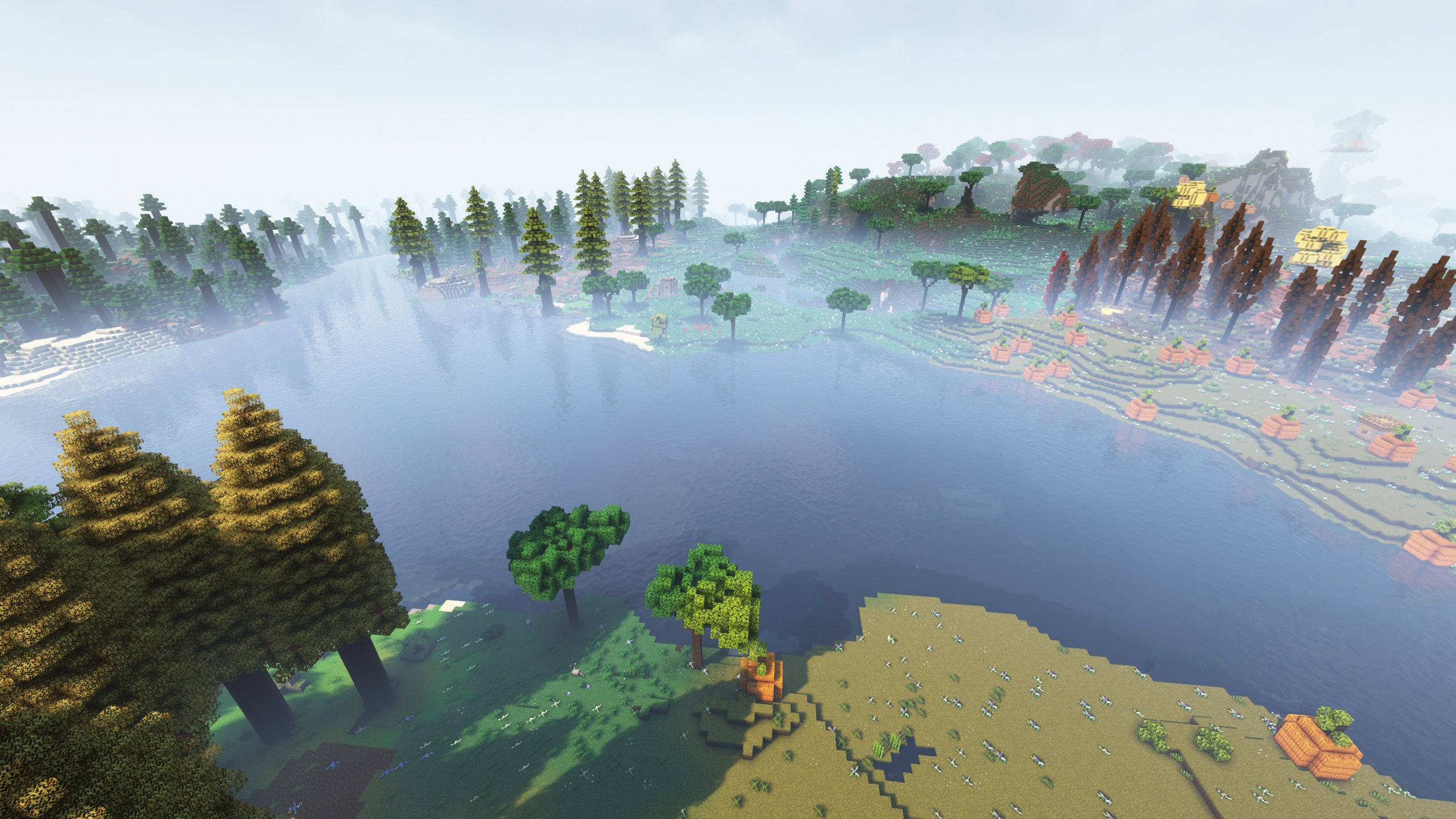


介绍
About
✔️ 80+ new biomes across all three dimensions
✔️ 100+ new mobs
✔️ Close to Vanilla
✔️ In-game documentation
✔️ Many new building blocks
✔️ Suited for players, who haven’t played a modpack before, too
❌ Being bored after having seen basically everything in Vanilla
❌ Quest line you have to follow
❌ Being overwhelmed with new information
If you like technical aspects of Minecraft, check out Saffron Create
More images here
Found a bug or have an idea how to improve the pack? Tell me on the GitHub page
How to download?
- If you don’t have java 17 on your PC, you need to install it first. You can do that here
- Download the CurseForge installer here
- Run the installer file and follow the installation helper
- After opening the CurseForge app, click “Minecraft”
- Click “Browse Modpacks”
- Type “Saffron” or “LaidBackSloth” in the search bar and press Enter
- Click the orange “Install” button from the Saffron modpack
- Navigate back to “My Modpacks” and wait until the installation process is done
- To start the modpack, hover over it and then press the appearing orange “Play” button. The regular Minecraft Launcher should now open, and you can press “Play” in there to start Saffron
How to allocate RAM and how much?
- In the CurseForge app, click the settings-gear in the bottom-left corner
- Click on “Minecraft” and scroll down until you find “Allocated Memory”
- Drag the slider to the amount of RAM you want to allocate
Allocate at least 4-6 GB of RAM, 8-12 GB is recommended
How to play with Shaders?
- Download this file or a newer version of Oculus
- Open the CurseForge App, where you would normally start the modpack
- Right-click on the Saffron profile
- Left-click on “Open Folder”
- A folder should pop up. In there, navigate to the subdirectory “mods”
- Now drag the downloaded file from Oculus in there
- Download this mod and drag it into the mods-folder too
- Download the shaderpack of your choice. If you don’t know what shader to use, pick one here. I used Complementary Shaders v4 for the screenshots
- Go back to the modpack-folder (the folder in which the mods-folder is located in). Create a folder called “shaderpacks” if there isn’t already one. Drag your shaderpack (as a ZIP-file) in there
- To use the shaderpack, load up the game and go to “Options…”. From there, go to “Video Settings…” and then “Shader Packs…”
- The name of your shaderpack should appear on the screen. Click on it and then press “Apply”
- If the text above your shaderpack is “Shaders: Disabled”, click on it, so that it is “Shaders: Enabled”
- Now you can click done and leave the settings. Your shaderpack should be applied
How to play with friends?
- If you want to host a server on your own device, download the server-file and follow the steps in the SERVER_README.txt
- If you want are willing to spend some money, check out Kinetic Hosting. They provide powerful servers for a fair price while being easy to use, and they have a nice support. Click on the image below for more information, and if you are interested, use code LAIDBACKSLOTH at checkout for a 15% discount.
- Note: The Modpack installers of hosting providers probably won’t work properly for this pack, so you should download it on your own device and then upload it to the server.

常见问题
Saffron 支持哪些 Minecraft 版本?
Saffron 基于 Minecraft Java 版 1.18.2,使用 Forge 加载器。
Saffron 怎么安装?
点本页「前往下载」拿到整合包文件(Modrinth 的是 .mrpack,CurseForge 的是 .zip),在 PCL2 或 HMCL 启动器里选择「导入整合包」,启动器会自动装好 Minecraft、加载器和全部模组。建议在启动器里给游戏分配 4–6 GB 内存。
Saffron 开服需要多大内存?
推荐服务器内存 12 GB。在线人数多、或者建了大量机器和区块加载器时,可以再加 2–4 GB。
怎么和朋友一起玩 Saffron?
点本页的「一键开服」,选好配置后会自动安装 Saffron 的服务端,几分钟就能开好。把服务器地址发给朋友,大家用同一个版本的整合包连进去就行。
LaidBackSloth 的其他作品
查看全部 →
Oculus Particle Fix
修复了 Oculus 光影模组中拾取物品时粒子穿墙闪烁的视觉问题

Angel Block Renewed
一种可以放置在空中的方块,方便建造空岛基地等。

Why stacks of 16?
物品初始堆叠上限从16提升至64

Better Brightness Slider
将亮度/伽马滑块调高或调低至默认值以外的范围。
评论
登录后评论和评分