
Optimised Engineering
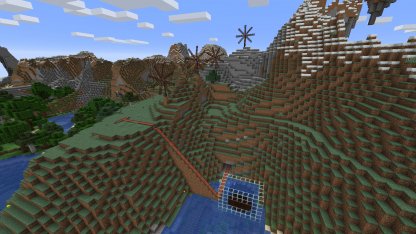
Simple modpack based primarily on Immersive Engineering as well as Optimized Forge 1.19 by "bruh". Really slim lightweight Vanilla+ modpack
截图


介绍
Note: Make sure to add “datapacks” folder to your world after creating your world!
Note: I am not updating this modpack! Feel free to update the mods through Prism Launcher though
Make sure to backups your worlds manually as well once in a blue moon, Simple Backups corrupted my world once (Out of about 8-10 restores)
Quark Engineering mod created by rickiegamer can be found here: https://www.curseforge.com/minecraft/mc-mods/quark-engineering
Simple modpack based primarily on Immersive Engineering as well as Optimized Forge 1.19 by “bruh”. Really slim lightweight Vanilla+ modpack.
Aether Legacy wil be added when they backport it to 1.19.2
Includes:
- Appleskin
- Gravestone mod
- JEI
- Waystones/Waymaker
- Storage Drawers
- Xaero’s Minimap
Many QoL improvements and performance mods based on the Optimized Forge 1.19 modpack.
You might want to add Twilight Forest for some extra stuff to do
Additional Changes/Features:
-Experience drops for smelting/blasting IE grit!
-Fusz_’s Easy Anvils, Easy Magic (Reroll Enchantments), Trading Post, Completionist’s Index & Enchantment Infuser Mod (Repairing disabled)
-Quark + Quark Copper pipe added and configured for a cohesive experience
-Added a balanced recipe for coke coal creation from the Arc Furnace
-Ore doubling for Immersive Engineering re-introduced as per pre-1.17: https://modrinth.com/datapack/immersive-engineering-ore-doubling
-Automatically spawn with an IE Guide
- Waystones + Xaero’s Compat
- Super fast! Optimised for low-end computers thanks to the Optimised Forge modpack and mod creators , if you have a higher-end computer make sure to configure the Quality and Performance Tabs in the Video Settings
- Faithful x32/Quark32x included: https://faithfulpack.net/ / Note: f32.me (Faithful modded) NOT included
If you want to make a server, just remove/disable the following mods from the server mods folder:
Textrue’s Rubudium Options
Rubidium
Rubidium Extra
Oculus
Dynamic Lights Reforged
Distant Horizons
Enjoy! And pls give advice for how I can improve it, Thanks
[email protected]
包含的模组 43 个,另有 9 个其他文件
 苹果皮
 AutoRegLib
 bad packets
 Balm
 Better Advancements
 Collective
 Completionist's Index
 CraftTweaker
 遥远的地平线
 简易铁砧
 Easy Magic
 Embeddium (Rubidium) Extra
 Enchanting Infuser
 实体剔除
 Faithful 32x
 Fastload
 FerriteCore
 GraveStone Mod
 沉浸工程
 Just Enough Immersive Multiblocks
 JEI物品管理器
 Just Enough Professions (JEP)
 Just Enough Resources (JER)
 Memory Leak Fix
 No Telemetry
 Not Enough Crashes
 Oculus
 Polymorph
 Puzzles Lib
 夸克
 Quark Oddities
 Rubidium
 Simple Backups
 spark
 Starlight (Forge)
 Starter Kit
 TexTrue's Rubidium Options
 The One Probe
 Trading Post
 Visual Workbench
展开全部 43 个


绿色边框的模组本站有收录,点进去看中文介绍;其余跳转到 Modrinth。
常见问题
Optimised Engineering 支持哪些 Minecraft 版本?
Optimised Engineering 基于 Minecraft Java 版 1.19.2,使用 Forge 加载器。
Optimised Engineering 怎么安装?
点本页「前往下载」拿到整合包文件(Modrinth 的是 .mrpack,CurseForge 的是 .zip),在 PCL2 或 HMCL 启动器里选择「导入整合包」,启动器会自动装好 Minecraft、加载器和全部模组。这个整合包有 43 个模组,建议在启动器里给游戏分配 4–6 GB 内存。
Optimised Engineering 开服需要多大内存?
推荐服务器内存 12 GB。在线人数多、或者建了大量机器和区块加载器时,可以再加 2–4 GB。
怎么和朋友一起玩 Optimised Engineering?
点本页的「一键开服」,选好配置后会自动安装 Optimised Engineering 的服务端,几分钟就能开好。把服务器地址发给朋友,大家用同一个版本的整合包连进去就行。
paulbevzyuk 的其他作品
查看全部 →
Thaumcraft 4 Enhanced for PojavLauncher
A light collection of mods specifically intended for compatibility with PojavLauncher for Android Devices

TerraFirmaCraft Odyssey: TFC+
This is a lightweight pack based on the unoffical TerraFirmaCraft Modpack and the mods' many addons

Thaumcraft 6 Pack
An assortment of mods for 1.12.2 based primarily on Thaumcraft 6 and its addons.

Immersive Balance + Ore Doubling
Return ore doubling for Immersive Engineering as per pre-1.17!
评论
登录后评论和评分