Max Realism (MMR)
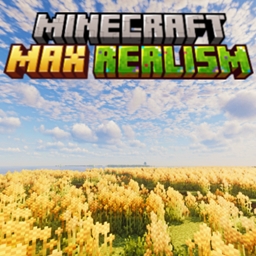
Turn vanilla into a scenic, high-fidelity world. MMR upgrades graphics and terrain while adding new structures, biomes, and fresh gameplay features.
介绍
Minecraft Max Realism (MMR)
Minecraft Max Realism is a modpack built to push Minecraft’s visuals to the next level. It focuses on graphical intensity and immersive realism, designed for players who want Minecraft to look as close to real life as possible.
⚠️ Performance Warning:
This pack is demanding. A mid-to-high-end graphics card is strongly recommended. Play at your own risk—your PC might sound like it’s about to take off.
✨ Features:
- Enhanced visuals with shaders and texture improvements
- Immersive sound and atmosphere
- Optimized combination of community mods for a realistic experience
📌 Disclaimer:
I do not own any of the included mods. All credit goes to the amazing mod developers who made them. This pack simply brings them together to create a unified realism-focused experience.
💬 Feedback & Reviews:
I’d love to hear what you think! Your comments and reviews help improve the modpack and guide future updates. Please consider leaving feedback on the Modpack’s Feedback Page – Every suggestion makes a difference.
常见问题
Max Realism (MMR) 支持哪些 Minecraft 版本?
Max Realism (MMR) 基于 Minecraft Java 版 1.20.1,使用 Fabric 加载器。
Max Realism (MMR) 怎么安装?
点本页「前往下载」拿到整合包文件(Modrinth 的是 .mrpack,CurseForge 的是 .zip),在 PCL2 或 HMCL 启动器里选择「导入整合包」,启动器会自动装好 Minecraft、加载器和全部模组。建议在启动器里给游戏分配 4–6 GB 内存。
Max Realism (MMR) 开服需要多大内存?
推荐服务器内存 12 GB。在线人数多、或者建了大量机器和区块加载器时,可以再加 2–4 GB。
怎么和朋友一起玩 Max Realism (MMR)?
点本页的「一键开服」,选好配置后会自动安装 Max Realism (MMR) 的服务端,几分钟就能开好。把服务器地址发给朋友,大家用同一个版本的整合包连进去就行。
NotJacobtwch 的其他作品
查看全部 →
Shared Survival (USE NEW MOD)
共享生存:共享生命值、饥饿值和物品栏,还可选用距离语音聊天,让一切变得更加混乱。

Jacob’s QOL Pack
Vanilla Minecraft with many Quality of Life mods designed to enhance your experience
KlubCraft Season 3
Taking place after JacobAndFSMP Season 2, KlubCraft brings a calm and progressive journey to Minecraft

Jacob’s BeautyPack (Client Edition)
A completely client-side modpack that revamps Minecraft's visuals using stunning shaders, particles, ambience, and so much more.
评论
登录后评论和评分