介绍
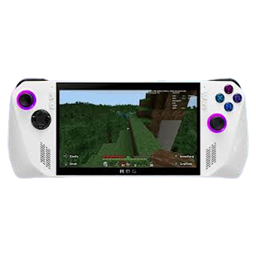
This small modpack aims to make Minecraft compatible with the ROG Ally.
This pack features:
– Controller support thanks to Mr Crayfish’s Controllable mod
This mod allows for controller input but is also compatible with most mods that add keybinds (as long as they’re in the vanilla keybind menu) thanks to their radial menu.
– Ui improvements:
Advanced compass has a UI element that let’s you see what direction you are facing and let’s you see waypoints (it’s own as well as Xaero’s minimap waypoints). Mini HUD allows you to see what time of day it is in game and the real time as well (as usually you can’t see that while playing in fullscreen). Better f3 also cleans up the f3 menu to not clutter the small screen.
– A map:
With the use of Xaero’s world map you can see the map of your world as well as your waypoints (only Xaero’s minimap waypoints!).
– Shaders!
Sodium and Iris makes it so you can use shaders. The ROG Ally is powerful enough to play at a stable 60 fps even with some shaders. This pack includes Complementary reimagined shaders as this shaderpack is awesome and isn’t that hard on performance on the ROG Ally.
– Continuity
Continuity adds connected textures to Minecraft, as this is a small graphical improvement I just added it in the pack
Things of note:
– Everything is configurable thanks to the modmenu, if some ui elements don’t fit for you, just change them!
– Don’t forget to setup your keybinds, the default setup included works well, but you may want to edit them to your liking (go to the little controller next to controls in the menu)
– Due to a small incompatibility issue between Xaero’s worldmap and controllable it is impossible to navigate the map with your controller, luckily the Ally has a touchscreen wich works really well with it!
This pack makes vanilla minecraft playable as is on the ROG Ally, but can also be a baseline for any modpack that wants to be compatible with it.
Use this pack as you like, you can also edit it and share it with no conditions.
常见问题
MC Allied – Fabric 支持哪些 Minecraft 版本?
MC Allied – Fabric 基于 Minecraft Java 版 1.20.1。
MC Allied – Fabric 怎么安装?
点本页「前往下载」拿到整合包文件(Modrinth 的是 .mrpack,CurseForge 的是 .zip),在 PCL2 或 HMCL 启动器里选择「导入整合包」,启动器会自动装好 Minecraft、加载器和全部模组。建议在启动器里给游戏分配 4–6 GB 内存。
MC Allied – Fabric 开服需要多大内存?
推荐服务器内存 12 GB。在线人数多、或者建了大量机器和区块加载器时,可以再加 2–4 GB。
怎么和朋友一起玩 MC Allied – Fabric?
点本页的「一键开服」,选好配置后会自动安装 MC Allied – Fabric 的服务端,几分钟就能开好。把服务器地址发给朋友,大家用同一个版本的整合包连进去就行。
Kerrghan 的其他作品
查看全部 →
Kerrghan’s Dragon Block C and Naruto C pack
Dragon Block C and Naruto together? Hell yeah!

Jeniaverse
Small modpack with dragons

Frozen Leaf Pack
Light magic and tech pack

Kerrghan’s music pack
This pack edits minecraft music disks to a personal selection
评论
登录后评论和评分