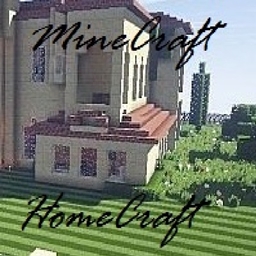
介绍
About: (as of version 2.0) – I recommend memory be set from 4 – 6 Gb to effectively run this pack.
HomeCraft is essentially regular MineCraft BUT is modded and tweaked with a lot of GUI support, extra carry inventory, a bit of tech, and decoration support… LOTS of decoration support. This pack has only 1 real goal – build your house, town, village, etc. as only you can. A few extra mods for crops, food, services, and tools…. but mainly, just the beautiful environment and the ambiance of MineCraft mixed with extra decorative building blocks to make a place truly your own.
Be sure to set the WorldType as Biomes O’ Plenty for that extra good look when creating a new world.
Included Mods:
Recommended Mods:
-PiP (for multiplayer) and a good resource pack.
– I also recommend using the addon resourcepack by Golrith at here for AntiqueAtlas.
1. Download the file and extract to a separate directory to copy/move the files.
2. Put the AntiqueAtlasExtra file into your HomeCraft resourcepacks directory.
3. (ONLY IF you are using Biomes O’Plenty) Put both the .json files into the HomeCraft/config/antiqueatlas directory.
This will allow for color mapping using when using the Antique Atlas.
–DO NOT USE Optifine. There are noted conflicts and issues with many of the mods in this pack when running Optifine. As such, Optifine will likely cause your client to crash and/or possibly corrupt your world save.
Notes:
The Server.Properties mod is installed in this pack. This allows players to make an easier Open to Lan server with specific settings. This also means that with EACH individual world save you create, there is a server.properties file which needs to be configured.
Easy Steps:
1) Create your world
2) save and exit to MineCraft Main Menu – there is NO NEED to exit MineCraft entirely
3) through your file manager – go to your instance’s saves game directory (specifically the world save you wish to share) and configure the server.properties file with a text editor
4) save the changes made to the server.properties file and close the editor
5) return to MineCraft Main Menu and load your world
6) Open to LAN with your configured settings
It’s that easy… BUT, if you are running this pack on a dedicated server, be sure to disable the server.properties mod as it is not needed and potentially can (and usually will) cause issues with the dedicated server setup.
常见问题
HomeCraft 支持哪些 Minecraft 版本?
HomeCraft 基于 Minecraft Java 版 1.10.2,使用 Forge 加载器。
HomeCraft 怎么安装?
点本页「前往下载」拿到整合包文件(Modrinth 的是 .mrpack,CurseForge 的是 .zip),在 PCL2 或 HMCL 启动器里选择「导入整合包」,启动器会自动装好 Minecraft、加载器和全部模组。建议在启动器里给游戏分配 4–6 GB 内存。
HomeCraft 开服需要多大内存?
推荐服务器内存 12 GB。在线人数多、或者建了大量机器和区块加载器时,可以再加 2–4 GB。
怎么和朋友一起玩 HomeCraft?
点本页的「一键开服」,选好配置后会自动安装 HomeCraft 的服务端,几分钟就能开好。把服务器地址发给朋友,大家用同一个版本的整合包连进去就行。
Unitearica 的其他作品
查看全部 →
SZMP – Simple Zelda Mod Pack
Classic ZMP for Curse
BetaA Redux Skyblock
A new Skyblock version of an original classic.
BetaA Redux Full
A new version of an original classic.

Random Testing ModPack
MC 1.8.9 Longevity Testing Modpack
评论
登录后评论和评分