Animalia – Zoo and City
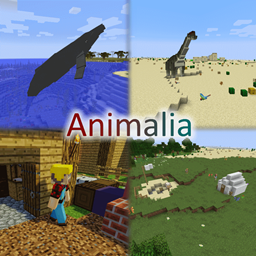
这个整合包围绕两大主题展开:使用“MineColonies”建造城市,以及用“Zoo and Wild Animals Mod: Rebuilt”打造动物园。你甚至可以借助“Fossils and Archology Revival”建造一座活体博物馆。
介绍
这个整合包以使用“MineColonies”建造城市,以及使用“Zoo and Wild Animals Mod: Rebuilt”建造动物园为核心。
你甚至可以用“Fossils and Archology Revival”打造一座活体博物馆
从 MineColonies 开始体验整合包。
然后修建道路基础设施,这样你就能开着汽车在城市里四处兜风。
最后,你可以开始建造动物园或恐龙公园……或者两个都建……我建议都建。
不过要小心,有些恐龙能破坏比铁更脆弱的方块……我猜你可不想让那只霸王龙追着动物园里的其他动物跑。
除此之外,这是一个以科技为主的整合包(这里没有魔法),让你有事情可做,打发时间。
你可以通过 MineColonies、蜜蜂或 Mystical Agriculture 获取资源,也可以三种方式都用。
大型存储系统将从 Simple System 起步,之后升级到 Refined Stroage。
这个项目最初是我和一位朋友一起制作的整合包。投入了大量时间后,我决定再多花些功夫,把它作为公开整合包发布。
我尽量让所有配方都保持原版风格,只在必要时进行调整。
如果你遇到任何问题,或有任何建议,请告诉我。
不提供服务器文件,因为你只需:
1. 将实例中的 Config、Mods 和 Scripts 文件夹复制到服务器文件夹中
2. 下载对应版本 Forge 的安装程序(目前为 1.12.2 – 14.23.5.2854)
3. 将 Forge 安装到服务器目录
4. 创建一个批处理文件(批处理文件的内容见下方)
5. 运行批处理文件,它会启动服务器,然后崩溃。
6. 打开 Eula.txt 并接受协议。
7. 再次运行批处理文件,Forge 会帮你关闭仅限客户端使用的模组。
8. 运行过程中会要求你输入默认生成器:默认世界请输入 “/defaultworldgenerator-port 1″,自定义生成请输入 “/defaultworldgenerator-port 2”
这个整合包使用默认世界生成,不过你也可以使用自定义生成;它会将世界生成中的噪声减半,从而生成更平滑的地形。
默认 server.properties
#Minecraft server properties
#Mon Jul 13 20:35:16 EDT 2020
max-tick-time=60000
generator-settings=
force-gamemode=false
allow-nether=true
gamemode=0
enable-query=false
player-idle-timeout=0
difficulty=1
spawn-monsters=true
op-permission-level=4
pvp=true
snooper-enabled=true
level-type=DEFAULT
hardcore=false
enable-command-block=false
max-players=30
network-compression-threshold=256
resource-pack-sha1=
max-world-size=29999984
server-port=25566
server-ip=0.0.0.0
spawn-npcs=true
allow-flight=true
level-name=world
view-distance=10
resource-pack=
spawn-animals=true
white-list=false
generate-structures=true
online-mode=true
max-build-height=256
level-seed=
prevent-proxy-connections=false
motd=Animalia Server
enable-rcon=false
defaultworldgenerator-port=49b59191-c3e3-11ea-99ac-000000000000
自定义 server.properties
#Minecraft server properties
#Mon Jul 13 20:35:16 EDT 2020
max-tick-time=60000
generator-settings={“coordinateScale”\:342.0,”heightScale”\:2658.0,”lowerLimitScale”\:2244.0,”upperLimitScale”\:2244.0,”depthNoiseScaleX”\:100.0,”depthNoiseScaleZ”\:100.0,”depthNoiseScaleExponent”\:0.25,”mainNoiseScaleX”\:2460.0,”mainNoiseScaleY”\:2420.0,”mainNoiseScaleZ”\:2460.0,”baseSize”\:8.5,”stretchY”\:19.0,”biomeDepthWeight”\:0.75,”biomeDepthOffset”\:0.0,”biomeScaleWeight”\:0.5,”biomeScaleOffset”\:0.0,”seaLevel”\:63,”useCaves”\:true,”useDungeons”\:true,”dungeonChance”\:8,”useStrongholds”\:true,”useVillages”\:true,”useMineShafts”\:true,”useTemples”\:true,”useMonuments”\:true,”useMansions”\:true,”useRavines”\:false,”useWaterLakes”\:true,”waterLakeChance”\:80,”useLavaLakes”\:true,”lavaLakeChance”\:90,”useLavaOceans”\:false,”fixedBiome”\:-1,”biomeSize”\:4,”riverSize”\:4,”dirtSize”\:33,”dirtCount”\:10,”dirtMinHeight”\:0,”dirtMaxHeight”\:256,”gravelSize”\:33,”gravelCount”\:8,”gravelMinHeight”\:0,”gravelMaxHeight”\:256,”graniteSize”\:33,”graniteCount”\:10,”graniteMinHeight”\:0,”graniteMaxHeight”\:80,”dioriteSize”\:33,”dioriteCount”\:10,”dioriteMinHeight”\:0,”dioriteMaxHeight”\:80,”andesiteSize”\:33,”andesiteCount”\:10,”andesiteMinHeight”\:0,”andesiteMaxHeight”\:80,”coalSize”\:17,”coalCount”\:20,”coalMinHeight”\:0,”coalMaxHeight”\:128,”ironSize”\:9,”ironCount”\:20,”ironMinHeight”\:0,”ironMaxHeight”\:64,”goldSize”\:9,”goldCount”\:2,”goldMinHeight”\:0,”goldMaxHeight”\:32,”redstoneSize”\:8,”redstoneCount”\:8,”redstoneMinHeight”\:0,”redstoneMaxHeight”\:16,”diamondSize”\:8,”diamondCount”\:1,”diamondMinHeight”\:0,”diamondMaxHeight”\:16,”lapisSize”\:7,”lapisCount”\:1,”lapisCenterHeight”\:16,”lapisSpread”\:16}
force-gamemode=false
allow-nether=true
gamemode=0
enable-query=false
player-idle-timeout=0
difficulty=1
spawn-monsters=true
op-permission-level=4
pvp=true
snooper-enabled=true
level-type=customized
hardcore=false
enable-command-block=false
max-players=30
network-compression-threshold=256
resource-pack-sha1=
max-world-size=29999984
server-port=25566
server-ip=0.0.0.0
spawn-npcs=true
allow-flight=true
level-name=world
view-distance=10
resource-pack=
spawn-animals=true
white-list=false
generate-structures=true
online-mode=true
max-build-height=256
level-seed=
prevent-proxy-connections=false
motd=Animalia Server
enable-rcon=false
defaultworldgenerator-port=91365de1-c4b7-11ea-a917-6045cb9ee640
批处理文件:start.bat
java -Xmx16G -Xms8G -jar forge-1.12.2-14.23.5.2854.jar nogui
pause
常见问题
Animalia – Zoo and City 支持哪些 Minecraft 版本?
Animalia – Zoo and City 基于 Minecraft Java 版 1.12.2,使用 Forge 加载器。
Animalia – Zoo and City 怎么安装?
点本页「前往下载」拿到整合包文件(Modrinth 的是 .mrpack,CurseForge 的是 .zip),在 PCL2 或 HMCL 启动器里选择「导入整合包」,启动器会自动装好 Minecraft、加载器和全部模组。建议在启动器里给游戏分配 4–6 GB 内存。
Animalia – Zoo and City 开服需要多大内存?
推荐服务器内存 12 GB。在线人数多、或者建了大量机器和区块加载器时,可以再加 2–4 GB。
怎么和朋友一起玩 Animalia – Zoo and City?
点本页的「一键开服」,选好配置后会自动安装 Animalia – Zoo and City 的服务端,几分钟就能开好。把服务器地址发给朋友,大家用同一个版本的整合包连进去就行。
Absolute_Phoenix 的其他作品
查看全部 →
Simply Seasons – Harvest City Edition
为 Harvest City 稍作调整的简约四季模组。
Tome of Azure
一个拥有丰富任务系统的空岛生存。
Advent of Automation
Explore and automate.

MultiArkGaming Event Mod
this is a mod for the MultArkGaming Community Server
评论
登录后评论和评分