
截图
介绍
中文介绍正在准备中,下面暂时显示原文。
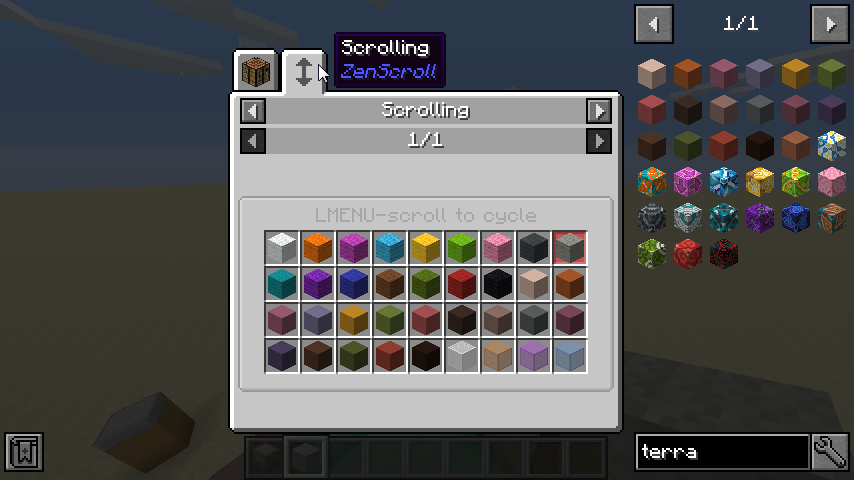
With ZenScroll, modpack authors can use CraftTweaker to create “scroll groups”. You can cycle between items in a scroll group by holding down the modifier key (default ALT) and scrolling the mouse wheel.

To learn more about how to create scroll groups, check my Github readme. Here are a few examples:
import mods.zenscroll.ZenScroll;

ZenScroll.add(<minecraft:apple>, <minecraft:gravel>, <minecraft:dirt>);
ZenScroll.add(<minecraft:wool:*>);
ZenScroll.add(<minecraft:stained_hardened_clay:*>);
But wait, there’s more:
var glasses = ScrollGroup.of(<minecraft:stained_glass:*>, <minecraft:stained_glass_pane:*>);
glasses.copyTag(); //retain any nbt tags when you scroll
ZenScroll.add(glasses);

//scroll apples into cookies but not the other way around (contrived example :D)
ZenScroll.add(<minecraft:apple>).processor(
  function(prev as IItemStack, next as IItemStack) {
    return <minecraft:cookie>;
  }
)
Questions? Comments? Just lonely? Join me on Discord: https://quat1024.github.io/discord/
常见问题
ZenScroll 支持哪些 Minecraft 版本?
ZenScroll 支持 Minecraft Java 版 1.12.2,可用的加载器:Forge。下载时注意选择和你游戏版本一致的文件。
ZenScroll 怎么安装?
先用 PCL2 或 HMCL 启动器安装对应版本的 Forge,再把下载的 .jar 文件放进游戏目录的 mods 文件夹,重新启动游戏即可。开启了版本隔离的,mods 文件夹在 versions/版本名 下面。
quat 的其他作品
查看全部 →
夸克 Quark
by GoesBySully, AmyMialee 等
夸克是一种非常微小的东西。这个模组是一系列小玩意的集合……
2.9亿
9 天前
Modrinth · CurseForge

Zeta
by Vazkii, Siuolplex 等
模块化模组的综合支撑前置库
8443万
6 个月前
Modrinth · CurseForge

Rebind Narrator
by quat
现在是2021年,你仍然改不了旁白快捷键 更新:现在是2022年,你还是改不了旁白快捷键 更新:现在是2023年,你依然改不了旁白快捷键 更新:现在是2024年,你仍旧改不了旁白快捷键 更新:现在是2025年,而
4477万
2 个月前
Modrinth · CurseForge

Simple Trophies
by quat
它添加了奖杯!
685.2万
6 年前
CurseForge · Modrinth
评论
登录后评论和评分