
ZapHosting Server Integration Menu
A ZAP-Hosting Server Integration Menu is a custom in-game or web-based UI that promotes your ZAP-Hosting partner link and discount code. It allows players to easily access hosting services while supporting your partnership.
截图

介绍

ZAP-Hosting Server Integration Menu
This mod provides an in-game configurable menu for integrating ZAP-Hosting directly into your Minecraft Modpack. With this, you can easily add your partner link and discount code to promote your ZAP-Hosting affiliation.
This mod is intended for Zap-Hosting Official Partners.
Apply for the Partnership Program.
Mod Installation & Features Guide
Installation Instructions
Step 1: Install the Mod
-
Download the mod
.jarfile. -
Place it inside the
modsfolder of your Modpack.-
Location:
Your_Modpack_Folder/mods/
-
Step 2: Generate the Configuration File
-
Launch the modpack or directly execute the
.jarfile. -
This will automatically generate the necessary config files in the following directory:
-
Config Path:
config/zap_hosting_server_integration_menu/common.json5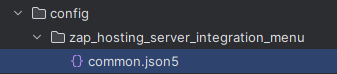
-
Step 3: Configure the Mod
-
Modify settings using either:
-
The in-game Config Menu
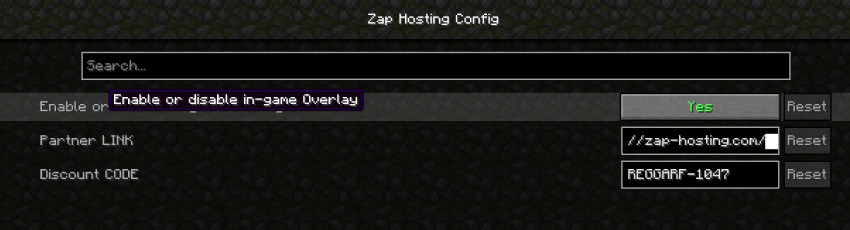
-
Manually editing the
common.json5file.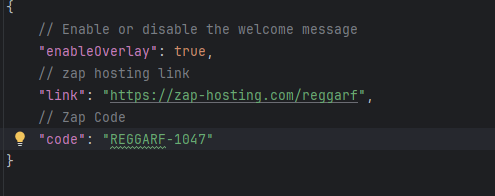
-
Mod Features
1. ZAP-Hosting Integration
-
Players can order a Minecraft server directly by clicking on the ZAP-Hosting image in the game.
-
This provides a seamless way to set up multiplayer worlds with optimized hosting.
2. First-Time In-Game Notification
-
When launching a world for the first time, a special one-time popup message will appear.
-
This message informs players about the ZAP-Hosting integration and how to order a server.
-
The message will only appear once per world to avoid spam.
3. Customizable Settings
-
Players can adjust settings in
common.json5to:-
Enable/disable the popup message.
-
Customize the ZAP-Hosting image click behavior.
-

常见问题
ZapHosting Server Integration Menu 支持哪些 Minecraft 版本?
ZapHosting Server Integration Menu 支持 Minecraft Java 版 1.20.1–1.21.3,共 8 个版本,可用的加载器:Forge / NeoForge。下载时注意选择和你游戏版本一致的文件。
ZapHosting Server Integration Menu 怎么安装?
先用 PCL2 或 HMCL 启动器安装对应版本的 Forge / NeoForge,再把下载的 .jar 文件放进游戏目录的 mods 文件夹,重新启动游戏即可。开启了版本隔离的,mods 文件夹在 versions/版本名 下面。运行环境:仅客户端。
Reggarf 的其他作品
查看全部 →
Create Waystones Recipes
这个模组调整了传送石碑的合成配方,使其更适配机械动力并使用机械动力的内容,也对配方进行了些许平衡。
Underground Villages, Stoneholm (Fabric/Forge/NeoForge)
(✓ Forge、✓ NeoForge 和 ✓ Fabric)Stoneholm 是一款适用于 Forge 和 Fabric 的模组,会在世界中生成地下村庄。灵感来自要塞和村庄。

Create: Better Villager (Fabric/Forge/NeoForge)
[Create-6.0.6 (✓)] Create: Better Villager,添加了一系列机械动力模组的村民职业 | 支持 Forge/NeoForge 和 Fabric

Better Library
这只是一个简单的配置前置库,用于首次加入消息和实时消息。
评论
登录后评论和评分