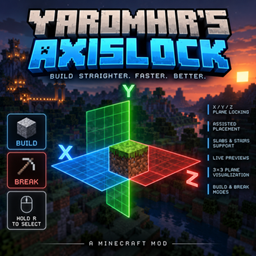
Yaromhir’s Axislock
A lightweight client-side building utility for locking block placement and breaking
介绍
aromhir’s Axislock
Yaromhir’s Axislock is a lightweight client-side building utility for Minecraft that makes building straight lines, walls and other precise structures faster and less frustrating.
Hold R to open the Axislock menu, move your cursor over the desired plane and release R to activate it. A quick tap of R disables the current lock.
Features
- X / Y / Z plane locking for precise block placement
- BUILD and BREAK modes
- Assisted placement when building along edges and walls
- Live WYSIWYG placement preview
- Support for slabs and stairs, including their orientation
- 3×3 plane visualization while selecting an axis
- Clean hold-R selection menu
- Small HUD showing your currently active plane
- Only one mode and plane active at a time
- Normal Minecraft controls when Axislock is disabled
Controls
Hold R — Open the Axislock menu
Move mouse — Select BUILD / BREAK and X / Y / Z
Release R — Confirm selection
Tap R — Disable Axislock
The keybind can be changed in Minecraft’s Controls menu.
Compatibility
Minecraft: 1.20.1
Mod Loader: Forge
Side: Client
Yaromhir’s Axislock is designed to stay out of the way when you don’t need it and make repetitive building significantly easier when you do.
Build straighter. Think less. 🗿
常见问题
Yaromhir’s Axislock 支持哪些 Minecraft 版本?
Yaromhir’s Axislock 支持 Minecraft Java 版 1.20.1,可用的加载器:Forge。下载时注意选择和你游戏版本一致的文件。
Yaromhir’s Axislock 怎么安装?
先用 PCL2 或 HMCL 启动器安装对应版本的 Forge,再把下载的 .jar 文件放进游戏目录的 mods 文件夹,重新启动游戏即可。开启了版本隔离的,mods 文件夹在 versions/版本名 下面。
评论
登录后评论和评分