介绍
中文介绍正在准备中,下面暂时显示原文。
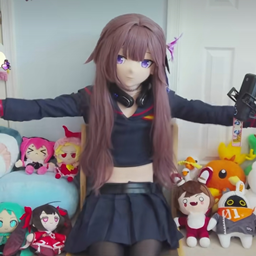
craft Herta from Honkai : star rail herself !
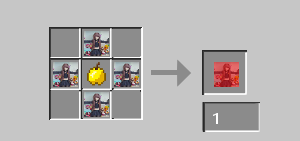
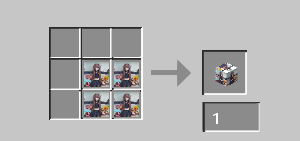
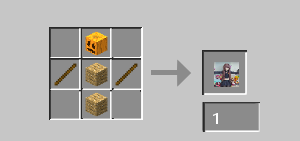
this mod adds an item, a block and a food.
The item is useless in itself but it is needed to craft the block and the food.
The block will allow you to spread the magnificence of Y-chan/Herta in your minecraft world. (it is purely decorative)
While the food, will vgive you REALLY strong effect, like a regeneration lvl 5, resistance lvl 5 and a lot of other powerful effects.
View images to know the recipes.
<textarea id="BFI_DATA" style="width: 1px; height: 1px; display: none;"></textarea>
TRANSLATE with ![]() x
<input id="LanguageMenu_svid" style="display: none;" autocomplete="on" name="LanguageMenu_svid" type="text" value="en" /> <input id="LanguageMenu_textid" style="display: none;" autocomplete="on" name="LanguageMenu_textid" type="text" />
English
TRANSLATE with
![]()
COPY THE URL BELOW
<input id="ShareTextbox" name="ShareTextbox" readonly="readonly" type="text" />
![]()
![]() Back
<input id="EmailSubject" name="EmailSubject" type="hidden" value="Check out this page in {0} translated from {1}" /> <input id="EmailBody" name="EmailBody" type="hidden" value="Translated: {0}%0d%0aOriginal: {1}%0d%0a%0d%0aAutomatic translation powered by Microsoft® Translator%0d%0ahttp://www.bing.com/translator?ref=MSTWidget" /> <input id="ShareHelpText" type="hidden" value="This link allows visitors to launch this page and automatically translate it to {0}." />
EMBED THE SNIPPET BELOW IN YOUR SITE ![]()
<input id="EmbedSnippetTextBox" name="EmbedSnippetTextBox" readonly="readonly" type="text" value="<div id='MicrosoftTranslatorWidget' class='Dark' style='color:white;background-color:#555555'></div>" />
常见问题
Y-chan | Herta 支持哪些 Minecraft 版本?
Y-chan | Herta 支持 Minecraft Java 版 1.20.1,可用的加载器:Forge。下载时注意选择和你游戏版本一致的文件。
Y-chan | Herta 怎么安装?
先用 PCL2 或 HMCL 启动器安装对应版本的 Forge,再把下载的 .jar 文件放进游戏目录的 mods 文件夹,重新启动游戏即可。开启了版本隔离的,mods 文件夹在 versions/版本名 下面。
评论
登录后评论和评分