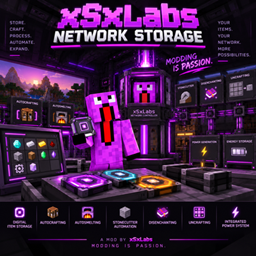
xSxLabs Network Storage
A digital item storage and automation system with storage disks, autocrafting, autosmelting, processing and integrated power — actively developed and continuously expanded.
介绍
xSxLabs Network Storage
STORE. CRAFT. PROCESS. AUTOMATE. EXPAND.
💾 Digital Item Storage
-
Centralized digital item storage
-
Network Controller
-
Storage Drives with up to 16 Storage Cells
-
Storage Cell capacities: 4K, 16K, 64K, 256K and 1M
-
Storage Terminal and Crafting Terminal
-
Network-based item access
-
Automatic item importing and exporting
-
Item filters and configurable transport
-
Network interfaces and storage upgrades
-
Persistent storage across world restarts
⚙️ Autocrafting
-
Network-based automatic crafting
-
Multiple simultaneous crafting recipes
-
Automatic material retrieval
-
Crafting quantity input
-
Advanced Crafting Terminal search
-
Enchantment and metadata searching
-
Configurable search autofocus
-
Improved crafting recipe handling
-
JEI recipe integration
-
Partial crafting-grid filling when ingredients are missing
🔥 Automated Processing
-
Autosmelting
-
Stonecutter automation
-
Disenchanting
-
Uncrafting
-
Automated processing chains
-
Integration with network storage and crafting
🔌 Advanced Cable Systems
-
Network Cables
-
Item Cables
-
Fluid Cables
-
Energy Cables
-
Multilayer Cable Bundles
-
Multiple cable types within one block
-
Cable Facades
-
Item filtering and transport upgrades
-
Configurable cable connections
-
INPUT / OUTPUT / BOTH / OFF energy modes
-
Directional FE transfer
-
Automatic item, fluid and energy transportation
📡 Wireless Networks
-
Wireless network connections
-
Wireless Transmitters and Receivers
-
Wireless storage access
-
Network status monitoring
-
Configurable wireless connections
-
Cross-network infrastructure integration
⚡ Integrated Energy System
-
FE-based energy generation and storage
-
Multiple solar generator tiers
-
Energy Cables and energy distribution
-
Rechargeable energy storage blocks
-
Energy input and output configuration
-
Integration with machines and automation systems
☢️ Nuclear Reactor
-
Fully functional nuclear multiblock reactor
-
Customizable sizes from 5×5×5 to 64×64×64
-
Uranium Ore world generation
-
Raw Uranium and Uranium Ingots
-
Uranium Fuel Rod crafting
-
Compatibility with tagged uranium ingots from other mods
-
Water-based reactor cooling
-
Adjustable Control Rod insertion
-
Automatic shutdown when the energy buffer is full
-
Automatic restart after energy is consumed
-
30-second active fuel rod duration at 20 TPS
-
Dedicated item, fluid and energy ports
-
Live reactor monitoring GUI
-
Real-time FE generation information
-
Custom reactor casing and controller models
-
Connected glass textures
-
Transparent reactor glass
-
Illuminated operating states
🔋 Multiblock Powerbank
-
Expandable multiblock energy storage
-
Sizes from 3×3×3 to 3×3×12
-
Storage capacity from 10 billion to 100 billion FE
-
Dedicated energy input and output ports
-
Live energy input and output monitoring
-
Charge level indicators
-
Persistent energy storage
-
Custom industrial multiblock appearance
-
Connected transparent glass
-
Illuminated controller and casing details
☀️ Solar Power Generation
-
Multiple Solar Panel tiers
-
Renewable FE generation
-
Elite Solar Panels
-
Ultra Solar Panel
-
Ultra Solar Panel generation: 46,080 FE/t
-
Ultra Solar Panel internal buffer: 32,000,000 FE
-
Advanced endgame crafting recipes
-
Energy Cable integration
-
Optimized solar generation performance
💧 Electric Water Pump
-
FE-powered water generation
-
Water source detection
-
32,000 mB internal water tank
-
Speed Upgrades
-
Fluid Cable connections
-
Automated reactor coolant supply
-
Dedicated machine GUI
🦾 Advanced Power Armor
-
Multiple Power Armor tiers
-
Advanced powered flight
-
Jet and thruster effects
-
Energy Shield
-
Upgrade Cards
-
Armor Station
-
Freestanding Power Armor
-
Armor equip and unequip functionality
-
Remote Power Armor Recall
-
Cross-dimensional armor recall
-
Recall of the last worn suit
-
Automatic nutrition support
-
Night Vision
-
Network Vision
-
Portal integration
-
Energy HUD
-
NutriPaste HUD
-
Optional Create moving-platform compatibility
🍖 Nutrinator & Automatic Nutrition
-
Nutrinator machine
-
Conversion of food into NutriPaste
-
Support for compatible modded food
-
1,000,000 mB internal NutriPaste storage
-
Up to 16 Speed Upgrades
-
NutriPaste as a transferable fluid
-
Fluid Cable integration
-
Network Tank storage
-
Automatic Power Armor helmet filling
-
Feeding Upgrade Card
-
Automatic hunger restoration
-
Live NutriPaste tank display
-
Helmet NutriPaste percentage indicator
🌱 Network Planter
-
Automatic planting
-
Automatic crop harvesting
-
Vanilla crop support
-
Compatible modded crops
-
Tree and sapling support
-
Speed Upgrades
-
Dedicated machine GUI
-
Visual crop growth
-
Item output buffering
-
Automatic item transportation
-
Network Storage integration
🗺️ Hologram Terminal
-
Holographic 3D World Map
-
Three-dimensional terrain visualization
-
3D Network Visualization
-
Connected cable and machine models
-
Custom holographic text
-
Configurable text colors
-
Adjustable hologram dimensions
-
Configurable map area and height
-
Custom hologram settings
🏗️ Blueprint & Automated Construction
-
Schematic & Quill
-
Structure area selection
-
Blueprint creation
-
Saved building blueprints
-
Network Printer
-
Automated structure construction
-
3D Blueprint preview
-
Blueprint rotation and positioning
-
Material retrieval from connected storage networks
-
FE-powered printer operation
-
Speed Upgrades
-
Missing material information
-
Air block skipping
-
Construction progress tracking
🌀 Portal System
-
Portal A and Portal B
-
Persistent portal destinations
-
Temporary portal entrances
-
Cross-dimensional teleportation
-
Portal destination selection
-
Unique portal IDs
-
Multiple portal orientations
-
Power Armor portal integration
-
Custom portal visuals
👁️ Network Vision
-
Power Armor Network Vision Upgrade Card
-
View Network Cables through walls
-
View Energy Cables through walls
-
Display actual cable models
-
Visualize connected network infrastructure
-
Toggleable Network Vision
-
Optimized client-side rendering
📘 Multiblock Guidebook
-
Craftable in-game guidebook
-
Nuclear Reactor building instructions
-
Powerbank building instructions
-
Interactive layer-by-layer diagrams
-
Multiblock component information
🛢️ Fluid Storage & Transportation
-
Network Tanks
-
Multiple tank capacity tiers
-
Fluid Importers
-
Fluid Exporters
-
Fluid Cables
-
Automated fluid transportation
-
NutriPaste support
-
Fluid storage monitoring
-
Tank GUI synchronization
🚀 Performance & Quality of Life
-
Optimized solar generator processing
-
Reduced unnecessary server tick operations
-
Optimized energy network processing
-
Improved energy transfer consistency
-
Optimized multiblock validation
-
Improved machine GUI synchronization
-
Live FE/t monitoring
-
Optimized hologram rendering
-
Optimized Network Vision rendering
-
Improved item filter handling
-
Better save and reload reliability
-
Dedicated server support
-
Multiplayer compatibility
TEXTURES ARE STILL WORK IN PROGRESS AND CAN CHANGE OVER TIME
If u are interesst to make a resourcepack or animations for the powersuit, let me know [email protected]
MODDING IS PASSION.
xSxLabs
常见问题
xSxLabs Network Storage 支持哪些 Minecraft 版本?
xSxLabs Network Storage 支持 Minecraft Java 版 26.1.2,可用的加载器:NeoForge。下载时注意选择和你游戏版本一致的文件。
xSxLabs Network Storage 怎么安装?
先用 PCL2 或 HMCL 启动器安装对应版本的 NeoForge,再把下载的 .jar 文件放进游戏目录的 mods 文件夹,重新启动游戏即可。开启了版本隔离的,mods 文件夹在 versions/版本名 下面。
xSxLabs 的其他作品
查看全部 →
Tacz Display Compat
Allows TaCZ guns to be placed in supported modded item frames, display stands and display cases, with configurable support for additional blocks.

TaCZ Bandits Bulletproof Glass
Prevents TaCZ Bandits from destroying glass and FramedBlocks when shooting, without changing normal TaCZ player weapon behavior.
Pipez Sable Compat
Compatibility patch for Pipez and Sable, fixing wrench extraction mode on Sable sublevels for Minecraft 1.21.1 NeoForge.

Sable Door Compat
Compatibility patch for Sable and Malisis Doors, fixing physics-related door issues on Minecraft 1.21.1 NeoForge.
评论
登录后评论和评分