
介绍


NO PORT TO FORGE PLANNED! (but feel free to port it by yourself and link it)
The mod is fully configurable to enable only changes that you like
Description
Never lose your levels again! Craft XP Books to store your experience and keep it safe from a coming death. Get it back whenever you want: read the book to retrieve it, or brew it in a brewing stand to create special Experience Bottles that can give you even more experience.
Upgrade your books with a smithing template so they store more and lose less. You can also pick one of the built-in data packs to play a completely different progression, without writing a single file. And if you like to tinker, the books, the upgrades and the brewing are all data-driven: tune them with your own data pack.
TO READ WHEN UPDATING FROM A VERSION OLDER THAN V1.6
⚠️ v1.6 UPDATE: XP Book II and III were removed, and item data changed! v1.6 converts everything: update to v1.6 first, open your world, and put your books in a crafting table to update them.
⚠️ Since v1.6.1, this conversion is gone: books and bottles that were not converted with v1.6 lose their content, so don’t skip v1.6!
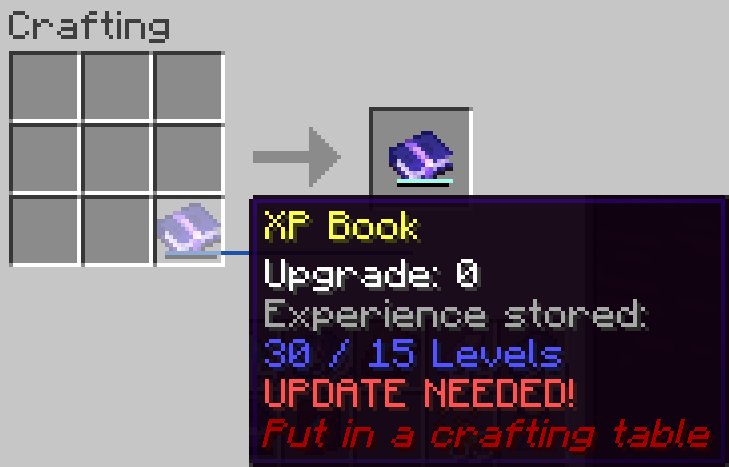
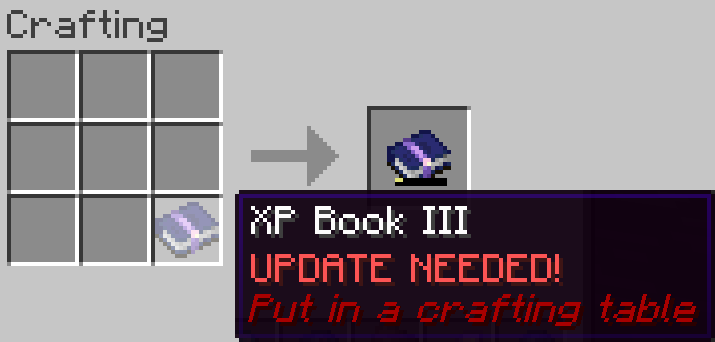
This is a short description, full description below.
Built-in data packs
Not a fan of the default progression? Since v1.6.1, the mod ships with ready-to-use data packs. They are disabled by default. Enable at most one:
| Data pack | XP Book | Upgrades |
|---|---|---|
| none (Default) | 15 levels, gives back 85%, 1 level per brewed bottle | Diamond (30 levels, 90%, 3), Netherite Ingot (50 levels, 95%, 5), Nether Star (100 levels, 100%, 10) |
Easy-Default xp_storage:easy_default |
15 levels, gives back 100% | Same as default, all at 100% |
Legacy xp_storage:legacy |
30 levels, gives back 100%, 1 level per brewed bottle | None |
Balanced-Legacy xp_storage:balanced_legacy |
30 levels, gives back 90%, 3 levels per brewed bottle | None |
OP-Legacy xp_storage:op_legacy |
100 levels, gives back 100%, 5 levels per brewed bottle | None |
- New world: Create World > More > Data Packs, then select one
- Existing world (needs cheats or operator; in singleplayer, use Open to LAN > Allow Cheats): each command reloads the data by itself, so there is no need for
/reload. The quotes are required, and tab completion adds them:/datapack enable "xp_storage:legacy"/datapack disable "xp_storage:legacy"to go back to the default progression
- Dedicated server, new world:
initial-enabled-packs=vanilla,xp_storage:legacyinserver.properties
If several are enabled, only the topmost one in /datapack list is used, and operators get a warning. Your books keep their data: switching only changes the books crafted or upgraded afterwards.
FAQ
-
Does it work on a server? Yes, it works on a server. The file is needed on both client and server
-
Can I include it in my modpack? Yes, you are free to include this mod in your modpack
-
Can I change the books, upgrades or bottles? Yes! Pick a built-in data pack, or write your own (see Customize with data packs below)
-
For any other things: Feel free to share your experience, problems and enhancement ideas on the Discord server, or create an issue on GitHub
Full description
Recipes
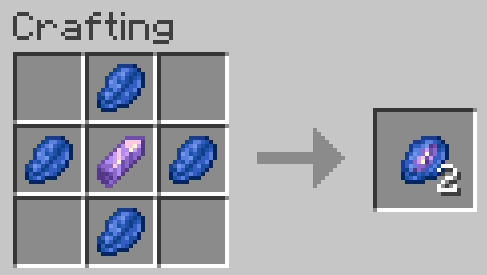
Crystallized Lapis
- 4 Lapis Lazuli (it stores experience, so that makes sense)
- 1 Amethyst Shard (it’s a precious gem)
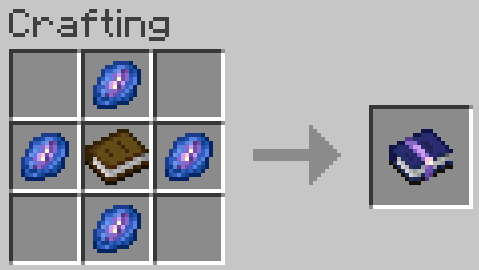
XP Book
- Stores up to 15 levels without upgrades (data pack).
This means the experience to go from level 0 to level X! That’s not the same amount as the experience from level Y to level X+Y! - 1 Book (of course, it’s a book)
- 4 Crystallized Lapis
Smithing Template
- Upgrades XP Books of any level, only the ingredient that goes with it changes
- 1 Diamond
- 8 Crystallized Lapis
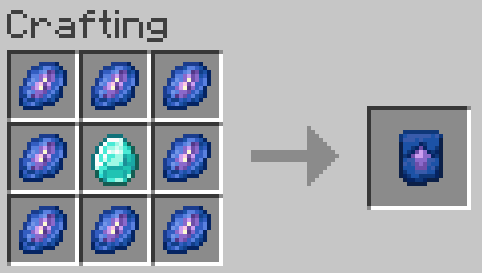
Smithing Template Duplication
- 1 Smithing Template
- 4 Crystallized Lapis
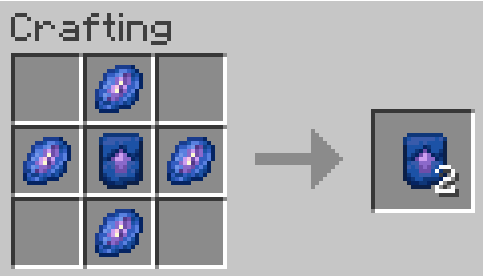
How to use?
XP Book
-
Store experience: Right click to store as much of your experience as the book can hold. If you have more experience than the book can hold, you keep the rest
-
Retrieve experience: Right click while sneaking to get back 85, 90, 95 or 100% (depending on the book’s level) of the experience stored in the book
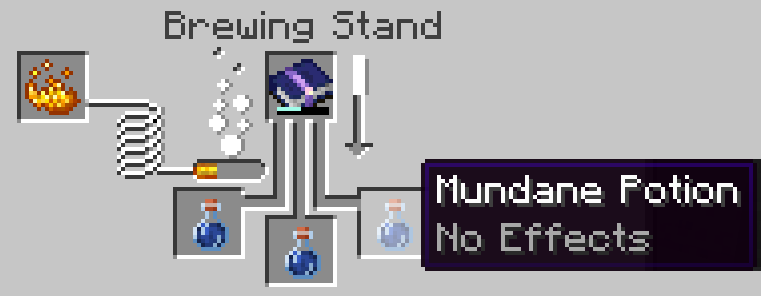
Brewing
- Put the XP Book in the brewing stand as the ingredient, with mundane potions or Experience Bottles made by brewing. Each brew takes 1, 3, 5 or 10 levels (depending on the book’s level) from the book for each bottle, and puts them in the resulting Experience Bottle (or adds them to it). The book is not consumed: only its experience is!
- Each Experience Bottle can hold up to 30 levels (config; in the brewing recipes on Minecraft 26.3+)
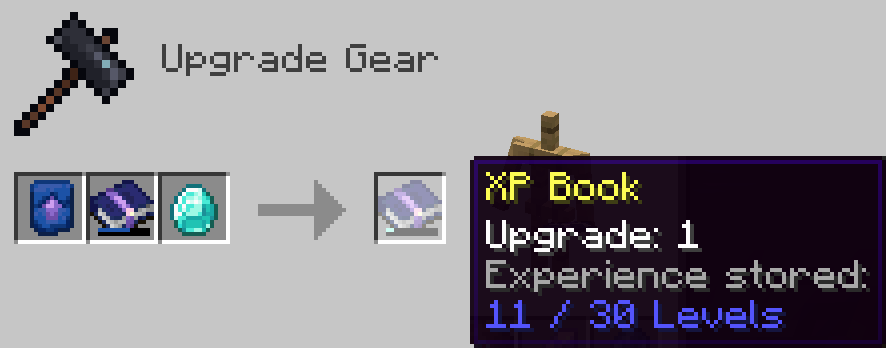
XP Book Upgrades
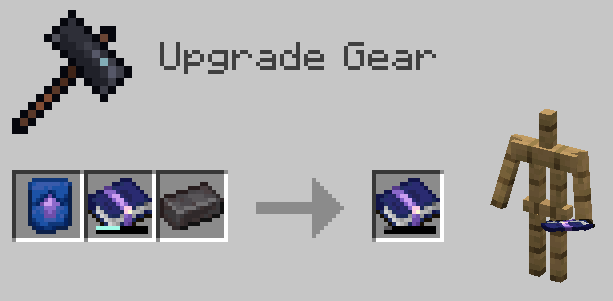
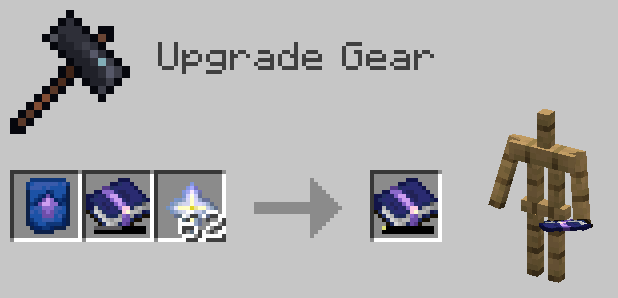
- Upgrade the book so it stores more experience and gives it back more efficiently
- Craft an XP Book Upgrade Smithing Template and use it with the right ingredient for the level of the XP Book you put in: Diamond, Netherite Ingot or Nether Star
- Every upgrade is a recipe: change them, or add new levels, with a data pack (see below)
Customize with data packs
Everything about the books lives in recipes. Override a recipe by putting a file with the same id in your data pack. If you also use a built-in data pack, enable yours after it (above it in /datapack list).
XP Book: xp_storage:xp_book
The crafted book carries its data in its result:
capacity: levels it can storexpFromUsing: percentage of the experience given back when usedxpFromBrewing: levels put in each brewed bottlebarColor: color of the experience bar, as a decimal RGB number
"result": {
  "id": "xp_storage:xp_book",
  "components": {
    "xp_storage:book_component": {
      "level": 0, "capacity": 15, "xpFromUsing": 85, "xpFromBrewing": 1, "barColor": 1856424
    }
  }
}
Upgrades: xp_storage:xp_book_upgrade/level_0, level_1, level_2
Smithing recipes, one per book level: baseLevel is the level of the book you put in. Add a level_3 recipe to go further!
{
  "type": "xp_storage:xp_book_upgrade",
  "template": "xp_storage:xp_book_upgrade_smithing_template",
  "base": "xp_storage:xp_book",
  "addition": "minecraft:diamond",
  "baseLevel": 0,
  "resultCapacity": 30,
  "resultXpFromUsing": 90,
  "resultXpFromBrewing": 3,
  "resultBarColor": 10615784
}
Brewing (Minecraft 26.3+, v1.6.2+)
Two brewing recipes: xp_storage:brewing/experience_bottle (the first brew, from a mundane potion) and xp_storage:brewing/experience_bottle_upgrade (a brewed bottle brewed again). Change the potion, restrict the book, or set the bottles’ maximum level. max_level is optional: remove it and bottles have no maximum level.
{
  "type": "xp_storage:experience_brewing",
  "input": {"item": "minecraft:potion", "potion_contents": {"potions": "minecraft:mundane"}},
  "reagent": {"item": "xp_storage:xp_book"},
  "output": {"id": "minecraft:experience_bottle"},
  "max_level": 30
}
Operators get a warning if two data packs give an upgrade for the same book level.
常见问题
XP Storage 支持哪些 Minecraft 版本?
XP Storage 支持 Minecraft Java 版 1.16.1–26.3,共 30 个版本,可用的加载器:Fabric。下载时注意选择和你游戏版本一致的文件。
XP Storage 怎么安装?
先用 PCL2 或 HMCL 启动器安装对应版本的 Fabric,再把下载的 .jar 文件放进游戏目录的 mods 文件夹,重新启动游戏即可。开启了版本隔离的,mods 文件夹在 versions/版本名 下面。


评论
登录后评论和评分