
Xp Bottles
Safely store and share your XP! Protect your experience from loss and easily transfer it to friends using simple, reusable XP containers.
截图

介绍
Unlock the ability to safely store and share your hard-earned XP with the **XP Bottles Datapack. Never lose your experience points upon death, and easily share XP with your friends by storing it in customizable XP containers!**
Store Your XP
With this datapack, you can store your XP in special containers like capsules, vials, and canisters. No more worrying about losing all your progress when things go wrong—store your XP and keep it safe for later use or share it with your friends.
How It Works:
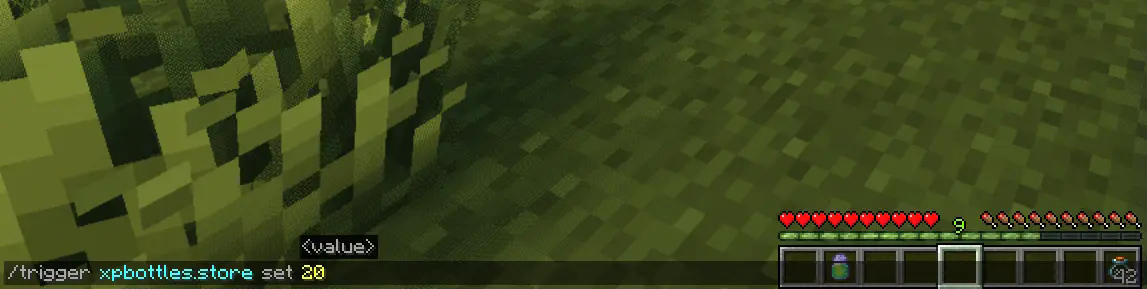
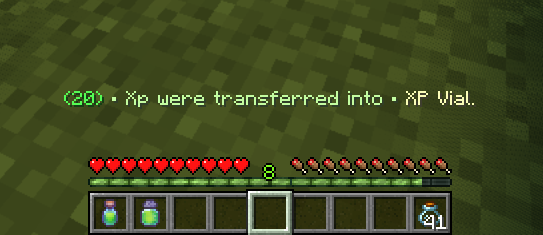
- To store your XP, simply use the command:
/trigger xpbottles.store set <amount of XP> - Make sure you have empty Glass Bottles in your inventory.
Depending on how much XP you’re storing, the number of glass bottles needed will vary:
- 1 Glass Bottle for less than 40 XP
- 2 Glass Bottles for XP between 40 and 100 XP
- 3 Glass Bottles for more than 100 XP
The XP will automatically be stored in the appropriate item (XP Capsule, XP Vial, or XP Canister) based on the amount.
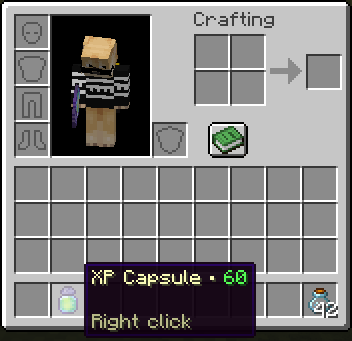
Retrieve Your XP
Getting your XP back is as easy as right-clicking with the XP item in your hand. Instantly reclaim the XP stored in the container and get back the glass bottles you used. No complicated commands—just a simple action to retrieve what you saved.
Key Features:
- XP Storage & Safety: Protect your XP from being lost when you die by storing it in reusable containers.
- Flexible Storage Options: Store different amounts of XP in different-sized containers based on your needs.
- Easy Sharing: Share XP with other players by giving them the XP items you’ve stored.
- Simple Commands & Actions: No complicated setup—just easy-to-use commands and in-game mechanics.
Whether you’re stocking up for later use or looking for a way to share XP with your friends, the XP Bottles Datapack is a must-have addition to your Minecraft experience! Download now and take control of your XP like never before.
Uninstalling
Ready to say goodbye to the Datapack? No problem! Simply follow these simple steps:
- Access the Chat Window.
- Enter the Uninstall Command and press Enter:
/function xpbottles:uninstall- You can now remove it safely from the Datapacks folder, every trace of the datapack has been removed.
Additional Notes
- Compatible with all other datapacks, following the standard conventions.
- This datapack was coded using JMC
常见问题
Xp Bottles 支持哪些 Minecraft 版本?
Xp Bottles 支持 Minecraft Java 版 1.21–1.21.1,共 2 个版本,可用的加载器:Fabric / Forge / NeoForge / Quilt。下载时注意选择和你游戏版本一致的文件。
Xp Bottles 怎么安装?
先用 PCL2 或 HMCL 启动器安装对应版本的 Fabric / Forge / NeoForge / Quilt,再把下载的 .jar 文件放进游戏目录的 mods 文件夹,重新启动游戏即可。开启了版本隔离的,mods 文件夹在 versions/版本名 下面。运行环境:客户端 / 服务端。
ProdigeGasy 的其他作品
查看全部 →
Loot Bags
Discover rare loot bags from mob kills! Hunt for mobs and find epic rewards in these Loot Bags.

Auto Smelt
Automatically smelt your ores into ingots while mining! This makes resource gathering a breeze!
Auto Smelt
Automatically smelt your ores into ingots while mining! This makes resource gathering a breeze!

Prodige’s Skills
Level up, and conquer new challenges with this plugin-style skills system!
评论
登录后评论和评分