
XaeroHeadTracker
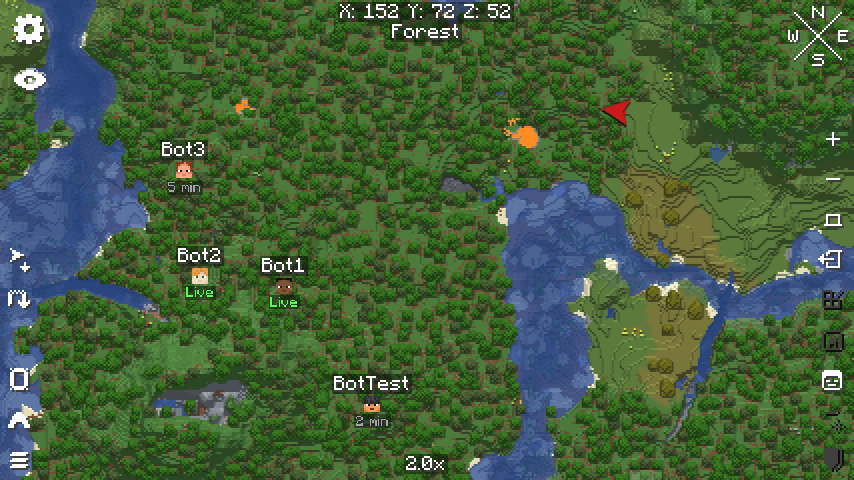
Displays the locations of other players on the world map, regardless of distance. A Xaero's World Map add-on.
截图
介绍
Xaero Head Tracker lets you see the location of other players on the server, regardless of distance, directly on Xaero’s World Map.
Choose who you see (v2)
Available since 2.0.0.
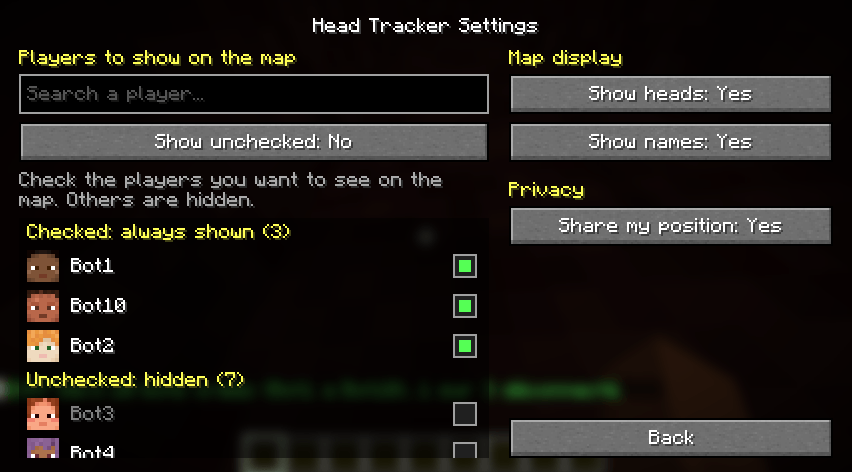
All players are hidden by default. Open the mod settings and tick the players you want to display on the map.
- Search players by name, checked players on top, the others below.
- A “Show other players” toggle displays everyone who is not checked.
- Choices are saved per server, by player UUID, so a name change does not break anything.
- Checked players stay in the list even when offline, so you can add a friend in advance.
Features
- Display heads and/or names, configurable.
- Choose whether to share your location with other players.
- If a player disables location sharing, their last known location shows how long it has been since it was last updated. Players who share their location are marked as Live.
- Compatible with Xaero’s Minimap, so player positions are not displayed twice.
Even if the mod is installed on the server, it is optional on the client side if you do not wish to use it, but it is required to display the positions of other players.
Leave a comment if you need a specific version that isn’t available yet.
You can submit your ideas for new features here: https://discord.gg/ChJVNk7mw
Thank you!
Support the mod
If you enjoy XaeroHeadTracker, you can support its development on Ko-fi. Thank you!
常见问题
XaeroHeadTracker 支持哪些 Minecraft 版本?
XaeroHeadTracker 支持 Minecraft Java 版 1.20.1–26.3,共 8 个版本,可用的加载器:Fabric / Forge / NeoForge。下载时注意选择和你游戏版本一致的文件。
XaeroHeadTracker 怎么安装?
先用 PCL2 或 HMCL 启动器安装对应版本的 Fabric / Forge / NeoForge,再把下载的 .jar 文件放进游戏目录的 mods 文件夹,重新启动游戏即可。开启了版本隔离的,mods 文件夹在 versions/版本名 下面。

评论
登录后评论和评分