
截图
介绍
⚙️ WynnMenu
A highly customizable, fast, and interactive radial menu mod designed for Wynncraft (but works anywhere)!
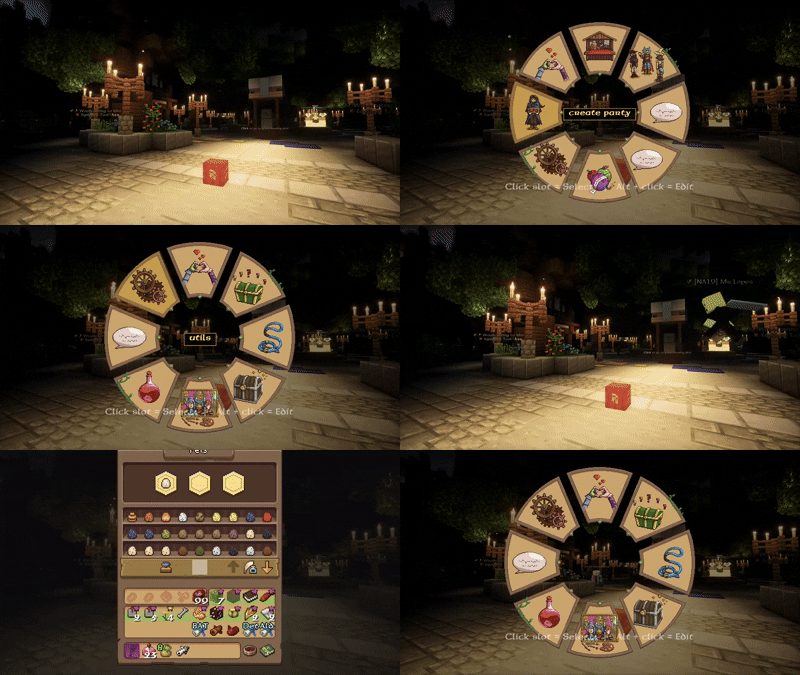
WynnMenu is a client-side Fabric mod that adds a fully customizable radial menu to your game. Originally designed to make navigating Wynncraft’s features smoother, it allows you to bind commands, simulate key presses, and navigate nested sub-menus—all through an intuitive, gorgeous radial interface.
✨ Features
- 🎯 Fully Customizable Slots: Bind any command, macro, or keybind to the menu slots.
- 📂 Infinite Sub-menus: Create menus inside menus! Perfect for organizing emotes, classes, or quick-chats.
- 🎨 Beautiful Default Assets: Comes pre-packaged with a custom wheel design and 21 built-in icons tailored for Wynncraft (Classes, Daily, Guild, Party, Shop, etc.).
- 🖼️ Custom Textures:
- Want your own icons? Just drop
.pngfiles intoconfig/wynnmenu/assets/icons/. - Want a different wheel? Place your custom
wheel.pnginconfig/wynnmenu/assets/. - ⌨️ Advanced Keybinds: Supports both “Press” (one-shot click) and “Hold” (toggles a key being held down continuously) modes.
- ⚡ Dynamic Variables: Make your commands smart! Use these variables in your slot commands, and they will automatically update when clicked:
[player]– Targets the name of the nearest player to you.[position]– Grabs the X Y Z coordinates of the block you are currently looking at.[clipboard]– Pastes the current text copied to your computer’s clipboard.[random]– Generates a random number between 0 and 9999.- 🛠️ In-Game Editor: No need to mess with JSON files (unless you want to). Simply press
Alt + Clickon any slot while the menu is open to open the visual editor! - 🌈 Customizable Highlight Color: Easily change the hover highlight color via the config file.
🚀 How to Use
- Press
V(default keybind, can be changed in Minecraft controls) to open the Radial Menu. - Hold
Altand Click on any slot to open the Editor. - Choose an Action:
- Command: Type any command (e.g.,
/class,/party invite [player]). - Keybind: Select a keybind ID to trigger or hold.
- Submenu: Enter the ID of the menu you want to link to.
- Select an icon from the scrolling list, set a display name, and you’re good to go!
📁 File Structure & Config
The mod automatically generates its configuration files upon first launch:
config/wynnmenu/menus.json– Where all your menu data is saved. You can also edit the"highlightColor": "#B8860B"value at the bottom of this file to change the slot hover color!config/wynnmenu/assets/wheel.png– Replace this to change the background wheel.config/wynnmenu/assets/icons/– Add your own.pngimages here to use them in the in-game editor. (The mod automatically extracts the 21 default icons here so you can use them immediately).
⚡ Performance Optimized
WynnMenu is built with performance in mind. Animations are smooth, and the rendering logic is heavily optimized to prevent micro-stutters, ensuring zero impact on your FPS even during intense gameplay.
🤝 Credits
Artist:
randomcat7outof32 (discord)
常见问题
wynnmenu 支持哪些 Minecraft 版本?
wynnmenu 支持 Minecraft Java 版 1.21.11,可用的加载器:Fabric。下载时注意选择和你游戏版本一致的文件。
wynnmenu 怎么安装?
先用 PCL2 或 HMCL 启动器安装对应版本的 Fabric,再把下载的 .jar 文件放进游戏目录的 mods 文件夹,重新启动游戏即可。开启了版本隔离的,mods 文件夹在 versions/版本名 下面。运行环境:仅客户端。

评论
登录后评论和评分