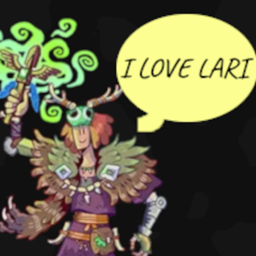
WynnBubbles
Wynncraft chat floats above your head and changes colors for party, guild, and private chat. A fork of TalkBubbles.
介绍
WynnBubbles
Show the people what you’re trying to say. Chat floats above your head and changes colors for party, guild, and private chat. A fork of TalkBubbles designed to work specifically with Wynncraft chat. Made for my modpack World of Wynncraft
What’s Up
- Shows chat bubbles above players’ heads when they talk
- Different colors for party, guild, and private messages
- Configurable bubble size, position, and colors
- Removes unwanted unicode symbols from chat
- Stops system messages during raids and dungeons from displaying (as happens using TalkBubbles)
- Stacks several bubbles per player, newest at the bottom
- Works with player ghosts
- Sits above whatever is drawn over a player’s name (Wynntils lines and badges)
Installation
- Make sure you have Fabric Loader and Fabric API installed
- Download and install Cloth Config API
- Download the latest version of WynnBubbles from the versions page
- Place the downloaded .jar file in your Minecraft mods folder
Future Features
- Custom icons above player head when casting spells that put messages in chat like War Scream, Heal, Windy Feet
- Custom bubble Border styles for different ranks
- Custom icons above player head when picking buffs in a raid
- Suggest features on the GitHub issues page!
Configuration
You can configure WynnBubbles through the Mod Menu interface or config file:
- Install Mod Menu if you haven’t already
- In the game, go to Mods -> Find “WynnBubbles” -> Click “Configure”
- Adjust settings like bubble scale, colors, chat range, and how many bubbles stack
- Toggle showing your own bubbles on/off
Usage
- Chat normally in-game to see bubbles appear
- Bubbles will show different colors for:
- Yellow = Party chat
- Aqua = Guild chat
- Green = Private messages
- Bubbles automatically disappear after a configurable time
- Access the mod’s configuration through Mod Menu to adjust bubble appearance
Requirements
- Minecraft 1.21.11
- Fabric Loader 0.18.4 or higher
- Fabric API
- Cloth Config API
- Mod Menu (optional, for the config screen)
- Wynntils (optional, used to match chat to players and ghosts when installed)
License
LGPL-3.0, see LICENSE and NOTICE.md. Versions before 2.0.0 were MIT.
Go Ham
- I don’t know nothing about java so if you wanna fork this and fix it up go ham
- Feel free to use this in your modpack
- If you know how to make the bubbles prettier please help
Acknowledgments
- Thanks to Globox_Z for the original TalkBubbles mod
- Thanks to CerbonXD and BluSpring for Talk Balloons, which the stacked bubbles follow
- Thanks to everyone who I forced to help test the chat detection
- Thanks to IgbarVonSquid!!!
Support and My Mods
Please report any bugs or feature suggestions on the Github Issues page, I’ll be updating this frequently with community feedback and ideas! You can also join my discord if you need direct support, or want to stay updated with all of my mods.
Check out all my projects!
常见问题
WynnBubbles 支持哪些 Minecraft 版本?
WynnBubbles 支持 Minecraft Java 版 1.21–1.21.11,共 4 个版本,可用的加载器:Fabric。下载时注意选择和你游戏版本一致的文件。
WynnBubbles 怎么安装?
先用 PCL2 或 HMCL 启动器安装对应版本的 Fabric,再把下载的 .jar 文件放进游戏目录的 mods 文件夹,重新启动游戏即可。开启了版本隔离的,mods 文件夹在 versions/版本名 下面。
DrBiznes 的其他作品
查看全部 →
WynnVista
为 Wynncraft 添加世界效果光影,并在离开 Wynn 地图时管理 Voxy 和 Distant Horizons 的 LOD。

WynnLODGrabber
自动为Wynncraft下载Distant Horizons的LOD
Wynn Weapon Bigger
我会把你的武器变大,这还用说吗?这是 Big Items, Duh 的分支版本,专门用于显示 Wynncraft 装备。

Nimble ReWynnded
Wynncraft 专用镜头工具,灵感来自模组 Nimble。
评论
登录后评论和评分