
WTF
A Fabric clientside mod for Minecraft that tracks where you stashed your stuff across chests and shulker boxes, so you never wonder "wtf did I put this" again.
截图

介绍
WTF
Tracks where you stashed your stuff, so you never wonder “wtf did I put this” again.
WTF keeps a running ledger of every chest and shulker box you’ve marked — what’s inside, where it is, and where it was last seen — and gives you a searchable grid screen to find it again.
Features
- Searchable inventory grid — pull up every tracked container and search by item name to find which box has what.
- Shulker box tracking — follows shulkers through inventory, placement, breaking, dropping, and hopper extraction, so the ledger stays accurate even when boxes move between containers.
- Last-known location — if a box gets pulled out from under you (hoppers, other players, server sync), WTF remembers where it last was instead of losing track.
- Named & unnamed box support — identifies boxes by name when available, falls back to content matching when not.
- Lightweight overlay — tooltips and markers show tracked info without getting in the way.
How it works
Mark a shulker box “happy” — hover it and hit the keybind, in your inventory or any chest/box screen, or use the ☺/☹ button when the box itself is open — and WTF starts tracking it. From there it quietly keeps a ledger of where the box actually is: dimension and coordinates, and whether it’s sitting in your inventory, placed as a block, or dropped as an item — updated as the box moves between containers, gets placed/broken, or gets pulled out by a hopper. If it disappears from view, WTF keeps its last known dimension/location instead of dropping it.
Boxes are identified by their UUID stamp where possible, falling back to slot position or content matching when the stamp is missing (unnamed box, server sync wipe), so identities don’t get lost or swapped. Tracking data persists across sessions in config/wtf/.
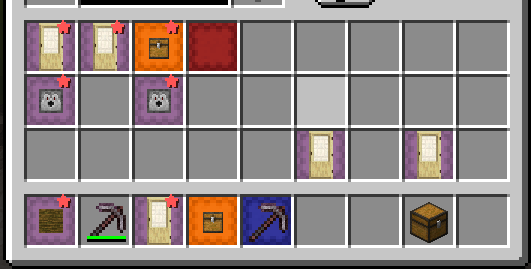
Open the Happy Shulkers grid screen via keybind to browse everything you’re tracking: a search bar filters by item name across all tracked containers, the left panel lists containers/sections, and the right panel previews the selected one’s contents and location.
Requirements
- Fabric API
- Fabric Language Kotlin
Source: https://github.com/mattlawliet/wtf
常见问题
WTF 支持哪些 Minecraft 版本?
WTF 支持 Minecraft Java 版 26.1.2–26.2,共 2 个版本,可用的加载器:Fabric。下载时注意选择和你游戏版本一致的文件。
WTF 怎么安装?
先用 PCL2 或 HMCL 启动器安装对应版本的 Fabric,再把下载的 .jar 文件放进游戏目录的 mods 文件夹,重新启动游戏即可。开启了版本隔离的,mods 文件夹在 versions/版本名 下面。运行环境:仅客户端。


评论
登录后评论和评分