截图




介绍
World Home Command 🏠✨
World Home Command is a lightweight Fabric mod that allows players to save multiple base locations (homes) and teleport to them at any time.
It’s incredibly useful for survival adventures and managing bases on multiplayer servers!
🌟 Features
Multiple Homes: Save as many locations as you want by giving them custom names.
Cross-Dimension Support: Works perfectly across the Overworld, Nether, and End. Teleports you to the exact dimension where the home was set.
Server-Side Only: This mod only needs to be installed on the server! Your friends or server members do not need to download this mod. They can join with a vanilla client and use the commands right away.
Safe Data Storage: Home data is safely saved as a dedicated JSON file within the world’s saves folder. Your data won’t be lost even if the server restarts or crashes.
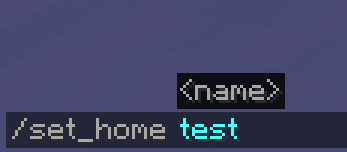
Action Bar Notifications & Auto-completion: Success messages are displayed neatly on the action bar (above the hotbar) to prevent chat spam. Fully supports command auto-completion (suggestions) while typing!
⌨️ Commands
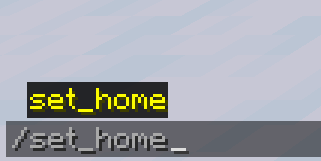
/set_home
Registers your current location as a home with the specified name.
(e.g., /set_home base)
/home
Teleports you to the registered home.
(e.g., /home base)
/delete_home
Deletes the registered home.
⚙️ Requirements
Mod Loader: Fabric
Dependencies: Fabric API (Recommended)
📥 Installation
[Singleplayer]
Drop the .jar file into your mods folder.
[Multiplayer (Server)]
Drop the .jar file into your server’s mods folder. Players joining the server do NOT need to install it on their clients.
常见问题
WorldHomeCommand 支持哪些 Minecraft 版本?
WorldHomeCommand 支持 Minecraft Java 版 1.20.1,可用的加载器:Fabric。下载时注意选择和你游戏版本一致的文件。
WorldHomeCommand 怎么安装?
先用 PCL2 或 HMCL 启动器安装对应版本的 Fabric,再把下载的 .jar 文件放进游戏目录的 mods 文件夹,重新启动游戏即可。开启了版本隔离的,mods 文件夹在 versions/版本名 下面。运行环境:仅服务端。
评论
登录后评论和评分