WorldGen Indicators
Add worldgen depending of another worldgen, like ore samples (Using craftweaker)
介绍

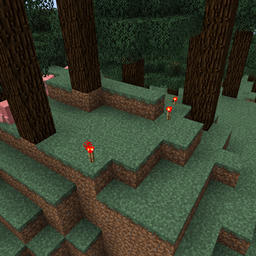
WorldGen indicators allows you to generate extra blocks depending of existing worldgen. One of the common uses is adding prospecting flowers for ores that generate in the chunk. It uses craftweaker to make it possible.

- Checking for any block in the chunk and generating a block in the surface

- Generate at a define Y relative to the checked block
- Generate at a define Y relative to the surface
- Generate structures based on Minecraft NBT structure
- Checkers based on the biome

First you need to create a BlockChecker by BlockChecker.create(1) where the number is the chance of getting triggered. Then you can add block to check to it with addValid(IBlock block) and Indicators with addIndicator(IIndicator indicator). The indicator can have multiple blocks added by the method add(IBlock block). (The indicators in the block checkers and the blocks inside of the indicators will be choosen at random)

Surface Indicator
The following script adds a 10% chance of adding a redstone torch in the surface when it finds a redstone ore:
import mods.worldgenindicators.BlockChecker;
import mods.worldgenindicators.WorldGenManager;
import mods.worldgenindicators.SurfaceIndicator;
import crafttweaker.block.IBlock;

var redstoneOre = <minecraft:redstone_ore>.asBlock();
var redstoneTorch = <minecraft:redstone_torch>.asBlock();
var surfaceIndicator = SurfaceIndicator.create().add(redstoneTorch);
var blockChecker = BlockChecker.create(0.1).addValid(redstoneOre).addIndicator(surfaceIndicator);
WorldGenManager.addChecker(blockChecker);
Relative Surface Indicator
The relative surface indicator needs a parameter in the create that is how many blocks above the surface will generate the blocks.
import mods.worldgenindicators.BlockChecker;
import mods.worldgenindicators.WorldGenManager;
import mods.worldgenindicators.RelativeSurfaceIndicator;
import crafttweaker.block.IBlock;

var grass = <minecraft:grass>.asBlock();
var glass = <minecraft:glass>.asBlock();
var surfaceIndicator = RelativeSurfaceIndicator.create(20).add(glass);
var blockChecker = BlockChecker.create(1).addValid(grass).addIndicator(surfaceIndicator);
WorldGenManager.addChecker(blockChecker);
Whitelist and Blacklist
import mods.worldgenindicators.BlockChecker;
import mods.worldgenindicators.WorldGenManager;
import mods.worldgenindicators.SurfaceIndicator;
import mods.worldgenindicators.RelativeSurfaceIndicator;
import crafttweaker.block.IBlock;
import crafttweaker.item.IItemStack;

WorldGenManager.addChecker(
    BlockChecker.create(0.5d)
        .addWhitelistEntry(<minecraft:sand>.asBlock())
        .addValid(<minecraft:gold_ore>.asBlock())
        .addIndicator(SurfaceIndicator.create().add( <minecraft:gold_block>.asBlock()) )
);

WorldGenManager.addChecker(
    BlockChecker.create(0.5d)
        .addBlacklistEntry(<minecraft:grass>.asBlock())
        .addBlacklistEntry(<blockstate:minecraft:air>.block)
        .addValid(<minecraft:iron_ore>.asBlock())
        .addIndicator(RelativeSurfaceIndicator.create(2).add(<minecraft:diamond_block>.asBlock()))
);




常见问题
WorldGen Indicators 支持哪些 Minecraft 版本?
WorldGen Indicators 支持 Minecraft Java 版 1.12.2,可用的加载器:Forge。下载时注意选择和你游戏版本一致的文件。
WorldGen Indicators 怎么安装?
先用 PCL2 或 HMCL 启动器安装对应版本的 Forge,再把下载的 .jar 文件放进游戏目录的 mods 文件夹,重新启动游戏即可。开启了版本隔离的,mods 文件夹在 versions/版本名 下面。
Buuz135 的其他作品
查看全部 →
Industrial Foregoing
一套机器合集,让你的 Minecraft 建筑更容易实现自动化

Titanium
Horizon Studio 的前置库
FindMe
在附近容器中搜索物品
功能性存储 Functional Storage
经典储物抽屉,升级更多!
评论
登录后评论和评分