
WorldEditCUI Forge Edition
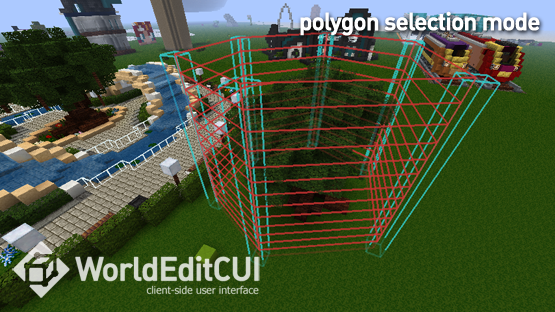
This mod provides a client-side user interface for the WorldEdit plugin allowing you to see your selected region in-game in real time
截图


介绍
Check the new version: WorldEditCUI Forge Edition 3 for forge 1.9.4 to 1.16.5

This mod provides a client-side user interface for the WorldEdit plugin allowing you to see your selected region in-game in real time. It allows you to work more quickly and accurately with your WorldEdit selection and is especially useful when working with Polygon, Convex Hull and Cylinder selections.
WorldEditCUI was originally written by lahwran, it was subsequently maintained by yetanotherx, and is actually maintained by Mumfrey for the liteloader version. WorldEditCUI Forge Edition does exactly the same as WorldEditCUI but for forge 1.7.10, 1.8.9 ,1.9, 1.9.4, 1.10, 1.10.2 and 1.11
Need WorldEditCUI for forge 1.11.2 and higher ? Visit WorldEditCUI Forge Edition 2

Display your WorldEdit selection instantly in-game

To install the mod:
- Download and install the latest forge 1.7.10 or 1.8.9 or 1.9 or 1.9.4 or 1.10 or 1.10.2 or 1.11
- Download the latest version of the WorldEdit CUI Forge Edition for you forge version and copy it to your mods folder.

To use WorldEdit CUI Forge Edition, simply make a selection on a server using WorldEdit, your selection will be instantly displayed on the screen. To clear your current selection issue the command //sel
If you feel the need to donate to this mod, then simply click the button below :

Of course, you’ll be added as a donator.
常见问题
WorldEditCUI Forge Edition 支持哪些 Minecraft 版本?
WorldEditCUI Forge Edition 支持 Minecraft Java 版 1.7.10–1.11.2,共 8 个版本,可用的加载器:Forge。下载时注意选择和你游戏版本一致的文件。
WorldEditCUI Forge Edition 怎么安装?
先用 PCL2 或 HMCL 启动器安装对应版本的 Forge,再把下载的 .jar 文件放进游戏目录的 mods 文件夹,重新启动游戏即可。开启了版本隔离的,mods 文件夹在 versions/版本名 下面。
hexosse 的其他作品
查看全部 →
WorldEditCUI Forge Edition 2
Client-side user interface for WorldEdit

WorldEditCUI Forge Edition 3
This mod provides a client-side user interface for the WorldEdit plugin allowing you to see your selected region in-game in real time

Chest locator
Chest Locator help find chests (containers) around you by adding an overlay of the color of your choice

Spawner locator
Locate spawners arround the world
评论
登录后评论和评分