
wCopy
Copy Chat is a lightweight quality-of-life mod that lets you easily copy Minecraft chat messages to your clipboard. Simply hover your cursor over a chat message and press Alt + Left Click to instantly copy it.
截图
介绍
Copy Chat
Copy Chat is a lightweight quality-of-life Minecraft mod designed to make interacting with chat messages faster, easier, and more convenient. It adds a simple but useful feature that allows players to copy any message from the in-game chat directly to their clipboard without needing to manually select text or use external tools.
Whether you want to save coordinates, copy a command, share a player message, record important information, or quickly move text into another application, Copy Chat provides a seamless way to do it directly from the Minecraft chat interface.
Features
📋 Instant Chat Copying
Copy any Minecraft chat message with just a simple action. Hover your cursor over the message you want to copy and press:
Alt + Left Click
The selected chat message will immediately be copied to your clipboard, ready to paste anywhere.
✨ Clear Confirmation Feedback
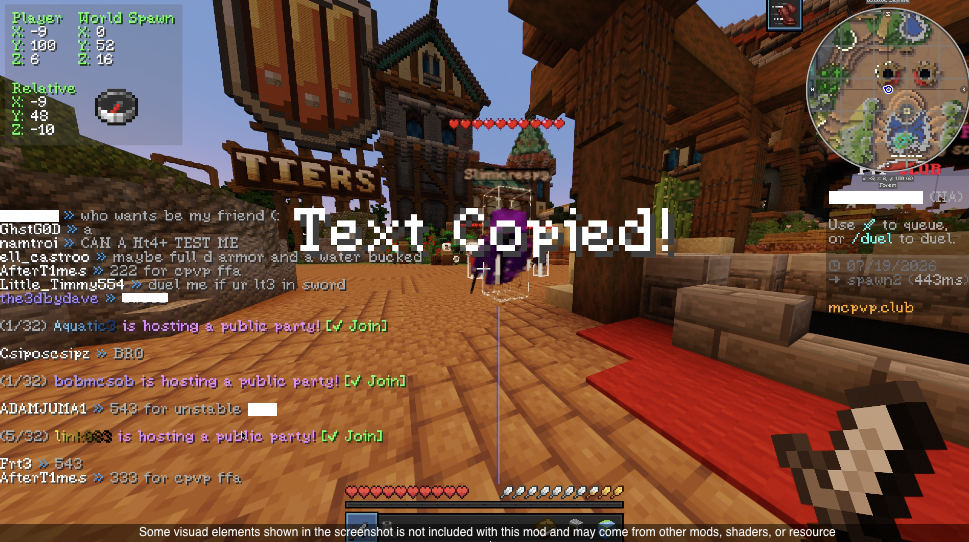
To make sure you know the action was successful, Copy Chat displays a large confirmation message in the center of your screen:
Text Copied!
This provides instant feedback so you never have to wonder whether the message was copied correctly.
⚡ Lightweight and Simple
Copy Chat focuses on doing one thing well: copying chat messages. It avoids unnecessary features and keeps the experience clean, making it a small and efficient addition to your Minecraft setup.
🎮 Improved Chat Interaction
Minecraft chat often contains useful information that players may want to save or reuse, such as:
- Coordinates
- Commands
- Server announcements
- Player messages
- Links
- Game information
- Custom text
With Copy Chat, transferring this information becomes quick and effortless.
How to Use
- Open the Minecraft chat.
- Move your cursor over the message you want to copy.
- Press Alt + Left Click.
- A “Text Copied!” notification will appear in the center of your screen.
- Paste the copied message wherever you need it.
Copy Chat makes Minecraft chat more practical by adding a simple interaction that fits naturally into the game, improving everyday gameplay without changing the vanilla experience.
Client-side only. No server installation required.
常见问题
wCopy 支持哪些 Minecraft 版本?
wCopy 支持 Minecraft Java 版 26.2,可用的加载器:Fabric。下载时注意选择和你游戏版本一致的文件。
wCopy 怎么安装?
先用 PCL2 或 HMCL 启动器安装对应版本的 Fabric,再把下载的 .jar 文件放进游戏目录的 mods 文件夹,重新启动游戏即可。开启了版本隔离的,mods 文件夹在 versions/版本名 下面。运行环境:仅客户端。
评论
登录后评论和评分