wCombatPatternAnalyzer
Analyze your enemy's combat patterns and predict their actions in PvP!
截图
介绍
中文介绍正在准备中,下面暂时显示原文。
🎯 What does this mod do?
wCombat Pattern Analyzer is a client-side Fabric mod that tracks and analyzes your opponents’ combat behavior in real-time, helping you predict their next actions.
⚔️ Key Features
- Attack Prediction – calculates average intervals between opponent’s attacks and shows when they’ll strike again
- Movement Analysis – detects movement patterns (W-Tap, S-Tap, Strafe)
- Shield Tracking – shows when opponent is blocking with shield
- Smart Indicators – color-coded danger levels:
- 🔴 Red – opponent attacking soon (danger!)
- 🟢 Green – safe to counter-attack
- 🟡 Yellow – neutral phase
📊 How it works
- Mod collects data about opponent’s last 20 actions
- Analyzes intervals between attacks and movement patterns
- Predicts next action based on collected data
- Displays information in convenient HUD to the left of crosshair
🎮 Usage
- Install the mod in your
modsfolder - Join a game and get within 16 blocks of an opponent
- Mod automatically starts tracking the closest player
- After 3+ actions, predictions will start showing
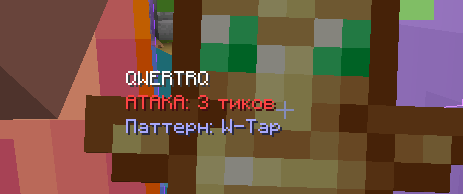
What’s displayed on screen:
Player Name
ATTACK: 5 ticks         (red - danger)
COUNTER READY           (green - attack now)
Waiting: 10             (yellow - neutral)
Pattern: W-Tap          (pattern detected)
BLOCKING SHIELD         (blue - holding shield)
⚙️ Configuration
Settings are located in config/wcombatpatternanalyzer.json:
{
  "enabled": true,
  "maxTrackedActions": 20,
  "predictionSensitivity": 0.75,
  "showAttackIndicator": true,
  "showMovementPattern": true,
  "showShieldUsage": true,
  "showCriticalJumps": true,
  "maxTrackingDistance": 16,
  "debugMode": false
}
Parameters:
enabled– enable/disable the modmaxTrackedActions– number of tracked actions (10-50)predictionSensitivity– prediction sensitivity (0.5-1.0)showAttackIndicator– show attack indicatorshowMovementPattern– show movement patternsshowShieldUsage– show shield usagemaxTrackingDistance– tracking distance in blocks (8-32)debugMode– debug mode (logs tologs/latest.log)
📋 Requirements
- Minecraft: 1.21.4
- Fabric Loader: 0.17.0+
- Fabric API: 0.119.4+1.21.4
- Java: 21+
🔧 Technical Details
What’s tracked:
- ✅ Attack intervals (timing)
- ✅ Movement patterns (w-tap, s-tap, strafe)
- ✅ Shield usage
- ✅ Critical hit jumps
- ✅ Action sequences
How it analyzes:
- Collects data about last 10-20 actions
- Calculates average interval between attacks
- Identifies repeating patterns
- Predicts next action based on current pattern
🎨 Features
- Minimal UI – doesn’t clutter your screen
- Closest player only – tracks one opponent at a time
- Automatic tracking – no configuration needed
- Client-side – works on any server
- Lightweight – no performance impact
📝 Notes
- Mod is client-side only
- Needs 3+ actions from opponent for accurate predictions
- More data = more accurate predictions
- Doesn’t provide unfair advantages, only analyzes visible behavior
常见问题
wCombatPatternAnalyzer 支持哪些 Minecraft 版本?
wCombatPatternAnalyzer 支持 Minecraft Java 版 1.21.4–1.21.11,共 8 个版本,可用的加载器:Fabric。下载时注意选择和你游戏版本一致的文件。
wCombatPatternAnalyzer 怎么安装?
先用 PCL2 或 HMCL 启动器安装对应版本的 Fabric,再把下载的 .jar 文件放进游戏目录的 mods 文件夹,重新启动游戏即可。开启了版本隔离的,mods 文件夹在 versions/版本名 下面。运行环境:仅客户端。

评论
登录后评论和评分