
What Are They Listening To (WATLT)
Mod that lets you show/see what are you/players listening to!
截图

介绍
What Are They Listening To (WATLT)
Have you ever wanted to play with your friends, and show them what are you listening to? It is possible with this mod!
You can see what other players listening to right now through _Last.fm_ in Tab menu!

Or if someone doesn’t have a Last.fm account (or they simply don’t want to show their music), they can disable tracking.

As you already noticed, it even supports album covers, _but_ not all songs on Last.fm have album covers… Though, you can add them yourself and contribute to Last.fm (I will not teach you how to do it sorry)
Usage
This mod uses Last.fm to fetch current song, so take your favorite music streaming app and pair it with any Last.fm scrobbler to start!
You will also need a Last.FM API key to communicate with API (which is obvious). Don’t worry, you can get it easily here: https://www.last.fm/api/account/create (you don’t need to fill callback URL btw, keep it empty)
So, now that you have an API key and server ready to start, simply start it with this mod, then fill API key in config file (.minecraft/config/watlt-common.toml) and restart server, you are now ready to use mod!
When player first join with this mod enabled, they will be prompted to enter their Last.fm username (NOT link), or deny tracking.
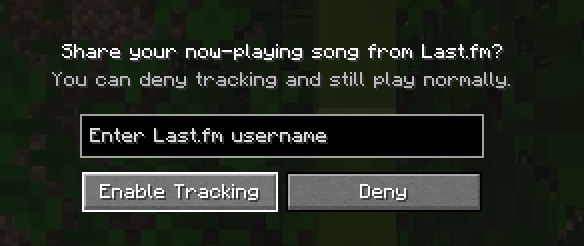
After that, they all set up and no more work needed! Easy, right?
Commands
There are several commands, but they are really simple
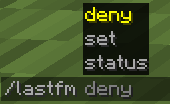
- /lastfm set – change your Last.fm username, or set it up, if you denied tracking on login
- /lastfm deny – deny tracking
- /lastfm status – debug, just debug
I guess that’s all, have fun!
Spoiler
and yes name inspired by mod What Are They Up To (WATUT) https://modrinth.com/mod/what-are-they-up-to
常见问题
What Are They Listening To (WATLT) 支持哪些 Minecraft 版本?
What Are They Listening To (WATLT) 支持 Minecraft Java 版 1.20.1–1.20.6,共 6 个版本,可用的加载器:Forge。下载时注意选择和你游戏版本一致的文件。
What Are They Listening To (WATLT) 怎么安装?
先用 PCL2 或 HMCL 启动器安装对应版本的 Forge,再把下载的 .jar 文件放进游戏目录的 mods 文件夹,重新启动游戏即可。开启了版本隔离的,mods 文件夹在 versions/版本名 下面。运行环境:客户端 / 服务端。
评论
登录后评论和评分