
截图
介绍
Warp radial
The radial menu is heavily inspired by the brilliant Tool Belt mod.
This mod requires BML version 1.0.18 or above, this is because the general radial implementation used in this mods is implemented in BML for wider use.
Features
- Warp to different points, this includes home, spawn, server warps added by ops on the server or player warps with cooldown.
- Cooldown can be either disabled, global or per warp category.
- Highly configurable in terms of what warps are allowed, the cooldown if any per category.
Commands
Commands can are used to set all the different warp points besides spawn if that type is allowed (You could also use the radial menu to add warps)
- warpradial (Base command)
- wr (Alternative base command)
- wr home set
- wr home remove
- wr warp add “x”
- wr warp remove “x”
- wr serverwarp add “x” (Only ops and players with create permissions)
- wr serverwarp remove “x” (Only ops and players with delete permissions)
- wr permission serverwarp create “player”
- wr permission serverwarp delete “player”
Radial
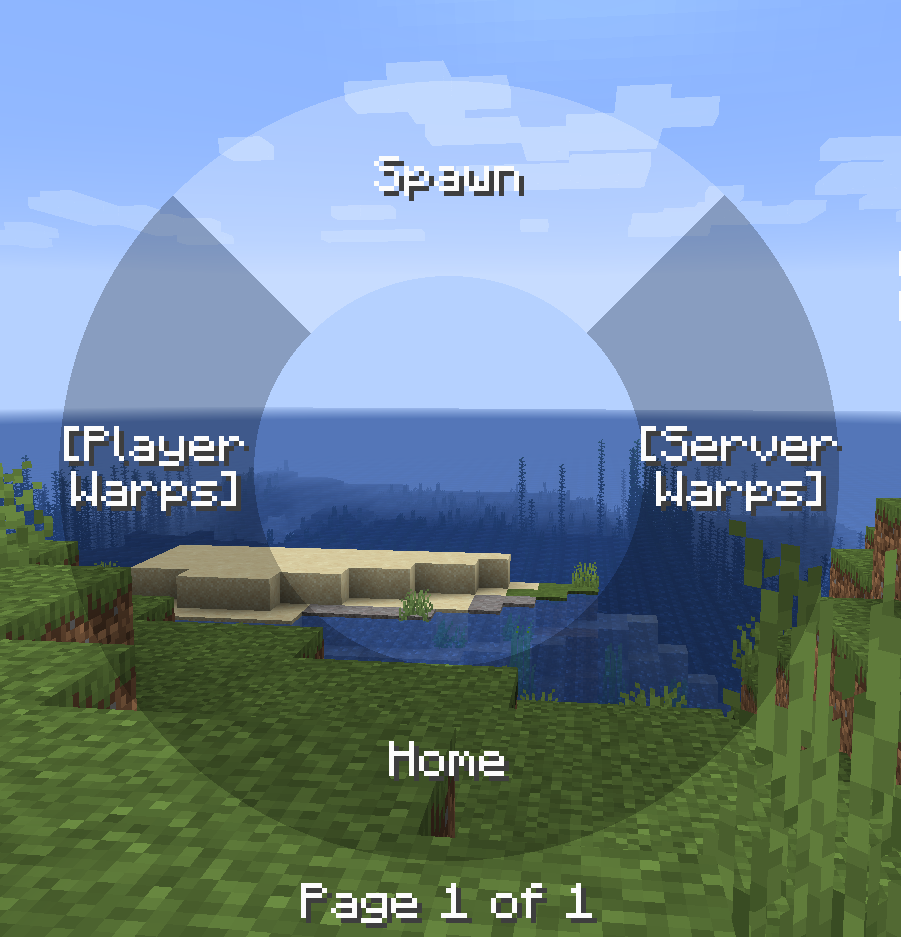
The radial menu is opened when the default keybind ‘r’ is pressed, then the mouse can be used to hover over items and it that item is not a category when releases you will warp to that point, you can also click on warp points to teleport to them.
You can also add and remove warps points by right clicking on categories and items.
The server and player warps are categories and requires you to click on them to view the warp points of that type.
There can be 7 items on each page and the scroll wheel can be used to switch pages.

Warps
Warps are stored in the world directory both for singleplayer worlds and server worlds. These warps are sent to the player when the player connects to the server or a new server warp is added / removed by a op / player with permission or player warp created by the player.
It is possible to disable player warps and then the radial will only have three main items. If all but one item is disabled and the last non-disabled item is a category the warps inside that category is shown instead of first having to select that category.
常见问题
Warp Radial 支持哪些 Minecraft 版本?
Warp Radial 支持 Minecraft Java 版 1.18.2–1.20.1,共 6 个版本,可用的加载器:Forge。下载时注意选择和你游戏版本一致的文件。
Warp Radial 怎么安装?
先用 PCL2 或 HMCL 启动器安装对应版本的 Forge,再把下载的 .jar 文件放进游戏目录的 mods 文件夹,重新启动游戏即可。开启了版本隔离的,mods 文件夹在 versions/版本名 下面。运行环境:客户端和服务端都要装。
black_dog20 的其他作品
查看全部 →
Server Tab Info
一个客户端和/或服务端模组,可方便地查看游戏的平均刻时间和每秒刻数(TPS)。

Friendly Griefing
生物/实体对 mobGriefing 游戏规则的允许列表

Tab Stats
一个用于显示玩家统计信息的标签列表

Black_dogs’s Modding Library (BML)
A core library for my mods going forward
评论
登录后评论和评分