
介绍
A mod that adds a Source Engine style voice command menu system to send commands and chat messages. Think of it as a chat bind system.
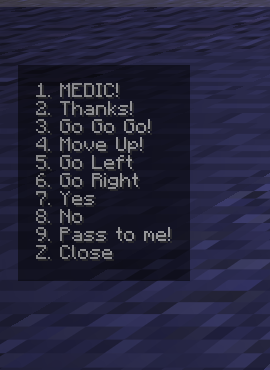
The default values mimic those present in Team Fortress 2, but are entirely customizable.
Similar to how it works in TF2, you first open the menu to view the list of commands, and then use your hotbar slot keybinds to select the command to run.
For consistency, selecting a command does not change your currently selected slot. This behavior can be disabled in the options.
Features
- Customizable chat messages
- All commands present in the menus can be customized from the message sent to the shorthand message that appears on the menu itself.
- Custom user defined message prefix
- You can define a global prefix to use for all menus, or define an override per each menu
- Supports commands, if the prefix starts with a
/, it’ll be sent as a command - Additionally, each individual entry can be configured to run a different command


Keybinds
|Key(s)|Action|
|-|-|
|Z, X, C|Open Voice Menu 1-3|
|Hotbar Slot 1-9|Issue voice command|
|F8|Open Mod options screen|
Disclaimer
This project is not affiliated with, endorsed by, or associated with Valve Corporation. Source Engine and Team Fortress are trademarks of Valve Corporation.
常见问题
VoiceCommands 支持哪些 Minecraft 版本?
VoiceCommands 支持 Minecraft Java 版 1.21.11–26.3,共 6 个版本,可用的加载器:Fabric。下载时注意选择和你游戏版本一致的文件。
VoiceCommands 怎么安装?
先用 PCL2 或 HMCL 启动器安装对应版本的 Fabric,再把下载的 .jar 文件放进游戏目录的 mods 文件夹,重新启动游戏即可。开启了版本隔离的,mods 文件夹在 versions/版本名 下面。运行环境:仅客户端。
评论
登录后评论和评分