
Voice Transcript
An addon for Simple Voice Chat that adds live transcripts and customizable chat bubbles.
截图
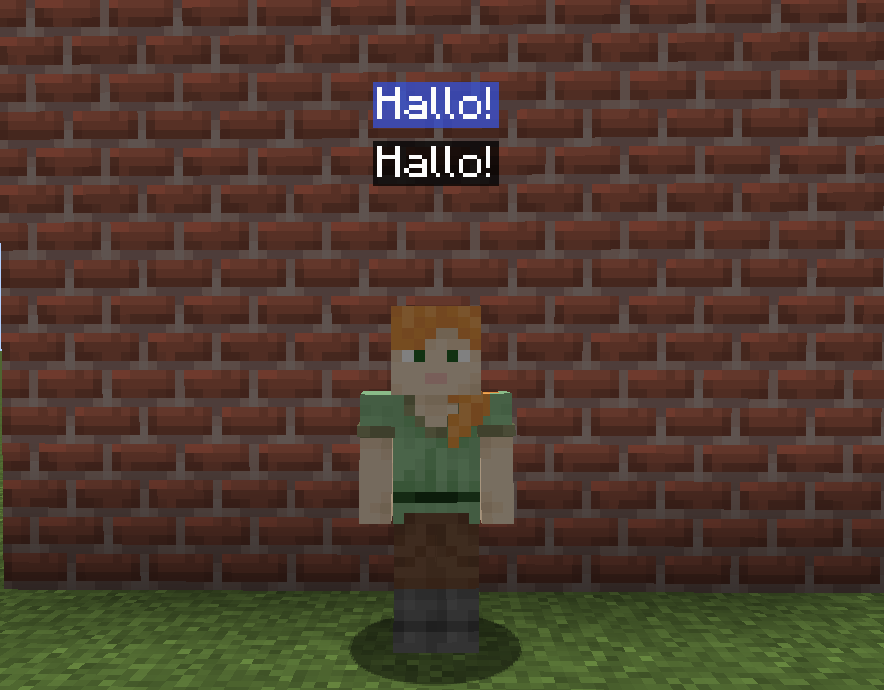
介绍
Voice Transcript
This is an addon for Simple Voice Chat. Before downloading please check the instructions on how to use the mod below.
This mod uses VOSK offline speech recognition and currently supports these languages:
English, Chinese, Russian, French, German, Spanish, Portuguese/Brazilian Portuguese, Greek, Turkish, Vietnamese, Italian, Dutch, Catalan, Arabic/Arabic Tunisian, Farsi, Filipino, Ukrainian, Kazakh, Swedish, Japanese, Esperanto, Hindi, Czech, Polish, Uzbek, Korean, Breton, Gujarati, Tajik and Telugu.
How to install
1.
Make sure you have the latest Simple Voice Chat mod version and the latest Voice Transcript mod version.
2.
Go inside your config folder, and search for a folder called “voicetranscript-model”, if you can’t find it, create it.
3.
Download your desired voice language model, here you can search for your language:
https://alphacephei.com/vosk/models
If you are going to speak in English, I recommend using this model here.
Keep in mind that using more large language models requires a stronger PC on your server-side.
4.
Extract the files inside the voicetranscript-model. Make sure to extract the files, and not create a new folder with the files inside it. Your voicetranscript-model folder needs to look like this:

Customizing
Chat Bubbles Color
You can change the chat bubbles color using the command: /bubblecolor

常见问题
Voice Transcript 支持哪些 Minecraft 版本?
Voice Transcript 支持 Minecraft Java 版 1.20–1.20.1,共 2 个版本,可用的加载器:Forge / NeoForge。下载时注意选择和你游戏版本一致的文件。
Voice Transcript 怎么安装?
先用 PCL2 或 HMCL 启动器安装对应版本的 Forge / NeoForge,再把下载的 .jar 文件放进游戏目录的 mods 文件夹,重新启动游戏即可。开启了版本隔离的,mods 文件夹在 versions/版本名 下面。运行环境:客户端和服务端都要装。

评论
登录后评论和评分