
Vista Thermal Camera
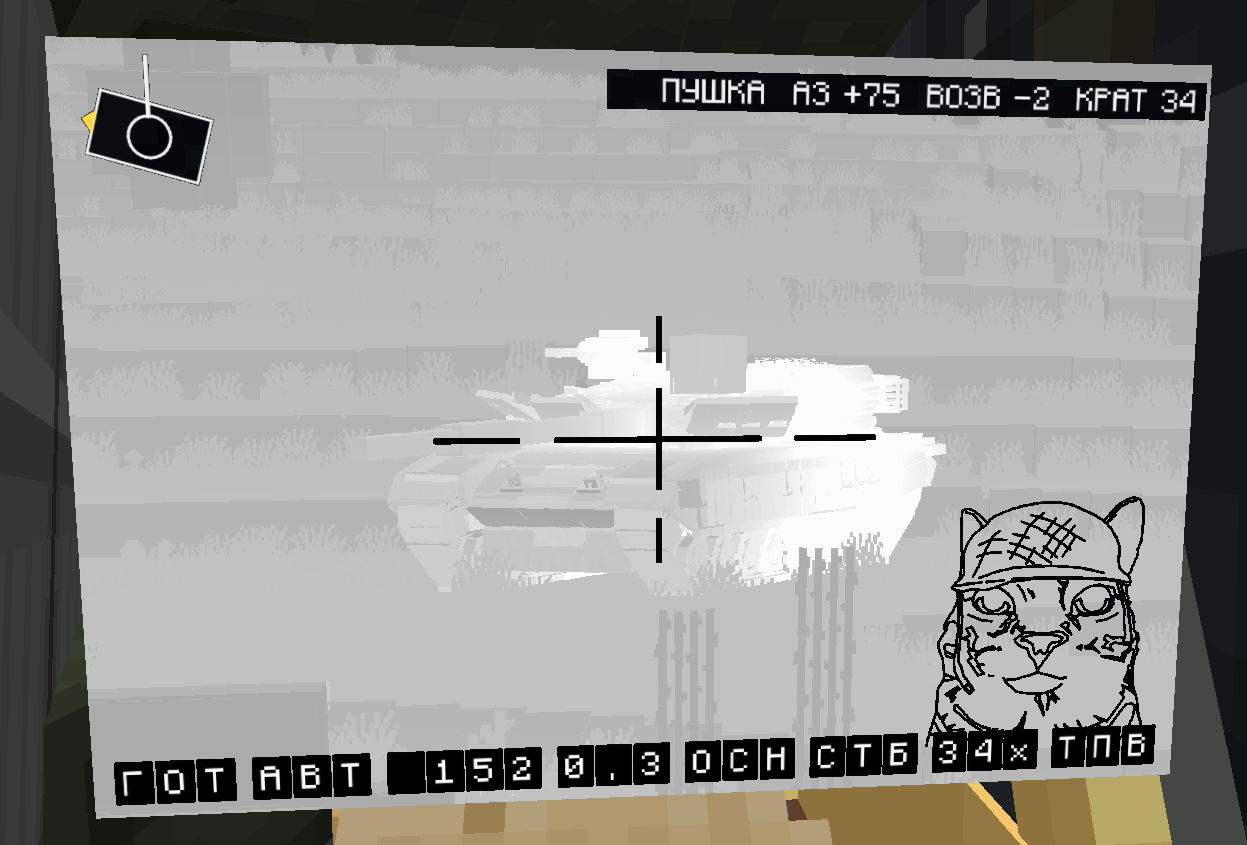
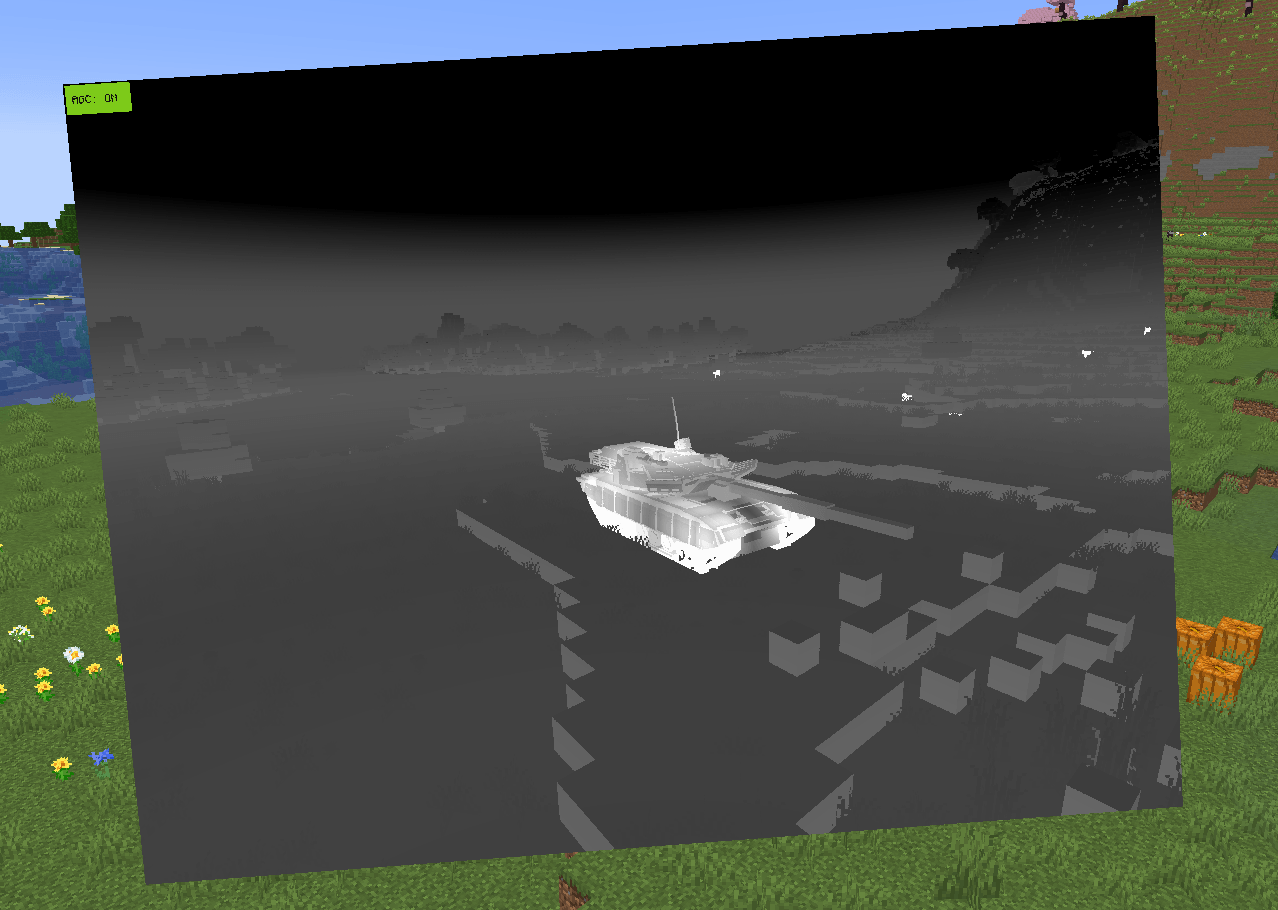
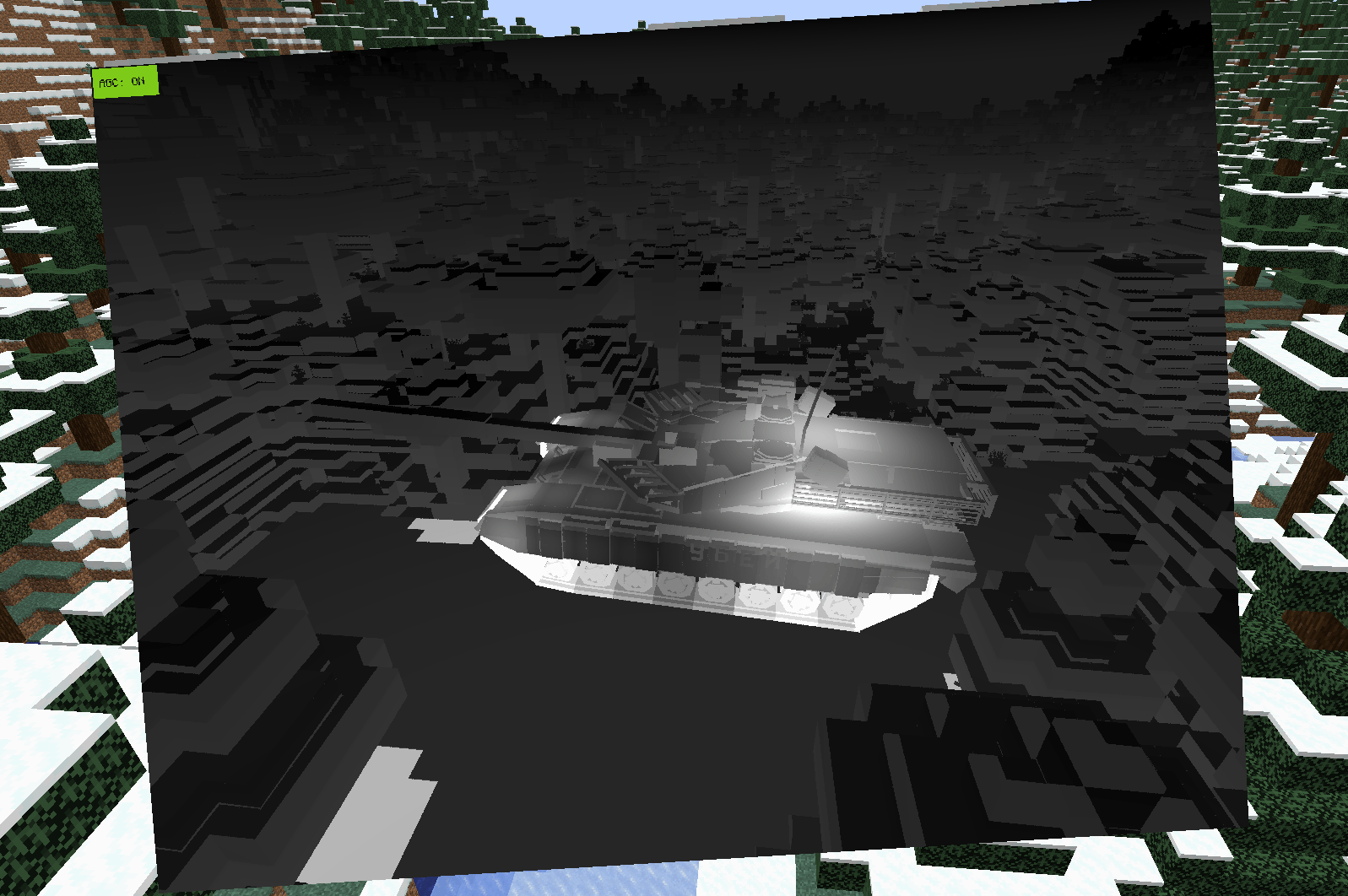
The mod adds a thermal vision mode to the Vista camera, controllable via CC:T.
截图
介绍
Vista Thermal Camera
Vista Thermal Camera extends the viewfinder block of Vista with a thermal imaging mode and a CC:Tweaked peripheral. The image is displayed on Vista televisions in the usual way; the peripheral provides numerical data only and does not transmit the image to Lua.
Requirements
- Minecraft 1.21.1, NeoForge 21.1.248 or newer
- Vista 5.5.7 or newer and its library Moonlight 3.5.2 or newer
- CC:Tweaked 1.115 or newer (optional; required for the
thermal_cameraperipheral) - Sable 2.0.3 or newer (optional; required for stabilization and structure tracking)
Without CC:Tweaked the viewfinder works as a standard Vista viewfinder, and the thermal view is enabled by placing tinted glass in the lens slot.
Graphics mods. The thermal view replaces parts of the world, entity and post-effect rendering in camera feeds. Mods that change the rendering pipeline (graphics optimizers, culling mods, shader loaders) may cause an incorrect thermal image. The mod is developed and checked with Sodium; Iris is supported without an active shader pack.
Thermal view
The thermal view is enabled by placing tinted glass in the lens slot of the viewfinder, or by the setThermal(true) peripheral call. It affects every television showing this camera.
A temperature in kelvin is calculated for each pixel of the image from a physical model of the climate, the materials and the heat sources, and displayed in the white-hot palette.
- Climate. The air temperature depends on the biome, the time of day and the altitude, derived from Sable air pressure. Deserts are hot with a large difference between day and night, snowy biomes are cold, humid and coastal biomes change little during the day. Rain and thunder lower the contrast and the visibility range; wet surfaces approach the air temperature and dry out afterwards.
- Dimensions. The Nether has a hot ceiling instead of a sky and ground heated from below; surfaces near lava are much hotter. The End is cold and uniform, so any heat source stands out.
- Materials. The material of every surface is taken from its block: stone, soil, sand, wood, vegetation, water, ice, snow, glass, metal, cloth, lava, lamps, soul sand and soul soil, and magma, each with its own emissivity and solar heating. Ice and snow stay below 273.15 K, so ice placed in a warm biome looks cold; grass blocks, and the grass and flowers on them, have the temperature of dirt. Blocks of other mods are classified automatically by their tags, sound type and map colour.
- Glass, water and ice. Glass, water and ice are opaque in the thermal view: a window shows the temperature of the glass, not the room behind it, and nothing is visible under water or ice.
- Sky. A clear sky is very cold overhead and close to the air temperature at the horizon. Clouds are warmer. The sun and the moon appear as small discs.
- Terrain. Sunlit and dark surfaces warm up during the day; surfaces facing the sky cool down at night. Water warms up and cools down more slowly than the air: it is coldest in the morning and warmest in the evening, and reflects the cold sky at shallow angles. Lava and fire are white hot.
- Living entities. Players and animals are warm, undead are at air temperature, blazes and magma cubes are hot. Burning entities and projectiles in flight are hot.
- Sable structures. A structure without heat sources has the temperature of the same blocks in the world. Engines heat the surrounding hull over minutes, and the heat spreads to structures joined by bearings or welds. High speed produces aerodynamic heating of the skin, strongest on the leading side and dependent on air density. Scaled structures are supported.
- Heat sources. Engines, computers, monitors, televisions and gun barrels of supported mods are heat sources, including those on Create contraptions. Engines have absolute running temperatures, so they stand out more in the cold. Moving parts of Create kinetic blocks and tracks show the temperature of their block.
- Running gear. The tracks of Create Tracks+ and the wheels of Offroad heat up from driving, most of all when the vehicle turns on the spot, and stay warm for a long time.
- Guns. Gun barrels heat up with every shot. A tank gun flashes with each shot and stays warm for tens of minutes; machine guns and autocannons heat up over long bursts and cool down within minutes. The breech heats more than the muzzle. Only the weapon that fired heats, not the guns next to it.
Display
By default a fixed temperature window is shown (263–313 K), so absolute differences remain visible: a hot desert looks bright, a snowfield dark, and the Nether saturates the image. Temperatures outside the window are clipped to black or white, as in a detector driven beyond its range.
Automatic gain control is switched on by the client setting autoGain or per camera from a computer. It fits the window to the histogram of the surfaces in the frame, including hot objects but not the sky: a hot engine entering the frame darkens the background, and the image “breathes” as the window follows the scene. A large very hot area such as lava goes to solid white without darkening the rest of the scene. autoLevel() sets the fixed window once from the current scene, like the auto-adjust button of a real thermal camera.
Supported heat sources: Create, Create Diesel Generators, Create Propulsion, Create Aeronautics (and Simulated), Create Thrusters, Synaxis, TFMG and Warium engines; CC:Tweaked, Tom’s Peripherals, Malachite Monitors and Create Radar electronics; Vista televisions and viewfinders; Create Big Cannons, CBC Military Supplement, CBC Modern Warfare, CBC AT, CBC Enhanced Shells, Warium and Mianbao’s NewModernWarfare guns; Create Tracks+ and Offroad running gear. Missing mods are skipped.
Client settings
File config/vista_thermal_camera-client.toml:
| Setting | Default | Purpose |
|---|---|---|
autoGain |
off | Automatic gain control for cameras whose mode is not set by a computer |
gainLevel |
288 K | Centre of the fixed display window |
gainSpan |
50 K | Width of the fixed display window |
aeroMinSpeed |
70 m/s | Speed threshold of aerodynamic heating |
aeroHeatTime |
8 s | Heating time constant of the skin |
aeroCoolTime |
120 s | Cooling time constant of the skin |
slowCoolingScale |
1.0 | Scale of the slow cooling times of running gear, hulls and gun barrels (0.01–1) |
redrawHotParts |
on | Redraw of hot block entity parts rendered by Flywheel with their temperature |
classVolumeSections |
16384 | Number of block sections whose material is kept per block on the GPU (2 KB each). Distant sections beyond it use a colour estimate; the Nether at a render distance of 32 needs about 40000 |
Large render distance. The material of the terrain is kept on the GPU for at most classVolumeSections sections of 16×16×16 blocks. With a large render distance the sections beyond this number use an estimate from the colour, and distant chunks look coarse and striped. If the client log reports Thermal block class volume is full, raise classVolumeSections: 32768 (64 MB) is enough for a render distance of 32 in the Overworld; the Nether needs about 40000.
Data files
The thermal model is described by three data files in assets/vista_thermal_camera/thermal/, each of which may be replaced by a resource pack: heat_sources.json (heat sources and guns), materials.json (material classes and block assignments) and climate.json (biomes, dimensions and weather). All temperatures in these files are absolute, in kelvin (273.15 K = 0 °C); differences are named *_delta. On start, the server log reports the identifiers of the bundled files that are not found in the installed mods. See “Adding custom heat sources with a resource pack” below.
Peripheral
Each viewfinder is a thermal_camera peripheral, accessible directly or through a wired modem.
local cam = peripheral.find("thermal_camera")
cam.setThermal(true)          -- thermal view, equivalent to tinted glass
cam.setReticle(true)          -- crosshair in the centre of the image
cam.setOverlayText("READY")   -- text at the bottom of the image
Functions provided:
- absolute and relative aiming, zoom control;
- stabilization against the carrying Sable structure, in the world frame or in pitch only;
- designation of a world point with automatic lock-on to the nearest structure, or lock-on to a specific structure by its identifier, followed by automatic tracking;
- operator correction on top of automatic tracking without loss of lock;
- passive tracking, in which the target data is maintained while the camera is aimed by the computer;
- target position, bounding box, range, angular error and velocity;
- a list of all structures within the field of view;
- a laser rangefinder along the line of sight;
- control of the thermal display window and of automatic gain control, including one-shot adjustment to the scene;
- a reticle and up to 256 characters of overlay text on the image;
- adjustable limits of camera rotation speed and acceleration.
Stabilization modes
While a computer is attached, a controller on the server maintains the commanded direction of the camera every tick.
setStabilized(false): angles are relative to the block; the camera is fixed to its mount.setStabilized(true): angles are held in the world frame; rotation of the vehicle is compensated.setStabilized(true, true): the heading follows the vehicle and the pitch is held in the world frame, which keeps the horizon level on a turret rotated by a separate drive.
Mode changes do not cause abrupt camera motion. When a computer is attached for the first time, the initial direction is taken from the placement of the block. Without an attached computer the viewfinder behaves as a standard Vista viewfinder.
Camera motion
All camera movements are performed with limited speed and acceleration and end exactly on the target direction without overshoot. The defaults are 180°/s and 720°/s²; they are changed with setMotionLimits. Moving targets are followed without lag. Stabilization is not affected by these limits.
Designation, lock and tracking
cue(x, y, z) turns the camera towards a world point and locks the structure nearest to the line of sight within a 3° cone and 1500 blocks. lock(sid) locks a specific structure by the identifier returned by getContacts(). The locked structure is then tracked automatically. The structure on which the camera is mounted is excluded.
The aim point is set by setAimHeightFraction(f) as a fraction of the bounding box height (0 bottom, 0.5 centre, 1 top; default 0.5). The same point is returned by getTrack(), so that the camera and a fire control program use a common target point.
correct(dYaw, dPitch) adds an operator offset of up to 20° while the lock is maintained. setAutoAim(false) converts the lock into passive tracking: target data remains available, while the camera is aimed only by setAim and nudge, which do not release the lock in this mode.
The lock is released when the structure is removed from the world. Distance does not release it.
Rangefinder
rangefind() traces a ray along the line of sight in steps of 0.5 blocks up to 1500 blocks and returns the first block with a collision shape, or nil. Unloaded chunks are not loaded. Sable structures are not detected by the rangefinder; their range is provided by getTrack() and getContacts().
Display window
setGain(level, span) sets a fixed window by its centre and width in kelvin; setLevel(k) and setSpan(k) change one of them. setAutoGain(true) switches on automatic gain control. autoLevel() sets the fixed window once from the current scene; the window is measured by a client that shows the feed on a television, getGain().levelPending is true until the result arrives, and the request expires after 10 s if nobody shows the feed. resetGain() returns the camera to the client settings. All these settings are stored in the camera.
API reference
Angles are in radians. Yaw follows the Minecraft entity convention: 0 is south (+Z), positive values turn towards west (−X). Pitch is negative upwards. Velocities are in blocks per tick. Coordinates are world coordinates. Temperatures are in kelvin.
All functions except rangefind() and getDebug() return immediately. Commands marked “queued” are applied at the start of the next server tick in the order of the calls; the corresponding getters reflect the change one tick later. Functions marked “snapshot” return the state at the end of the last server tick.
| Function | Mode | Description |
|---|---|---|
setAim(yaw, pitch) |
queued | Absolute aim in the current stabilization frame. With auto aim enabled, releases the lock, the designation and the correction. |
nudge(dYaw, dPitch) |
queued | Relative aim; same behaviour as setAim. |
getAimWorld() |
snapshot | Actual direction of the camera in the world frame (yaw, pitch). |
setZoom(level) / getZoom() |
queued / immediate | Vista zoom level. |
setStabilized(on [, pitchOnly]) / isStabilized() / isPitchOnly() |
queued / immediate | Stabilization mode. Stored in the block. |
setMotionLimits(maxRate, maxAccel) / getMotionLimits() |
immediate | Maximum rotation speed (rad/tick) and acceleration (rad/tick²). Defaults 9°/tick and 1.8°/tick². Stored in the block. |
setAutoAim(on) / isAutoAim() |
queued / immediate | Whether lock and designation move the camera (default true). Stored in the block. |
setAimHeightFraction(f) / getAimHeightFraction() |
immediate | Aim point within the target bounding box. |
cue(x, y, z) |
queued | Designate a world point and lock the nearest structure. |
lock(sid) |
queued | Lock the structure with the given identifier. |
unlock() |
queued | Release the lock or the designation. |
isLocked() |
immediate | Whether a structure is locked. |
correct(dYaw, dPitch) / clearCorrection() / getCorrection() |
immediate | Operator offset while locked; correct returns false without a lock. |
getTrack() |
snapshot | State of the locked target (see below). |
getContacts() |
snapshot | All Sable structures within the field of view up to 1500 blocks: sid, x, y, z, ymin, ymax, range, yawErr, pitchErr. |
rangefind() |
server thread | Laser rangefinder: range, x, y, z, bx, by, bz or nil. |
setThermal(on) / isThermal() |
immediate | Thermal view. isThermal() also returns true with tinted glass in the lens slot. |
setAutoGain(on) / isAutoGain() |
immediate | Automatic gain control of this camera. isAutoGain() returns nil while the camera follows the client setting. |
setGain(level, span) |
immediate | Fixed display window: centre (1–2000 K) and width (1–1000 K); switches automatic gain control off. |
setLevel(k) / setSpan(k) |
immediate | Centre or width of the fixed window alone; switches automatic gain control off. |
autoLevel() |
immediate | Sets the fixed window once from the current scene; the result arrives within a few ticks. |
getGain() |
immediate | {auto, level, span, levelPending}; absent fields follow the client settings. |
resetGain() |
immediate | Returns the display settings of this camera to the client settings. |
setReticle(on) / isReticle() |
immediate | Crosshair in the centre of the image. |
setOverlayText(s) / getOverlayText() |
immediate | Overlay text, lines separated by \n, up to 256 characters, UTF-8. |
getDebug() |
server thread | Diagnostic data of the controller. Not intended for control loops. |
getTrack() returns { locked = false } without a lock, otherwise:
| Key | Meaning |
|---|---|
sid |
Structure identifier |
x, y, z |
Aim point in world coordinates |
ymin, ymax, aimFrac |
Vertical extent of the bounding box and the aim fraction |
range |
Distance to the aim point |
yawErr, pitchErr |
Bearing to the aim point minus the current camera direction |
aimYaw, aimPitch |
Current camera direction in the world frame |
corrYaw, corrPitch |
Operator offset in effect |
vx, vy, vz |
Velocity of the aim point, blocks per tick |
velSamples |
Number of ticks in the velocity estimate; reliable from 3 |
Example
local cam = peripheral.find("thermal_camera")
if not cam then error("thermal_camera not found") end

cam.setStabilized(true)
cam.setReticle(true)

-- select the contact nearest to the centre of the image
local best, bestErr
for _, c in ipairs(cam.getContacts()) do
  local err = c.yawErr ^ 2 + c.pitchErr ^ 2
  if not bestErr or err < bestErr then best, bestErr = c, err end
end
if not best then error("no contacts in view") end

cam.lock(best.sid)
sleep(0.1)

while true do
  local t = cam.getTrack()
  if not t.locked then
    cam.setOverlayText("LOST")
    break
  end
  local speed = math.sqrt(t.vx ^ 2 + t.vy ^ 2 + t.vz ^ 2) * 20
  cam.setOverlayText(("RANGE %d m  V %.1f m/s"):format(math.floor(t.range + 0.5), speed))
  sleep(0.05)
end
Limitations
getContacts()does not check line of sight.rangefind()does not detect Sable structures.- The material of a surface is taken from its block within the loaded area around the player. Elsewhere, and for entity models, it is estimated from the colour.
- With a large render distance, distant chunks look coarse and striped unless
classVolumeSectionsis raised (see Client settings). - Heat sources come from the list in
heat_sources.json. Some engines do not report their running state to the client; they are recognised by their running sound or considered running while their structure moves. autoLevel()requires a client that shows the feed of the camera on a television.- The thermal view is not available with an active Iris shader pack.
- Distant Horizons is not supported; its LODs are not displayed in camera feeds.
For modpack authors
The mod is required on both the client and the server, in the same version. The peripheral and the controller run on the server; the thermal view runs on the client. The thermal data files may be replaced by a resource pack, and the server log reports on start which identifiers of the bundled files are missing in the installed mods.
Credits
Vista and Moonlight are developed by MehVahdJukaar, CC:Tweaked by SquidDev, Sable by RyanHCode. None of them is included in this mod; each must be installed from its official page.
License
All Rights Reserved (see LICENSE.txt). The license applies to all versions of the mod, including 1.0.0; copies of version 1.0.0 obtained before 27 September 2026 under the MIT License keep the rights of that license.
Permitted:
- use in single player, on servers and in videos or streams;
- inclusion in modpacks that download the mod from its official page;
- publication of programs that use the peripheral API, under any license;
- creation and publication of resource packs that replace the thermal data files (
heat_sources.json,materials.json,climate.json), including modified copies of those files. Such resource packs may not contain any other part of the mod.
Not permitted: redistribution of the mod, publication of modified versions, and reuse of its code or assets.
Changelog 3.53
Changes since 2.0.1. The thermal view is now based on a physical model of the climate, the materials and the heat sources. Client and server must both run release 3 (network protocol version 3).
Version numbers now have the form R.N: R is the number of the release, N the number of the build counted over all versions of the mod. This is release 3 and the 53rd build since 1.0.0.
Climate
- The air temperature depends on the biome, the time of day and the altitude. Every vanilla biome has its own mean temperature, daily range, solar heating and humidity; biomes of other mods are matched by common biome tags or derived from the game’s biome parameters.
- The daily temperature curve has its minimum at 06:00 and its maximum at 14:00.
- Rain, thunder and snow reduce the visibility and change the air temperature. Surfaces become wet in rain, approach the air temperature and dry out gradually afterwards.
- The Nether has a hot ceiling instead of a sky and geothermally heated ground; soul sand valleys are cooler and basalt deltas hotter, surfaces near lava are much hotter. The End is cold (228 K), has no sun and no daily cycle, and its void is very cold. Other dimensions receive a profile from their dimension type.
- The climate is defined in the new data file
climate.json, which a resource pack may replace.
Materials
- The material of a surface is determined by its block instead of its colour. The client keeps a map of the block classes of the loaded world on the GPU; the colour is used only where no block data is available.
- New data file
materials.jsonwith the parameters of 15 material classes (stone, soil, sand, wood, vegetation, water, ice, snow, glass, metal, cloth, lava, lamps, soul sand and soul soil, magma) and explicit block assignments. Blocks of other mods are classified automatically by their tags, sound type and map colour. - Ice and snow are never warmer than 273.15 K; ice placed in a warm biome is visible as a cold object. Water warms up and cools down more slowly than the air: it is coldest in the morning and warmest in the evening.
- Glass, water, ice and stained glass are opaque, as in the real infrared band: a window shows the temperature of the glass, and nothing is visible under water or ice.
- Grass blocks, and grass and flowers growing on the ground, have the temperature of dirt; moss, leaves and sugar cane are vegetation.
- Seagrass, kelp, coral fans and bubble columns have the temperature of the water around them.
- Metal has an emissivity of 0.85 and partly reflects its surroundings; wet surfaces emit like water.
- Sable structures use the same material model as the world. A structure without heat sources has the temperature of the same blocks in the world.
Display
- By default a fixed temperature window is shown (263–313 K), so the climate is visible directly: a desert by day is bright, a snowfield and the End are dark, the Nether saturates the image. Temperatures outside the window are clipped.
- Automatic gain control is optional (client setting
autoGainor per camera from a computer). It fits the window to the histogram of the surfaces in the frame, including hot objects but not the sky, and follows the scene with a delay (“breathing” of the image). - Protection against blooming: lava, fire and other very hot areas go to solid white and do not take part in the window, so they no longer darken the rest of the scene.
- The visible block and its face are found by following the ray of every pixel through the map of block classes. Distant terrain no longer shows stripes, ripple or grids at high zoom, and the edges of objects in front of water no longer have bright rims.
- Far away, where one pixel covers several block faces, the terrain takes the average temperature of the tops and sides of its steps instead of flickering between them.
Heat sources
- Heat sources have absolute running temperatures in kelvin, so an engine stands out more in a cold biome than in a desert. Sources may also be colder than the air.
- The hull around an engine warms up over minutes and cools down more slowly; the warm zone is smaller in cold air and while the vehicle moves. Heat from several sources does not add up.
- New running conditions for the heat source list: running sounds, Create shaft speed, chains of block entity methods and fields, and permanent operation. Warium engines are recognised by their running sounds.
- Running gear of Create Tracks+ and Offroad heats up from movement, most of all when the vehicle turns on the spot, and cools down over tens of minutes.
- Moving parts of Create kinetic blocks and the tracks of Create Tracks+ show the temperature of their block.
- Heat source overlays follow the block model, including model parts outside the block shape (rotated barrels, muzzles, rails).
- Barrels, running gear and hulls cool down while the thermal view is not in use.
Guns
- Guns heat up by groups: machine guns, autocannons, tank guns, rockets and light weapons. Every shot adds heat that is stored in the barrel and saturates towards the group’s limit, plus a short flash that fades within seconds. A tank gun flashes with each shot and stays warm for tens of minutes; machine guns and autocannons heat up over long bursts and cool down within minutes.
- The breech heats more than the barrel, muzzle devices less. Fast-firing weapons heat less per shot, so all autocannons heat equally per second of fire.
- Only the weapon that fired heats. The sounds of one shot are recognised together, so a shared echo no longer heats a different kind of weapon, and guns standing side by side no longer heat each other.
- New supported guns: Mianbao’s NewModernWarfare, additional blocks of CBC Military Supplement and CBC Modern Warfare; the shot and echo sounds of Warium guns.
Peripheral
- New functions for the display window:
setAutoGain,isAutoGain,setGain,setLevel,setSpan,getGain,resetGain. The settings are stored in the camera. - New
autoLevel(): the fixed window is set once from the current scene, like the auto-adjust button of a real thermal camera.
Configuration
- New client settings:
autoGain,gainLevel,gainSpan(display window),slowCoolingScale(shortens the slow cooling of running gear, hulls and barrels) andclassVolumeSections(GPU memory for block materials). With a large render distance raiseclassVolumeSections, otherwise distant chunks look coarse and striped (see Client settings).
Data files and resource packs
- All thermal data files use absolute temperatures in kelvin; differences are named
*_delta. The olderheatandidle_heatfields of heat source packs are still read. - The server log checks the identifiers of all bundled data files on start (blocks, tags, biomes, dimensions, sounds, gun groups).
- Resource packs may replace any thermal data file (
heat_sources.json,materials.json,climate.json).
Fixes
- Glass and heat sources near the camera no longer disappear at a large render distance.
- The thermal view no longer falls back to colour classification when another mod leaves a pixel buffer bound.
- Heat sources on a structure no longer add up to a white hull.
- Blocks in the Nether and in caves, including fire and lava, no longer take the material of their surroundings.
Adding custom heat sources with a resource pack
Any block can be made a heat source in the thermal view by a resource pack that replaces the heat source list. The list is read on the client; the server is not affected.
1. Create the pack structure
my_heat_sources/
├── pack.mcmeta
└── assets/
    └── vista_thermal_camera/
        └── thermal/
            └── heat_sources.json
pack.mcmeta for Minecraft 1.21.1:
{
  "pack": {
    "pack_format": 34,
    "description": "Custom heat sources for Vista Thermal Camera"
  }
}
2. Copy the original list
The file in the resource pack replaces the list of the mod completely; it is not merged with it. Extract assets/vista_thermal_camera/thermal/heat_sources.json from the mod jar (a jar is a ZIP archive), place it in the pack and add new entries to it. Otherwise the heat sources of the supported mods will no longer be hot.
3. Add an entry
Entries are added to the sources array. All temperatures are absolute, in kelvin: 0 K is absolute zero and 273.15 K is 0 °C. Fields ending in _delta are differences from the surrounding air, in kelvin.
Example: an engine that is hot only while it runs, an always-warm electronic block, and a cooling unit that is colder than the air:
{ "mod": "mymod", "kind": "engine", "temp": 370, "radius": 2.2, "soak_time": 150,
  "be_active": "isRunning", "sounds": [ "mymod:engine_loop" ], "when_moving": true,
  "blocks": [ "mymod:v8_engine" ] },
{ "mod": "mymod", "kind": "electronics", "heat_delta": 15, "radius": 1,
  "blocks": [ "mymod:server_rack" ] },
{ "mod": "mymod", "kind": "engine", "temp": 250, "radius": 1, "active_when": { "powered": "true" },
  "blocks": [ "mymod:freezer" ] }
Temperature
| Field | Meaning |
|---|---|
temp |
Surface temperature of the block while it runs, K. An engine with "temp": 370 stands out more in a cold biome than in a desert. |
idle_temp |
Surface temperature while the block does not run, K. Default: the temperature of the surrounding air. |
heat_delta |
Instead of temp: difference from the air while running, K. Suitable for electronics and electric motors, whose heat adds to the air temperature. The name heat of older packs is accepted. |
idle_delta |
Instead of idle_temp: difference from the air while idle, K. The name idle_heat of older packs is accepted. |
A source may be colder than the air (temp below the air temperature or a negative heat_delta), for example a cooling unit. Differences smaller than 0.3 K are not displayed.
Heating of the block and its surroundings
| Field | Default | Meaning |
|---|---|---|
radius |
2 | Distance, in blocks, over which the heat spreads to neighbouring blocks and the hull of a Sable structure. The zone is smaller in cold air and while the structure moves (air flow). |
warmup |
4 (30 for running gear) | Time constant of the block heating up, s. |
cooldown |
45 (900 for running gear) | Time constant of the block cooling down, s. |
soak_time |
120 | Time constant of the hull around the source heating up, s. The hull cools down three times slower. |
A time constant is the time in which about two thirds of the change takes place. Heat from several sources does not add up: a block takes the strongest warm and the strongest cold contribution.
Running conditions
Most blocks do not send their state to the client, so several ways to recognise that a block runs are available. active_when is a filter; the other conditions are alternatives, and the block runs if any of them holds.
| Field | Meaning |
|---|---|
active_when |
Block state properties under which the block may run, for example { "lit": "true" }. Several values are separated by |, for example { "mode": "on|boost" }. If the properties do not match, the block is idle regardless of the other conditions. |
be_active |
Method without arguments of the block entity, field:name for a field, or a chain of both separated by dots (getEngine.field:running). The block runs when the result is true, a non-zero number, or an enum value other than NONE, OFF, SMOULDERING or INACTIVE. If the method or field does not exist, the block counts as running. |
sounds |
Sound identifiers that the block plays while running. The block runs while one of these sounds started within sound_hold seconds (default 3) within sound_radius blocks (default 4); a looping sound counts for as long as it plays. |
kinetic_rpm |
For Create kinetic blocks: the block reaches its running temperature at this shaft speed, in rpm, and is proportionally cooler at lower speeds. |
when_moving |
true: the block runs while its Sable structure moves. |
always |
true: the block always runs. A block without any condition also always runs. |
If a block is listed in several entries, the first entry is used.
Running gear
Entries of kind running_gear are heated by friction while their Sable structure moves:
{ "mod": "mymod", "kind": "running_gear", "heat_delta": 40, "radius": 1.2, "full_speed": 6,
"axle": "facing", "lifted": "field:liftedUp", "blocks": [ "mymod:track_segment" ] }| Field | Meaning |
|---|---|
heat_delta |
Difference from the air at full load, K. |
full_speed |
Speed, in m/s, at which the full heat_delta is reached. The velocity of the part is split into rolling (across its axle) and sliding (along its axle); the load is rolling plus three times sliding, so turning on the spot heats the running gear most. Default 10. |
axle |
Name of the block state property whose direction is the axle of the wheel or track, for example facing. Default facing. Without such a property the sliding is estimated from the rotation of the vehicle. |
lifted |
Optional: method or field of the block entity that is true while the part does not touch the ground; a lifted part is not heated. |
Running gear cools down slowly (tens of minutes). The client setting slowCoolingScale shortens this time.
Reference values
Electronics: heat_delta 5–20. Electric motors: heat_delta 30–50. Piston engines: temp 350–390. Burners: temp 600–700. Jet engines and thrusters: temp 700–1100. Lava and fire are displayed at their own fixed temperature and are not configured in this list.
4. Guns (optional)
A block of kind gun is heated by shots. A shot is recognised by its sound within shot_radius blocks of the gun (global field, default 8).
Every gun block belongs to a group, and the group defines how it heats:
{ "mod": "mymod", "kind": "gun", "group": "tank_gun", "shot_scale": 1.3, "radius": 1.5,
  "blocks": [ "mymod:cannon_breech" ] },
{ "mod": "mymod", "kind": "gun", "group": "tank_gun", "radius": 1.5,
"blocks": [ "mymod:cannon_barrel" ] }| Field | Meaning |
|---|---|
group |
Name of a group from gun_groups. |
shot_scale |
Multiplier of the group’s heating for this block. Default 1. The bundled list uses 1.3 for breeches and chambers, 0.8 for muzzle devices and 0.6 for recoil springs. |
Groups are defined in the gun_groups object at the top level of the file. The bundled groups are machine_gun, autocannon, tank_gun, rocket and light; a pack may change them or add new ones.
"gun_groups": {
  "tank_gun": { "shot_delta": 6, "spike_delta": 40, "max_delta": 250, "cooling": 1200, "spike_time": 20 }
}| Field | Meaning |
|---|---|
shot_delta |
Heat stored in the barrel per shot, K. It saturates towards max_delta, so a long series heats the barrel quickly at first and then more slowly. |
spike_delta |
Short surface flash of each shot, K. |
spike_time |
Time constant of the flash fading, s. |
max_delta |
Largest difference from the air, K. |
cooling |
Time constant of the stored heat cooling down, s. The client setting slowCoolingScale shortens it. |
A gun block may also have rate_scale (default 1): it multiplies the heat of one shot, not the limit, for a weapon that fires faster than the reference weapon of its group, so that both heat equally per second of fire. The smallest rate_scale among the blocks of a weapon applies to the whole weapon, so put it on the breech when several weapons share the barrel blocks. The bundled data gives the Warium rotary autocannon 0.17 and the light autocannon 0.33 relative to the heavy autocannon.
Gun sounds played at one point within one game tick form one shot, and the shot heats only the groups that all its sounds have in common. List an echo that several kinds of weapons share with the groups of all of them: together with the weapon’s own shot sound it takes the kind of that weapon, and alone (heard far from the weapon) it heats the nearest gun of any of its groups. A shot heats only the weapon that fired it: the gun block of the shot’s groups nearest to the shot, together with the gun blocks of the same group in a straight line with it (a multi-block barrel), along the direction to the shot point. A gun block is heated at most once per game tick, so a weapon that plays several sounds per shot heats once per shot. Shot sounds are listed in the gun_sounds array. groups limits a sound to the guns of the listed groups; a coaxial machine gun therefore does not heat the main gun next to it. Without groups, a sound heats every gun within shot_radius.
"gun_sounds": [
  { "mod": "mymod", "groups": [ "tank_gun" ], "sounds": [ "mymod:cannon_fire" ] },
  { "mod": "mymod", "groups": [ "machine_gun" ], "sounds": [ "mymod:mg_fire" ] }
]
A gun block without a group uses the global fields shot_heat (heat per shot, K), shot_heat_max (maximum, K) and shot_cooling (cooling time constant, s).
5. Install and test
- Place the pack folder or ZIP archive in
resourcepacksand enable it in the game. - After editing the file, reload resources with
F3 + T. - If the file contains a syntax error, the client log reports
bad vista_thermal_camera:thermal/heat_sources.jsonand all heat sources are disabled until the error is corrected.
The identifier check in the server log (blocks, block state properties, running and gun sounds) covers only the list bundled with the mod; entries added by a resource pack are not checked there.
Resource packs of this kind may be published (see License). They may not contain any other part of the mod.
Changing materials with a resource pack
The material of every surface in the thermal view is taken from its block. Materials are defined in assets/vista_thermal_camera/thermal/materials.json, which a resource pack can replace in the same way (steps 1, 2 and 5 above apply). The file has two parts: the parameters of the material classes and explicit assignments of blocks to classes.
Classes: stone, soil, sand, wood, vegetation, water, ice, snow, glass, metal, cloth, lava, emitter, soul, magma. The set of classes is fixed; their parameters can be changed.
| Field | Meaning |
|---|---|
emissivity |
Emissivity in the 8–14 µm band, 0 to 1. A low value makes the surface reflect its surroundings, as polished metal does. |
solar_delta |
Heating of a dark surface facing the sun at full solar load, K. |
night_delta |
Cooling of a surface facing a clear sky at night, K. |
delta |
Constant difference from the air, K. |
max_temp |
Upper limit of the surface temperature, K (ice and snow: 273.15). |
temp |
Fixed temperature, K (lava, lamps). Replaces the calculation. |
plant_delta |
Difference applied to plants standing on the ground (grass, flowers), K. They take the material of the ground below them with a horizontal surface; vegetation uses 0, so they have the temperature of the ground. |
Assigning blocks to a class:
"blocks": [
  { "class": "metal", "blocks": [ "mymod:armor_plate", "#mymod:hull_blocks" ] },
  { "class": "snow",  "blocks": [ "mymod:frozen_panel" ] }
]
Blocks that are not listed are classified automatically by their tags, sound type and map colour, so most blocks of other mods need no entry.
Changing the climate with a resource pack
The climate of the thermal view is defined in assets/vista_thermal_camera/thermal/climate.json. A resource pack can replace this file in the same way as the heat source list (steps 1, 2 and 5 above apply). All temperatures in this file are absolute, in kelvin: 0 K is absolute zero and 273.15 K is 0 °C. Fields ending in _delta are temperature differences in kelvin.
A field that is left out of an entry is derived from the game’s own biome or dimension parameters, so an entry may contain only the fields to be changed. Biomes and dimensions that are not listed also receive values derived from the game parameters.
Biomes
Entries of the biomes array are checked in order; the first entry that matches the biome is used. Biomes are given by identifier (minecraft:desert) or by biome tag (#c:is_desert).
{ "biomes": [ "mymod:salt_flats", "#mymod:hot_plains" ],
"air_temp": 306, "diurnal_range": 26, "insolation": 1.35, "humidity": 0.1 }| Field | Meaning |
|---|---|
biomes |
Biome identifiers and biome tags. |
air_temp |
Mean air temperature at sea level, K. |
diurnal_range |
Difference between the daily maximum (14:00) and minimum (06:00) of the air temperature, K. |
insolation |
Scale of solar heating of surfaces. 1 corresponds to a temperate climate; deserts use about 1.4, snowy biomes about 0.6. |
humidity |
0 to 1. Humid air keeps the sky warmer and weakens the cooling of surfaces at night. |
night_cooling |
Scale of the cooling of surfaces at night. Derived from humidity when absent. |
surface_delta |
Constant difference between surfaces and air, K (for example, geothermal heating in the Nether). |
Dimensions
{ "dimension": "mymod:moon", "sky": "void", "sky_temp": 100, "air_temp": 250,
"daily_cycle": false, "solar": true, "night_load": 0.6 }| Field | Meaning |
|---|---|
dimension |
Dimension identifier. |
sky |
open (sky with atmosphere), ceiling (a roof at air temperature, as in the Nether) or void (empty space at sky_temp, as in the End). |
sky_temp |
Temperature of the void, K. |
air_temp |
Air temperature that replaces the biome values, K. |
daily_cycle |
Whether the air temperature follows the time of day. |
solar |
Whether the sun heats surfaces. |
night_load |
Constant cooling of surfaces facing the sky (0 to 1) where there is no daily cycle. |
light_heat_delta |
Heating of surfaces next to a block light level of 15, K (surfaces near lava). |
visibility |
Distance over which objects fade into the air temperature in clear weather, blocks. |
pressure_altitude |
Whether the air becomes colder with altitude. |
Weather
The weather object sets the effect of rain, thunder and snow at full strength: visibility (blocks), air_delta (change of the mean air temperature, K) and range_factor (scale of the diurnal range). wet_time and dry_time are the time constants, in seconds, with which surfaces become wet in rain and dry afterwards.
Water
The water object sets the daily cycle of the water surface in dimensions with a daily cycle. Water warms up and cools down more slowly than the air, so its minimum is in the morning and its maximum in the evening.
| Field | Meaning |
|---|---|
mean_delta |
Daily mean of the water surface minus the daily mean of the air, K. Default -2. |
range_scale |
Daily range of the water surface as a share of the daily range of the air. Default 0.4. |
coldest_hour |
Hour of the daily minimum, 0..24. Default 8. |
warmest_hour |
Hour of the daily maximum, 0..24. Default 19. |
Water is never colder than 273.65 K. Its emissivity, solar heating and night cooling are the parameters of the class water in materials.json.
Checking
If the file contains a syntax error, the client log reports Invalid vista_thermal_camera:thermal/climate.json, and the climate is derived from the game parameters only. The server log checks the biome and dimension identifiers of the file bundled with the mod on start (Thermal climate: ... ids OK).
常见问题
Vista Thermal Camera 支持哪些 Minecraft 版本?
Vista Thermal Camera 支持 Minecraft Java 版 1.21.1,可用的加载器:NeoForge。下载时注意选择和你游戏版本一致的文件。
Vista Thermal Camera 怎么安装?
先用 PCL2 或 HMCL 启动器安装对应版本的 NeoForge,再把下载的 .jar 文件放进游戏目录的 mods 文件夹,重新启动游戏即可。开启了版本隔离的,mods 文件夹在 versions/版本名 下面。
Graide 的其他作品
查看全部 →
Tracks+ Fix
Performance addon for Create: Tracks+ (by ChiyahaRe, fork of Create: Tracks by qwxon). Caches track terrain-probe data once per tick, cutting server lag and memory churn on tracked vehicles. No content changes.

High Speed Explosion Sable Fix
Fixes explosion damage to fast-moving Sable structures, lets explosions reach structures above the build height, and makes Create Big Cannons warheads on fast Sable craft detonate at the point of closest approach to their target.
评论
登录后评论和评分