
Vinyl Revival
Craft blank music discs from plastic, burn them into vanilla records, and play them on animated turntables. Explore the Nether, smelt Raw Plastic, and bring immersive audio to your world! Turntables must be placed 10+ blocks apart.
截图


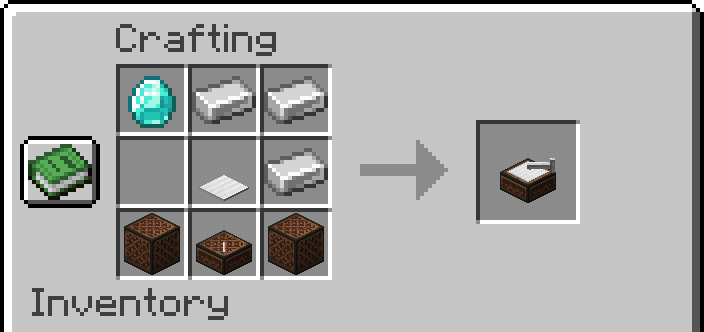
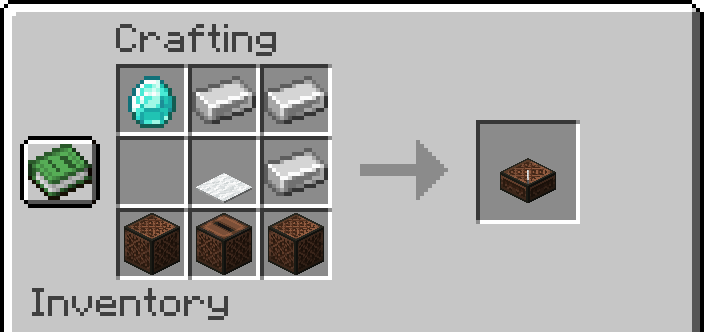
介绍
🎵 Vinyl Revival – Bring music to life in Minecraft
Vinyl Revival introduces a new, immersive way to create and play Minecraft’s vanilla music discs using real-world inspired materials and machines.
🧪 How it works
- Explore the Nether to find a new resource: Raw Plastic.
- Smelt Raw Plastic into refined Plastic, which is used to craft a blank Music Disc.
- Insert the blank disc into the Disc Burner to engrave it into one of Minecraft’s vanilla music discs.
- Play the discs using either the classic Jukebox or the new Turntable, which features a fully animated spinning vinyl.
⚠️ Important note
- It is recommended to place Turntables at least 8 blocks apart. Otherwise, minor audio issues or slight sound overlap may occur. These are not critical, but maintaining distance helps avoid them.
🛠️ Current Features
- New Nether resource: Raw Plastic
- Crafting system for vanilla music discs
- Disc Burner block to engrave blank discs
- Animated Turntable that plays vanilla records
- Fully compatible with Minecraft’s record sound system
👨💻 Developed with passion
- Created by a 15-year-old developer from Italy who loves Minecraft, music and modding — Vinyl Revival is a unique project combining creativity, technical skill and love for detail.
常见问题
Vinyl Revival 支持哪些 Minecraft 版本?
Vinyl Revival 支持 Minecraft Java 版 1.19.4–26.1.2,共 7 个版本,可用的加载器:Fabric / Forge / NeoForge。下载时注意选择和你游戏版本一致的文件。
Vinyl Revival 怎么安装?
先用 PCL2 或 HMCL 启动器安装对应版本的 Fabric / Forge / NeoForge,再把下载的 .jar 文件放进游戏目录的 mods 文件夹,重新启动游戏即可。开启了版本隔离的,mods 文件夹在 versions/版本名 下面。运行环境:客户端和服务端都要装。
HollowStudio 的其他作品
查看全部 →
Leaf Litter Recolor
Changes fallen leaves colors, making them more vibrant and natural. From brown tones to green and yellow shades, giving your world a fresh look without changing the vanilla style.

Leaf Litter Recolor
Changes fallen leaves colors, making them more vibrant and natural. From brown tones to green and yellow shades, giving your world a fresh look without changing the vanilla style.

Vanilla Modded (Tekkit 3)
Step into the era of technology and industrialization with Tekkit 1.19.2.

Advanced Paintings
🎨 Transform your game into an art gallery with Advanced Paintings! This mod adds a diverse selection of paintings, from abstract to serene landscapes, in pixel art styles. Personalize your spaces and bring timeless art into your game! 🎮
评论
登录后评论和评分