
Village Lens
Visualize a villager’s linked workstation and bed, then diagnose why it cannot claim a target block without changing villager AI.
截图
介绍
Village Lens
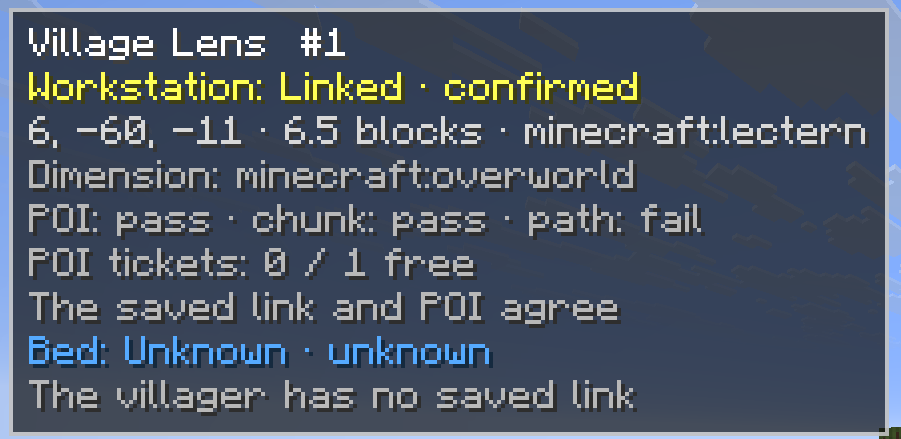
Village Lens shows the workstation and bed currently linked to a villager and explains why it cannot claim a selected block.
Select a villager to see its remembered workstation and bed, including their location, distance, current status, and a short diagnostic reason. You can also target a workstation or bed to check whether that villager can claim it.
Features
- Displays a villager’s linked workstation and bed
- Highlights workstations in yellow and beds in blue
- Draws lines between the villager and linked locations
- Diagnoses invalid blocks, occupied POIs, profession conflicts, unloaded chunks, range limits, and unreachable targets
- Shows diagnostic states and confidence levels
- Includes optional through-wall outlines, lines, labels, and villager highlighting
- Supports English and Japanese
Controls
- V: Select a villager or refresh its diagnosis
- Shift + V: Diagnose the targeted workstation or bed
- B: Toggle through-wall rendering
Read-only design
Village Lens does not modify villager memories, professions, POIs, paths, or AI state. It does not force-load chunks, teleport villagers, or force links between villagers and blocks.
Pathfinding checks run only when a diagnosis is requested.
Requirements
Village Lens must be installed on both the client and server.
Fabric installations also require Fabric API. Download the file matching your Minecraft version and mod loader.
~~~~
常见问题
Village Lens 支持哪些 Minecraft 版本?
Village Lens 支持 Minecraft Java 版 1.21–26.2,共 7 个版本,可用的加载器:Fabric / NeoForge。下载时注意选择和你游戏版本一致的文件。
Village Lens 怎么安装?
先用 PCL2 或 HMCL 启动器安装对应版本的 Fabric / NeoForge,再把下载的 .jar 文件放进游戏目录的 mods 文件夹,重新启动游戏即可。开启了版本隔离的,mods 文件夹在 versions/版本名 下面。运行环境:客户端和服务端都要装。
Misemise 的其他作品
查看全部 →
Reroll-Trades
按下按钮或快捷键(R)即可重置村民交易。可免费重置 —

Easy Deepslate Mining
还在为深板岩挖起来太慢而烦恼?这款模组让所有深板岩方块都能像石头一样快速挖掘,既保留游戏乐趣,也兼顾平衡。

unbound items
Unbound Items expands item stack sizes up to four times their original limit, capped at 256.

OreMiner
This will be help your ores mining!!!
评论
登录后评论和评分