截图







介绍


The Controlling mod is officially supported by ViewBoard 1.2.0+
IMPORTANT NOTE: A GUI scale of 3 or below is heavily recommended to display the keyboard at a resolution of 1080p or more.
TL;DR
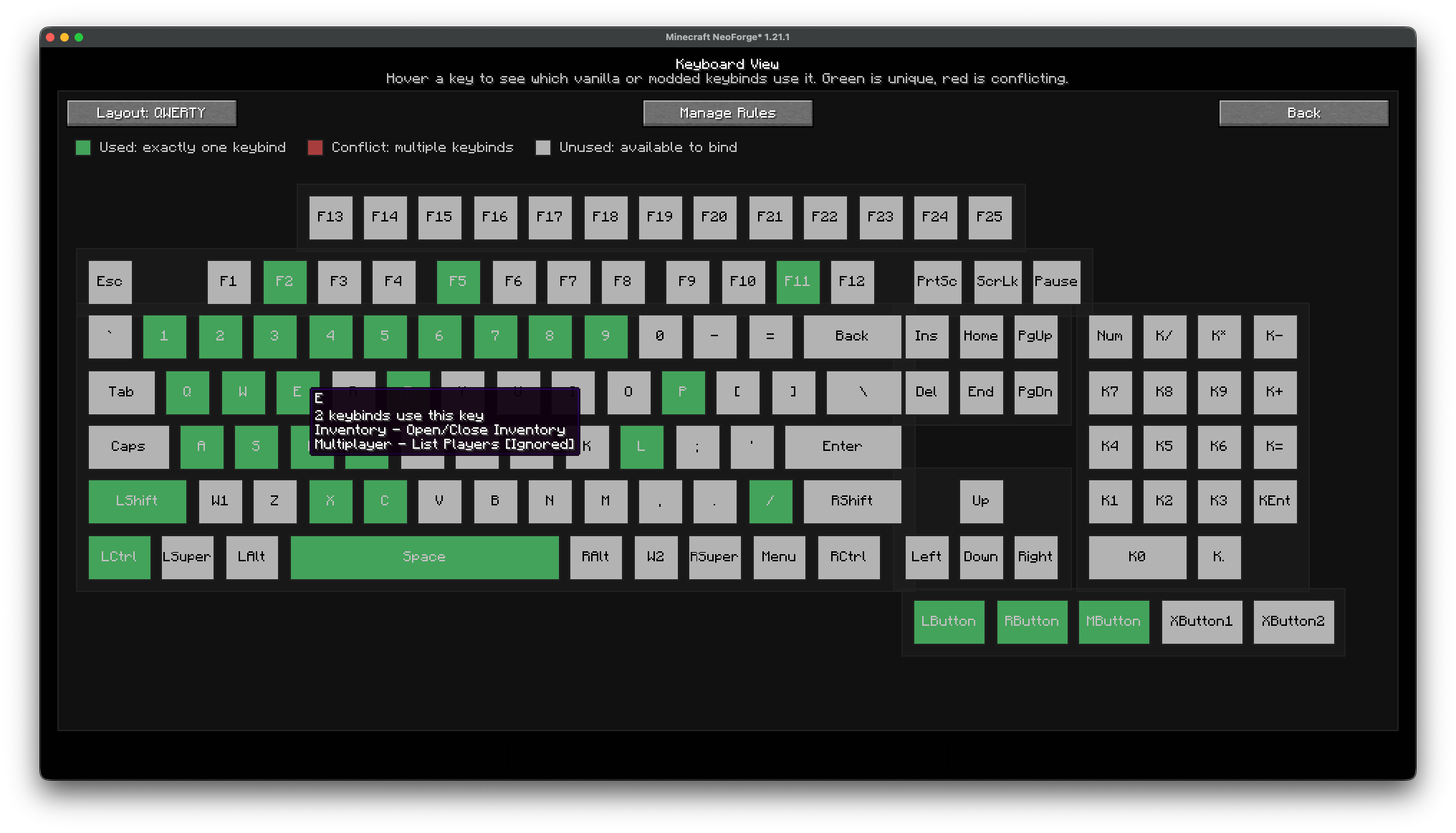
This mod adds a button in the bottom-right corner of the keybinds settings. It opens a preview of your keyboard and color codes each key depending on whether it’s:
- Free (No keybinds are using the key)
- Used (The key is being used by one keybind)
- Conflicting (Multiple keybinds use the key)
This mod is especially useful if you are playing a large modpack with multiple keybinds using the same key. You can also use it to find which key on the keyboard is free and can be assigned to a new keybind.
New Features in ViewBoard 1.2.0
- Official support for the Controlling mod
- Full compatibility with Controlling’s replacement keybind screen:
- Ignore/group conflict rules now apply there as well
- Conflict filtering support
- Keybind tooltip integration
- Saved Controls / Key Binds width modes:
DefaultLargeVery Large
- Wider layouts prevent long modded keybind names from overlapping ViewBoard tools
- Improved compatibility with FancyMenu:
- Avoids widget-discovery slowdowns
- Compatibility with KeyBind Bundles:
- Proper handling of bundled keybind rows
New Features in ViewBoard 1.1.0
- Support for most GUI scales (best results at GUI scale 3 or below)
- Ignore system for keybinds that lets intentional conflicts exist without warnings
- Integration with Vanilla Controls / Key Binds:
- Respects ignored keybinds
- Suppresses warnings there as well
- Keybind group system:
- Grouped keybinds share a forced key
- Key is removed when bindings leave the group
- Multiple keyboard layouts in keyboard view:
QWERTY,AZERTY, andQWERTZ
- Mouse button support in keyboard view
- Detection and display of custom keys assigned via Minecraft’s keybind settings
Usage
- Open Minecraft → Controls / Key Binds
- Click the Keyboard View button (bottom-right) to open the keyboard map
- Hover keys to inspect:
- Conflicts
- Ignored bindings
- Grouped bindings
- Use Manage Rules to configure keybind rules
- In Keybind Rules:
- Search keybinds
- Toggle ignored bindings
- Jump into group editing for specific keybinds
- In Keybind Groups:
- Create and rename groups
- Assign a shared trigger key
- Add or remove bindings
- Ignored bindings will no longer trigger conflict warnings in:
- ViewBoard
- Vanilla keybind screen
Bugs
- Fixed issue: UI rendering and logic conflict when paired with the Controlling mod on older ViewBoard versions. (Fixed on ViewBoard 1.2.0+)
If you encounter any other bugs, please report them on the mod’s GitHub page.
If you need a server: https://url-shortener.curseforge.com/Gg4yU
常见问题
ViewBoard 支持哪些 Minecraft 版本?
ViewBoard 支持 Minecraft Java 版 1.20.1–26.1.2,共 8 个版本,可用的加载器:Fabric / Forge / NeoForge。下载时注意选择和你游戏版本一致的文件。
ViewBoard 怎么安装?
先用 PCL2 或 HMCL 启动器安装对应版本的 Fabric / Forge / NeoForge,再把下载的 .jar 文件放进游戏目录的 mods 文件夹,重新启动游戏即可。开启了版本隔离的,mods 文件夹在 versions/版本名 下面。
ALostMagic 的其他作品
查看全部 →
ViewBoard
Shows you all the keys you have assigned keybinds to

Dap ur Homies (unofficially neoforged)
You can now DAP ur Homies! YEET them Catch them and more Coop Features

SwitchZ
Lightweight in-game offline username switcher

Just Ash
Lava instantly destroys burnable blocks
评论
登录后评论和评分