
VesposLocalTrims
Allows the player to locally load and change their armor trims client sided.
截图
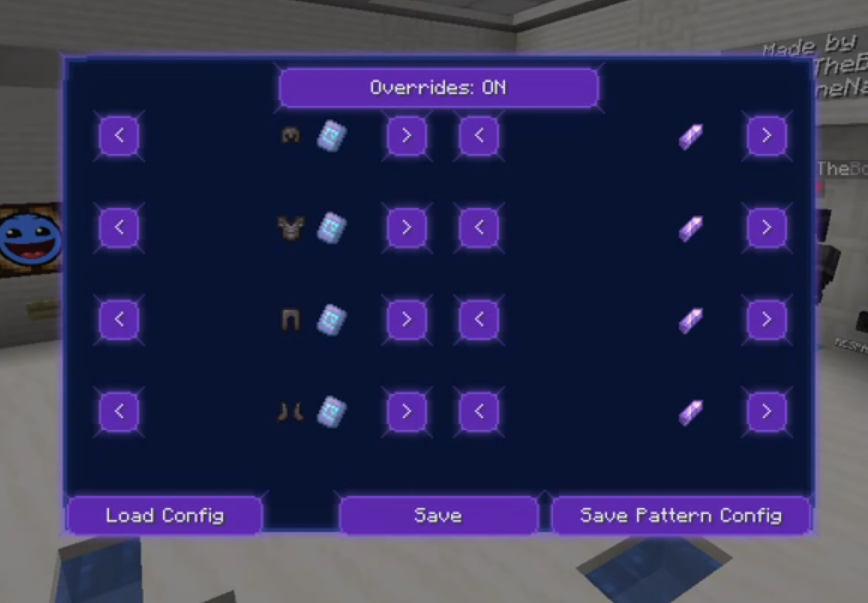
介绍
About VesposLocalTrims
Allows the player to locally load and change their armor trims client sided.
How to use
The default bind for toggling the ui is Y.
The bind is changable in the keybinds menu in the minecraft settings.
just use the arrows to switch trims and ignot, and upon completion with your trimset make sure “override” (the button uptop) is enabled, and then click on the save button
How to use configs
Once finished making your trimset, you may click on the “Save Pattern config”, and then choose a name and click on save. this will upload a config .json file of your trimset to .minecraft\config\VesposLocalTrims.
To load a config, click on the “Load Config” button in the ui, and then you will see a list of your existing configs. to use one, just click on the “Load” button of the config you wish to use and just click save.
常见问题
VesposLocalTrims 支持哪些 Minecraft 版本?
VesposLocalTrims 支持 Minecraft Java 版 1.21.11,可用的加载器:Fabric。下载时注意选择和你游戏版本一致的文件。
VesposLocalTrims 怎么安装?
先用 PCL2 或 HMCL 启动器安装对应版本的 Fabric,再把下载的 .jar 文件放进游戏目录的 mods 文件夹,重新启动游戏即可。开启了版本隔离的,mods 文件夹在 versions/版本名 下面。运行环境:仅客户端。

评论
登录后评论和评分